NETGEAR is aware of a growing number of phone and online scams. To learn how to stay safe click here.
Forum Discussion

mtarau
Feb 05, 2021Aspirant
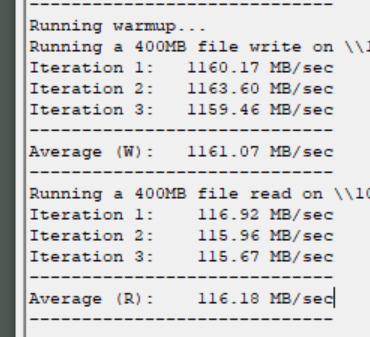
100 MB capped read speed - Readynas RR4312X on 10Gbps network
Hi guys, we currently use a Netgear ReadyNAS RR4312X (for 2 years now) connected to a 10 Gb Netgear switch. Everything worked fine until a couple of weeks ago when we observed some overall system la...
 Feb 07, 2021
mtarau wrote:... a connection by an 10gb IP port should go the same way normally, respectively the 10 gb switch, no?
No. When there are multiple routes from the NAS to the PC, the NAS chooses the adapter it wants to use when sending to that PC. That can be a different adapter than the one that the inbound traffic from the PC to the NAS is being received from.
There is a metric associated with each route that determines the choice. There are ways to set these metrics in linux, so you could go in with ssh and try to adjust them. But if you don't really need the gigabit bond, then it's simpler just to remove it.
StephenB
Feb 05, 2021Guru - Experienced User
Have you checked the log zip file for errors?
If you are ok with enabling ssh, I suggest installing iperf, and using that the measure the network throughput. That will help sort out if the issue is network related or not. Also, you could look at the network stats on the switch.
- mtarauFeb 05, 2021Aspirant
Here are the results with iperf:
About the switch stats, I don't realy know how to read them :)
Does this help?
Thanks
- StephenBFeb 05, 2021Guru - Experienced User
iperf also shows 1 gigabit in the NAS->Client direction, so this appears to be network related.
Are you seeing this on multiple PCs?
Perhaps try different cables.
- mtarauFeb 05, 2021Aspirant
It’s just on the nas. The rest of the pc’s work just fine with the 10gb switch.
Related Content
NETGEAR Academy

Boost your skills with the Netgear Academy - Get trained, certified and stay ahead with the latest Netgear technology!
Join Us!
