NETGEAR is aware of a growing number of phone and online scams. To learn how to stay safe click here.
Forum Discussion

Jetlag1
Dec 07, 2017Guide
526X in X-RAID displays RAID 5 as the "type"?
I just configured my new 526X with 6 WD 6TB Red HDDs.
I installed all of the new disks at once, then used the reset button and front button menus to do the full system setup. It took about 12-14 hours, but everything completed normally and I am now copying all of the data from my Pioneer Pro over to the new NAS.
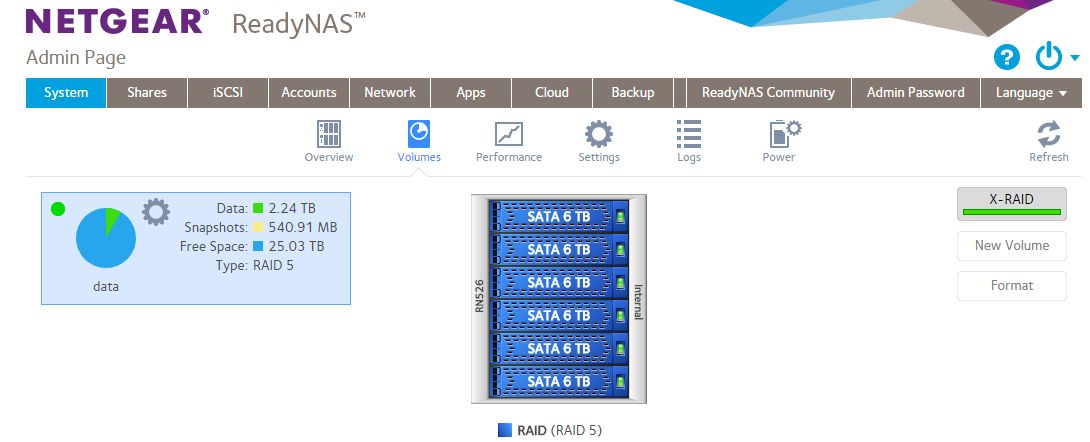
My question since I'm a OS newbie, is on the System>Volumes page, it shows "X-RAID" with a green button on the right side of the GUI, but over on the left it says "RAID 5". Is this correct or should it be in RAID 6 mode with X-RAID and 6 HDDs?
See attached image.
Thanks,
Jetlag
5 Replies
Replies have been turned off for this discussion
- mdgm-ntgrNETGEAR Employee Retired
On 6-bay systems the default with 6 disks is still RAID-5.
To switch to RAID-6:
1. Backup your data
2. Verify backup is good
3. Disable X-RAID
4. Destroy the volume
5. Create a new volume (best to call it ‘data’ - no quotes) using RAID 6.
6. Re-enable X-RAID
 Jetlag1Guide
Thanks for the guide.
I read the help guide which described the difference between 5 and 6, curious if you recommend I make the switch? Data integrity is more of a priority for me than speed or TB of storage. Thanks.
- mdgm-ntgrNETGEAR Employee Retired
I would definitely switch to RAID-6 then. Do note whichever RAID level you use backups are still important. Don't store important data on just the one device.

Related Content
NETGEAR Academy

Boost your skills with the Netgear Academy - Get trained, certified and stay ahead with the latest Netgear technology!
Join Us!