NETGEAR is aware of a growing number of phone and online scams. To learn how to stay safe click here.
Forum Discussion

schlaraffen
Dec 17, 2024Aspirant
All my datas are lost for unknwon reason.
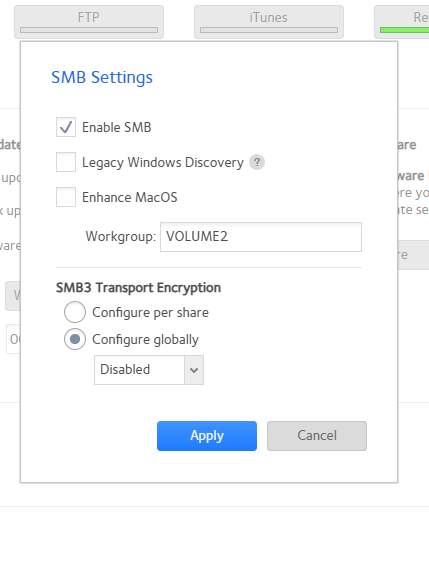
Hello dear Netgear community, two days ago, I changed some SMB settings. If I remember right I believe I disabled "Legacy Windows Discovery" and changed SMB3 Transport Encryption to "configure gl...
schlaraffen
Dec 17, 2024Aspirant
Hmpff.... no anwer yet from anyboday here. ;-(. Please help.
I`ve read some cross articels and manged to access my ready NAS device via putty ssh:
and in there I was able to access my missing folders and shares.
Can someone tell me how I get the usable and accesable by my WEB GUI again?
- schlaraffenDec 17, 2024Aspirant
- SandsharkDec 17, 2024Sensei
Your expectation of a reply within a half hour is ridiculous. This is a user-to-user forum, not Netgear support (which is no longer available for ReadyNAS, anyway).
Only moderators (who are basically unseen in the forum these days) and special users (StephenB being the only one I know of) can even see your screen captures until they get approved. Until I can see the screen captures, your description of the issue is insufficient for me to be of any help.
- schlaraffenDec 17, 2024Aspirant
Comon...I did not expect any answer so far... I just found some news out and posted them....
anyway I`ve carried out this "btrfs fi df //" But it did not work for me:
 StephenBDec 17, 2024Guru - Experienced User
schlaraffen wrote:
Hmpff.... no anwer yet from anyboday here. ;-(. Please help.
This is a user-to-user forum - and it's been a very long time since a Netgear employee replied to anything posted here. Those of us who do respond aren't monitoring the forum 24x7, so you need to be more patient.
Your configuration change shouldn't have resulted in the shares disappearing from the shares list in the web admin ui. One possibility is that you have a full OS partition. You can use btrfs fi df // to check for that.
If the OS partition isn't full: If you'd like, I can look at the logs for you. Download the full log zip file from the web ui, and then put a copy into cloud storage (dropbox, google drive, etc). Send me a download link via private message (PM) using the envelope icon in the upper right of the forum page. Make sure the permissions are set so anyone with the link can download.
Do you have a backup of the data?
- schlaraffenDec 17, 2024Aspirant
And yes, I would like to sent you the logs. I have collected them already but I can`t share them here in the forum. Even renaming the zp to jpg does not work. Upoades are blocked.... Also I do not have any dropbox, google drive.... ;-(
- StephenBDec 17, 2024Guru - Experienced User
schlaraffen wrote:
but I can`t share them here in the forum.
Correct. And you do should not post them publicly, since there is some privacy leakage.
schlaraffen wrote:
Also I do not have any dropbox, google drive.... ;-(
Both are free, so you can get them if you want.
OneDrive (free if you have a microsoft PC) and iCloud (free if you have an Apple device) are also possibilities
There other options, these are just a few of many.

Related Content
NETGEAR Academy

Boost your skills with the Netgear Academy - Get trained, certified and stay ahead with the latest Netgear technology!
Join Us!
