NETGEAR is aware of a growing number of phone and online scams. To learn how to stay safe click here.
Forum Discussion

hunterbagwell
Sep 02, 2018Aspirant
Amazon Drive not turning on
I am having the same issue of the Amazon Drive will not turn on as in the discussion:
https://community.netgear.com/t5/Backing-up-to-your-ReadyNAS/Amazon-Drive-not-turning-on/m-p/1555839
I have tried different browsers, reset browsers, on firmware 6.9.3, reset the OS, erased the authentication with Amazon, blah, blah, blah. Worked fine for a long time and then was checking it one day and saw that it was not syncing. Carbon copy of the same discussion above. How can I get this resolved also?
Thank you,
Hunter
3 Replies
Replies have been turned off for this discussion
- Marc_VNETGEAR Employee Retired
Welcome to the Community!
Have you tried changing your Network settings as mentioned in the post? You can do that by going to the Network Tab and clicking on the Cog icon and set a static DNS server like google DNS (8.8.8.8) and your router address.
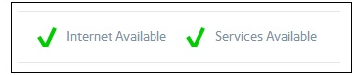
Make sure you have this check marks as well under the cloud tab
You may also want to try leaving Amazon cloud and toggle he service on and off.
Hope this helps!
Regards
- hunterbagwellAspirant
I use 8.8.88 and 8.8.4.4 as my default DNS since I bought the NAS units. Unfortunately, that does not allow me to turn the service on.
I did not understand the last statement "You may also want to try leaving Amazon cloud and toggle he service on and off." I have removed permissions for the NAS in Amazon hoping it would reprompt for permissions when I turned the Amazon service in the NAS on. It does not help. All the other services in the NAS (Google, Microsoft, etc...) allow me to turn the service on in the NAS and begins the process. Not Amazon.
- Marc_VNETGEAR Employee Retired
Apologies on the last statement, what I meant was to toggle the service forgot that it can't be turned on.
Kindly download the latest logs and since you have done OS Reinstall already it may need back end access to remove the configuration/settings of the Amazon service.
Were you able to get in contact with Support? You can go to my.netgear.com and login to create a case.
If you can send me a link to your logs kindly PM that to me. e.g Dropbox or Google drive.
Regards

Related Content
NETGEAR Academy

Boost your skills with the Netgear Academy - Get trained, certified and stay ahead with the latest Netgear technology!
Join Us!
