NETGEAR is aware of a growing number of phone and online scams. To learn how to stay safe click here.
Forum Discussion

michaelsammler
Jan 10, 2022Aspirant
Boot up gets stuck on same file, tried booting into read only and stuck on different file.
Hello. There was an update, then I had a drive fail. I hot swapped it and everything seemed to work fine. Later when the nas shut down it would not boot up again. Raid X Netgear RAIDar shows my...
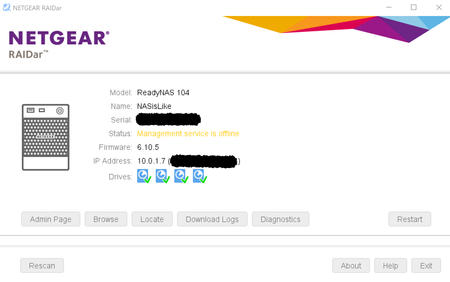

michaelsammler
Jan 15, 2022Aspirant
Hello,
I have used the built in TEST DISK boot menu option and all the disks have shown no issues.
Are you suggesting a seagate test?
Michael

StephenB
Jan 15, 2022Guru - Experienced User
michaelsammler wrote:
Are you suggesting a seagate test?
Sounds like he is suggesting Seatools.
michaelsammler wrote:I have used the built in TEST DISK boot menu option and all the disks have shown no issues.
Netgear's threshold for bad sectors is higher than mine - I suggest also downloading the log zip file, and looking in disk-info.log.
 rn_enthusiastJan 15, 2022Virtuoso
Yes the disk-info.log log is good to look at.
You can get it by downloading the logs from the NAS via RAIDar here and then open the zip file and find the disk-info.log
- michaelsammlerJan 18, 2022Aspirant
Here is the DISK INFO LOG from the RAIDar downloaded logs. I made it a pdf file so I could attach. Hope that works.
Thanks for the clarification.- StephenBJan 18, 2022Guru - Experienced User
sda (serial S301EEYH) doesn't look healthy.
Try powering down the NAS, and removing that drive. Then try booting read-only and see if anything changes.
It looks like it's in bay 4, though the numbering is a bit unusual (normally sda is bay 0). So make sure you check the serial number when you pull the drive.
Related Content
NETGEAR Academy

Boost your skills with the Netgear Academy - Get trained, certified and stay ahead with the latest Netgear technology!
Join Us!
