NETGEAR is aware of a growing number of phone and online scams. To learn how to stay safe click here.
Forum Discussion

MMcD3v1
Aug 10, 2023Tutor
Cannot Access RN214
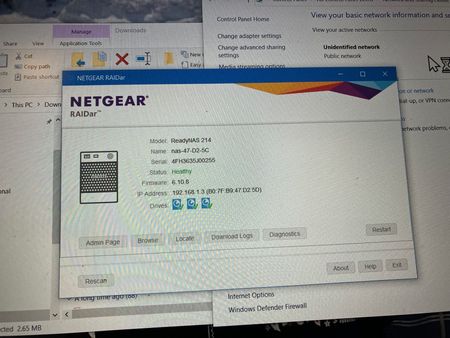
I have a RN214. Running OS 6.10.8 I have RAIDar 6.5 I cannot access the NAS I can see it w RAIDar (see below) but when I click on Admin page I get the following cannot access. I have disconnecte...

StephenB
Aug 10, 2023Guru - Experienced User
MMcD3v1 wrote:
In the PC I have tried changing the adaptor settings in Control Panel>Network and Internet>Ethernet (properties) the IPv4 (properties) to the IP address of 192.168.1.3 (the NAS)
Don't do that. Duplicate IP addresses will really mess up your home network. Try reconnecting the NAS to your router, and set up the PC to use DHCP.
Did something change on your home network (new router perhaps???)
Is the PC normally using a 192.168.1.x IP address?
Try running cmd on the PC (assuming windows) and then enter
ping 192.168.1.3and see if that responds.
- MMcD3v1Aug 10, 2023Tutor
I also tried on the network with both PC and NAS on network and Pinging 192.168.1.3
- MMcD3v1Aug 10, 2023Tutor
I did an OS reinstall. got in with new IP address DCHP server gave to it.
All is right with the world again
- schumakuAug 11, 2023Guru - Experienced User
MMcD3v1 wrote:
I did an OS reinstall. got in with new IP address DCHP server gave to it.
All is right with the world again
Great. Before we get more noise on the community, update to 6.10.9. https://www.netgear.com/support/product/rn214#download

Related Content
NETGEAR Academy

Boost your skills with the Netgear Academy - Get trained, certified and stay ahead with the latest Netgear technology!
Join Us!
