NETGEAR is aware of a growing number of phone and online scams. To learn how to stay safe click here.
Forum Discussion

Devilstompa
Jun 19, 2015Aspirant
Can't delete a folder
Hello I am a new user, I am currently having a problem with being unable to delete a certain folder. It is the Ready nas logo under Network locations I would like to be able to edit folders and add content. Delete or edit folder isn't coming up
when I click on the folder. Any help would be appreciated
when I click on the folder. Any help would be appreciated
11 Replies
Replies have been turned off for this discussion
- mdgm-ntgrNETGEAR Employee RetiredPlease provide a screenshot.
 DevilstompaAspirantHow can I add a picture.
- NhellieVirtuoso
Devilstompa wrote: How can I add a picture.
You can upload the screenshot to an image sharing site and paste the embed link on your response. - DevilstompaAspirant
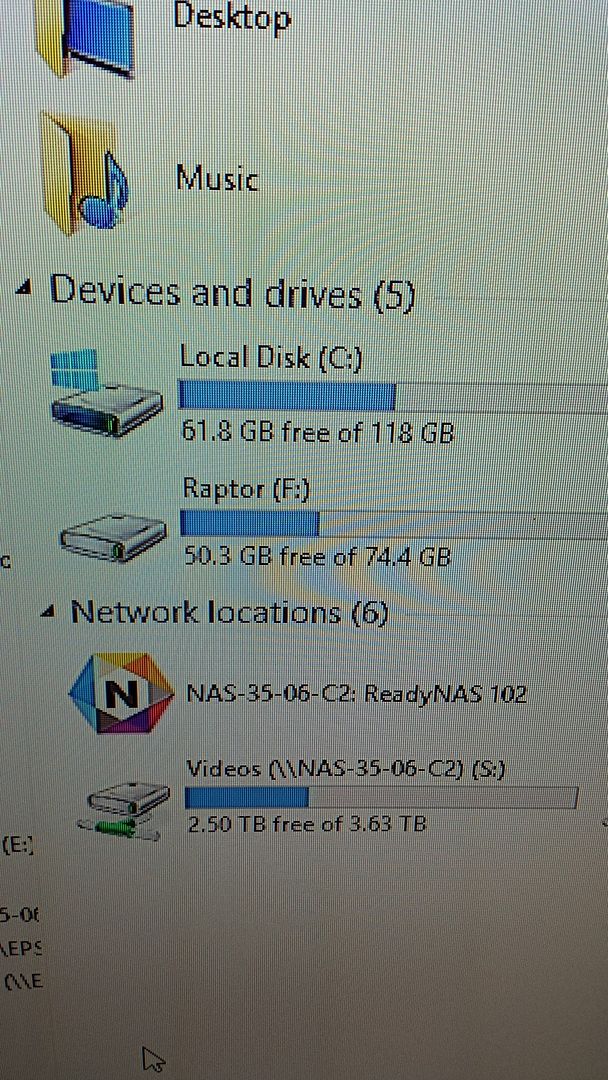
- DevilstompaAspirantWhen I Double Click to go into the Nas symbol there are folders and I would like to edit the folders or delete a folder.
- NhellieVirtuosoYou can just do it on the UI of the NAS. Do you have raidar installed and can access the user interface?
Check this link, will give you a lot of information in folder management:
http://kb.netgear.com/app/answers/detai ... /related/1 - DevilstompaAspirantThank you.
- DevilstompaAspirantI don't have raidar installed do I need it. I can access the user interface and change folders in there but it dosent change the folders when I click into the symbol
is it suppose to change the folders in the symbol to. It shows in the user interface but dosent show when I click into the symbol it only has some folders and not others its like its not synced or
needs to be reset or something.  StephenBGuru - Experienced UserThe folders in your screenshot are "shares". You create/delete/rename them in the web UI (https://NAS-35-05-C2/admin, or https://nasipaddress/admin) RAIDar will tell you the IP address.
You can delete/create/rename folders and files within the share from Windows (for instance if you open "Videos") - but not the share itself.
You might want to review the user manual (http://www.downloads.netgear.com/files/ ... ch2015.pdf)- DevilstompaAspirantI figured it out. Thank you

Related Content
NETGEAR Academy

Boost your skills with the Netgear Academy - Get trained, certified and stay ahead with the latest Netgear technology!
Join Us!
