NETGEAR is aware of a growing number of phone and online scams. To learn how to stay safe click here.
Forum Discussion

pstoev
May 09, 2018Tutor
Default route on ReadyNAS 4220
Hello there, I am trying to set a default route using statically configured eth1 interface. I am in Networks - Routes menu and I enter 0.0.0.0 for IP and 0.0.0.0 for subnet mask. Subnet mask does not...
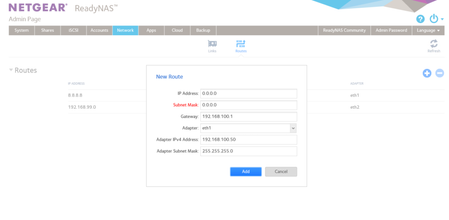
- May 10, 2018
until I have physical access to the box, this is my temprary solution. Apperatnly though it will not work if the ReadyNAS is rebooted
root@Netgear:/# route delete default gw 0.0.0.0 eth0
root@Netgear:/# route add default gw 192.168.100.1 eth1

TeknoJnky
May 10, 2018Hero
pstoev wrote:
Ok here is the background:
eth0 - 172.30.1.5 IP is connected to the network to backup VMs on 172.30.1/24 network
eth1 - 192.168.100.50 is connected the network to backup VMs on 192.168.100/24 network AND 192.168.100.1 is the gateway out to internet
eth2 - 192.168.199.47 is connected the network to backup VMs on 192.168.199.24 network and 192.168.199.1 is the gateway to 192.168.99/24 network BUT NOT to internet
Like I said, try removing any default gateway from ETH0 first and see if that works.
Ok, reading above, here is what I would suggest, swapping eth0 and eth1;
eth0 - 192.168.100.50 is connected the network to backup VMs on 192.168.100/24 network AND 192.168.100.1 is the gateway out to internet

eth1 - 172.30.1.5 IP is connected to the network to backup VMs on 172.30.1/24 network

eth2 - 192.168.199.47 is connected the network to backup VMs on 192.168.199.24 network and 192.168.199.1 is the gateway to 192.168.99/24 network BUT NOT to internet
SO,
ETH0 goes to 192.168.100.x and the internet (default gateway 192.168.100.1)
ETH1 goes to 172.30.1.x ONLY (default gateway BLANK)
ETH2 goes to 192.168.199.x AND has access to 192.168.99.x (via default gateway 192.168.199.1)
eth2 is a little more complicated and perhaps could use a static route, but should not be required.
example static route: 192.168.99.0 255.255.255.0 > gateway 192.168.199.1 > adapter eth2
I would suspect explicitly defining this static route would allow for quicker access to 192.168.99.x instead of having to flow down through eth0 then eth1, before finally finding the way out through eth2.
pstoev
May 10, 2018Tutor
until I have physical access to the box, this is my temprary solution. Apperatnly though it will not work if the ReadyNAS is rebooted
root@Netgear:/# route delete default gw 0.0.0.0 eth0
root@Netgear:/# route add default gw 192.168.100.1 eth1
- TeknoJnkyMay 10, 2018Hero
can you confirm or did you try setting ETH0 default gateway to BLANK, or alternatively to 192.168.100.1 ???
- pstoevMay 10, 2018Tutor
tried eth0 default gateway set to blank - that did not work, it was still thinking eth0 is the way out to the internet.
tired eth0 default gateway set to 192.168.100.1 - that did not work
 StephenBMay 10, 2018Guru - Experienced User
pstoev wrote:
until I have physical access to the box, this is my temprary solution. Apperatnly though it will not work if the ReadyNAS is rebooted
root@Netgear:/# route delete default gw 0.0.0.0 eth0
root@Netgear:/# route add default gw 192.168.100.1 eth1Another option would have been to set the default metrics so that eth1 would win out over eth0 and eth2.
But swapping eth0 and eth1 is the way to make sure it survives reboots.
FWIW, Netgear could provide a more complete GUI for this.
- TeknoJnkyMay 10, 2018Hero
Yeah, Metric is configurable in windows, but I don't think it is in the GUI for os 6.
I'm sure some google-foo would determine if and howto modify NIC metric via linux. In case you were not already aware, os 6 uses debian jessie, so if researching try to find info related to that version (different versions of debian have different ways of doing things).
Metric determines exactly what order of precedence a network interface has.
for example, wifi vs ethernet. I believe windows typically attempts to determine metric by priortizing faster link speeds.
Related Content
NETGEAR Academy

Boost your skills with the Netgear Academy - Get trained, certified and stay ahead with the latest Netgear technology!
Join Us!
