NETGEAR is aware of a growing number of phone and online scams. To learn how to stay safe click here.
Forum Discussion

Danny2
Apr 11, 2018Aspirant
Drive in a Readynas 102 changing state from RESYNC to FAILED while resyncing.
Hi. I've had some issues with my Readynas 102 recently. It has two drives in raid, drive 2 have been giving early signs of age for quite some time.(Detected high command timeouts happening once or ...

Danny2
Apr 11, 2018Aspirant
Thanks for the reply.
I'll do some testing through the night and report back tomorrow. I'm starting of the drive that should be dead (according to the NAS),
considering that the WD RED 3TB was working fine until i installed it in the 2-bay NAS.
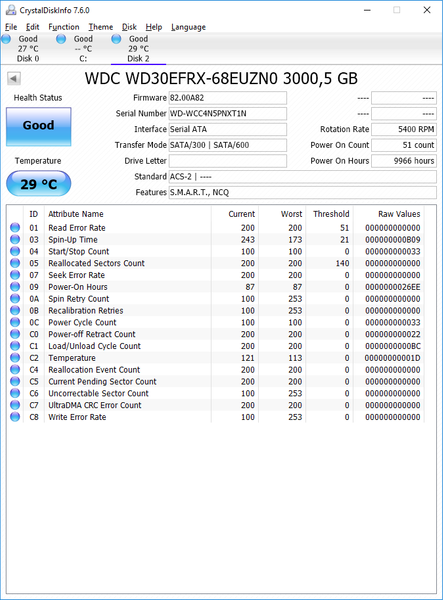
Do you have any suggestions on how to troubleshoot the S-ATA connectivity? Would it be safe to export the system drive, test the NAS with two other drives, then cold-import the original system-drive afterwards?
Also, here's a large part of the DMESG output from earlier today, complaining about bad sectors on the WD RED drive, which Im pretty sure is 100% fine.

StephenB
Apr 11, 2018Guru - Experienced User
Danny2 wrote:
Do you have any suggestions on how to troubleshoot the S-ATA connectivity? Would it be safe to export the system drive, test the NAS with two other drives, then cold-import the original system-drive afterwards?
Don't export anything. Just shut down the NAS, and remove the working drive (labeling it by slot).
Then try inserting the WDC drive into the same slot that the working drive is in, and do a factory default via the boot menu. If that install works, then run a disk test on the drive from the NAS volume settings wheel.
Then repeat that process, but putting the WDC drive into the other slot.
When you are done, you can power down, restore the working drive back into it's slot (leaving the other slot empty), and then power up.
- Danny2Apr 13, 2018Aspirant
UPDATE:
What I've done so far:
Performed the extensive/long test on the "broken" drive (ST2000DL003). The WD utillity reported a few bad sectors, that it appearently fixed (assuming it marked the sectors as broken). The test then finished as successful.
As expected I guess, being powered on for more than 5 years.... still managed to pass the test.
I fired up the NAS with the ST200D-drive in the second bay/slot, which seemed to work perfectly fine, however, the something caused the setup wizard to fail, preventing me from finishing (hitting the apply-button in the end did nothing, and the dev-tool in chrome revaled this:Apparently, something went wrong when attempting to set the admin-password....... but it seemed fine according to the syslog.
I then cancelled the wizard, created the volume, and ran the test, taking about 5 hours. no errors.
Link to full dmesg: Pastebin
I shut down the nas, removed the ST2000 drive, wiped the WD red, installed it in bay2, and booted the nas again.
Went through the setup wizard, created the volume, everything seemed fine.Suggestions? I hoped this would bring me closer to a solution, but Im honestly more confused now....
Thanks in advance.
- StephenBApr 13, 2018Guru - Experienced User
Did you look at the SMART stats on the seagate?
Also, is slot 1 empty right now?
- Danny2Apr 13, 2018Aspirant
Didn't look super-closely, but as far as I know, the drive isn't in perfect shape any more.
I really don't plan on using it any more, but I chose to run tests on it since the NAS orginally acted as if the seagate was completely dead.Here's a screenshot of the SMART stats for the seagate:
Not exactly in perfect shape, but still working.
Correct. Bay/slot 1 is empty, been so while I've done the tests from the readynas webinteface/GUI.
Related Content
NETGEAR Academy

Boost your skills with the Netgear Academy - Get trained, certified and stay ahead with the latest Netgear technology!
Join Us!
