NETGEAR is aware of a growing number of phone and online scams. To learn how to stay safe click here.
Forum Discussion

flip68
Jan 25, 2017Aspirant
Help Needed...ReadyNAS Pro 6 booting very slowly
I need some assistance to confirm what is happening. I have a ReadyNAS Pro Pioneer edition that was running 6.6.0 for a long time with no issues. I recently upgraded to 6.6.1 and it seemed to ha...

JennC
Jan 25, 2017NETGEAR Employee Retired
Hello flip68,
Can you still get to the boot menu and select Skip Volume Check? Please see if the RAIDar will detect the NAS and its HDDs status. If you can download logs, please do.
By the way, I do hope you have backup of the files.
Regards,

flip68
Jan 26, 2017Aspirant
Well i finally decided to just power down the NAS and reboot it to the BOOT MENU, I selected SKIP VOLUME CHECK and it booted successfully with no apparent problems.
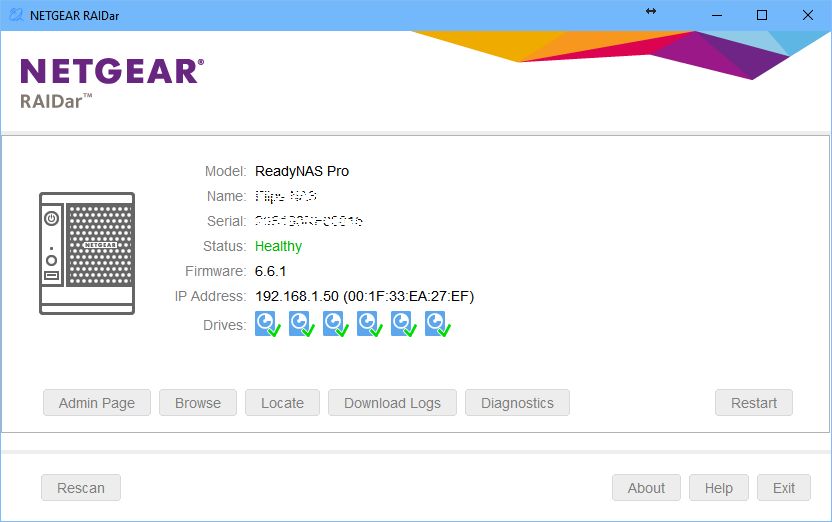
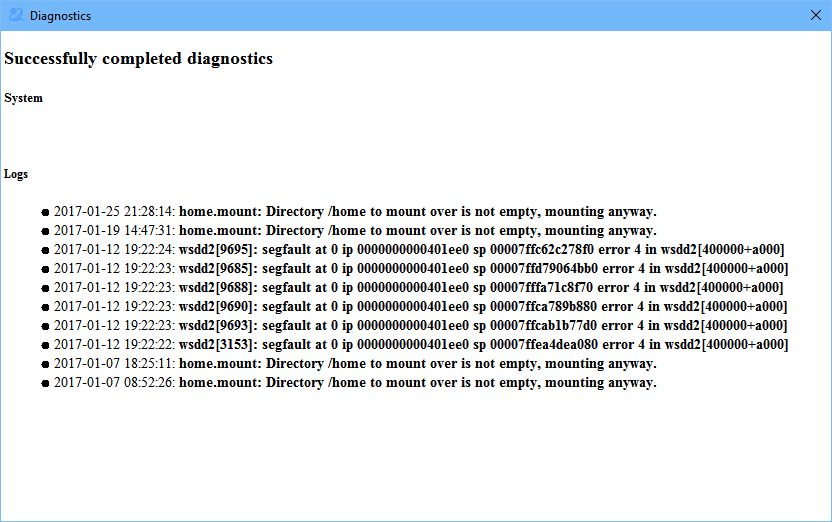
My files in all my shares appear to be fine and I launched RAIDAR and it shows the following. I clicked diagnostics and got the following below although I'm not sure how to interpret it.
I also downloaded the log files and am not sure how to send them to you for a possible quick review of what might have happened?
Thanks!
- StephenBJan 26, 2017Guru - Experienced User
/home should be empty, so something is certainly wrong there.
Do you have ssh enabled?
Related Content
NETGEAR Academy

Boost your skills with the Netgear Academy - Get trained, certified and stay ahead with the latest Netgear technology!
Join Us!
