NETGEAR is aware of a growing number of phone and online scams. To learn how to stay safe click here.
Forum Discussion

vrspectre
Nov 15, 2021Apprentice
How much snapshot is really using
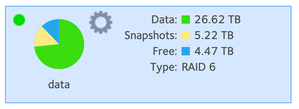
I'm trying to figure out how much space i'm actually using for snapshots. I think it's 0, but the number on the usage pie chart says otherwise. When i try to browse the snapshots there's nothing ther...
 Nov 16, 2021
vrspectre wrote:
If I got into the .snapshots folder of each share and just delete everything there is that going to break anything?
I think a better path is to create temporary share (tDrew), and then copy the contents from Drew into it (not .snapshots of course). Then delete the Drew share, and rename tDrew to Drew.
After that I suggest running a balance from the volume settings wheel.

mdgm
Nov 16, 2021Virtuoso
If you download your logs what does your btrfs.log look like?
If you have snapshots they should show in the subvolumes list. With that level of snapshot usage you'd expect there could be a number of snapshots or one very old snapshot on a share that has had a lot of changes.
 vrspectreNov 16, 2021Apprentice
Keeping in mind that I have no idea how to read the logs it would appear that there are indeed snapshots that just aren't showing up in the UI. There are lines like this for other shares as well. Is there a way to prune all the snapshots for the entire share?
D 60532 gen 4188789 top level 265 path Drew/.snapshots/4449/snapshot
ID 60564 gen 4188789 top level 265 path Drew/.snapshots/4457/snapshot
ID 60568 gen 4188789 top level 265 path Drew/.snapshots/4458/snapshot
ID 60572 gen 4188789 top level 265 path Drew/.snapshots/4459/snapshot
ID 60576 gen 4188789 top level 265 path Drew/.snapshots/4460/snapshot
ID 60580 gen 4188789 top level 265 path Drew/.snapshots/4461/snapshot
ID 60584 gen 4188789 top level 265 path Drew/.snapshots/4462/snapshot
ID 60588 gen 4188789 top level 265 path Drew/.snapshots/4463/snapshot
ID 60592 gen 4188789 top level 265 path Drew/.snapshots/4464/snapshot
ID 61860 gen 4188789 top level 265 path Drew/.snapshots/4773/snapshot
ID 61864 gen 4188789 top level 265 path Drew/.snapshots/4774/snapshot
ID 61868 gen 4188789 top level 265 path Drew/.snapshots/4775/snapshot
ID 61872 gen 4188789 top level 265 path Drew/.snapshots/4776/snapshot
ID 61876 gen 4188789 top level 265 path Drew/.snapshots/4777/snapshot
ID 61880 gen 4188789 top level 265 path Drew/.snapshots/4778/snapshot
ID 134488 gen 4188789 top level 265 path Drew/.snapshots/17721/snapshot
ID 134492 gen 4188789 top level 265 path Drew/.snapshots/17722/snapshot
ID 134496 gen 4188789 top level 265 path Drew/.snapshots/17723/snapshot
- mdgmNov 16, 2021Virtuoso
Those are snapshots. If you had no snapshots you'd expect to still see
Drew/.snapshots
but not any of the snapshots e.g.
Drew/.snapshots/4457/snapshot
These snapshots can be pruned using SSH.
It's odd that these snapshots aren't showing in the GUI.
- vrspectreNov 16, 2021Apprentice
If I got into the .snapshots folder of each share and just delete everything there is that going to break anything?
Related Content
NETGEAR Academy

Boost your skills with the Netgear Academy - Get trained, certified and stay ahead with the latest Netgear technology!
Join Us!
