NETGEAR is aware of a growing number of phone and online scams. To learn how to stay safe click here.
Forum Discussion

kleinma
Nov 25, 2015Aspirant
Installed a ReadyNAS with 4x2TB Drives and selected XRAID2. Only getting 1.8TB storage.
As the subject says, after a brand new installation of a ReadyNAS (it was an older model, but never was setup), and 4 unopened 2TB drives, the capacity showing on the LCD readout on the device, as we...

StephenB
Nov 25, 2015Guru - Experienced User
What model, and what firmware? Also, what drives are you using?
It should 5.4 TB of course. Are you seeing all the disks in the array in Frontview?

kleinma
Nov 25, 2015Aspirant
That is weird because I typed out a big long reply, and posted it, but then it seems to have vanished. So I will try again.
Anyway, we installed x86 4.2.28 which is claimed to be the latest and final release of firmware. Not sure what "frontview" is, I think the web interface is called "RAIDiator", and the windows client app is RAIDar. Both of those show 4 drives, and the LED lights on the front of the unit indicate all 4 drives are present and good. The setup I walked through was basically all left at the defaults and everything works just fine the best I can tell, short of this storage mystery. The drives are Seagate 2TB drives from retail boxes. Not sure of exact model numbers, but the client got it from Dell (both the NAS and the drives) so I would assume Dell was selling drives that were compatible. I mean if the drives were not compatible, I would expect nothing to work. Thanks for your input.
- kleinmaNov 25, 2015Aspirant
Well now both my replies are showing up. Oh well.
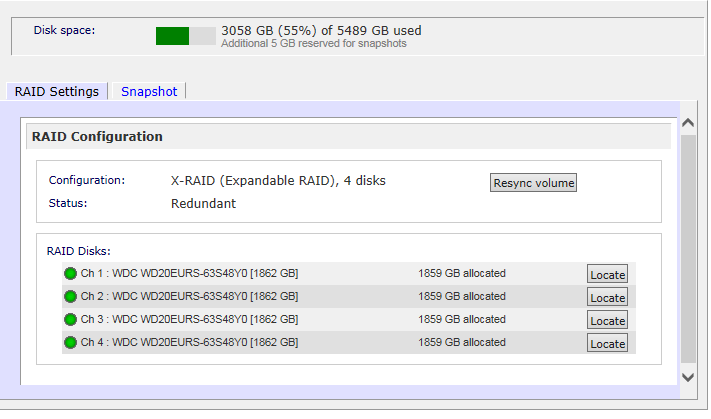
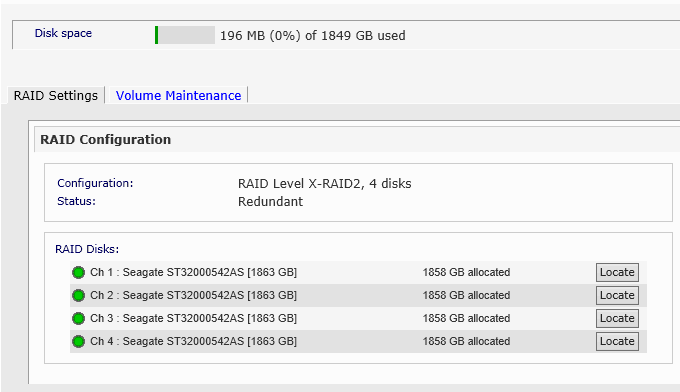
In the mean time, I talked to the client, and I got a screenshot to hopefully shed some light on things. So the first picture is my personal ReadyNAS, which is a bit older, but as you can see, it is set to XRAID with 4x2TB and the allocations seem correct and the storage seems correct. The second screenshot is of the client's ReadyNAS, and everything is identical except for the fact that his disk space is much lower and his configuration is XRAID2 versus my XRAID.
- StephenBNov 25, 2015Guru - Experienced User
Is the report of 200 MB of data on the NAS correct?
Perhaps back up the data and do a factory reset.
- kleinmaNov 25, 2015Aspirant
Yes, because we just set this up yesterday and I mentioned to not put stuff on it yet in the event that we need to do a reset. So are you with me at least that this is NOT normal and it should be reporting more than 1.8TB with what is in that screenshot and the RAID selection?
Related Content
NETGEAR Academy

Boost your skills with the Netgear Academy - Get trained, certified and stay ahead with the latest Netgear technology!
Join Us!
