NETGEAR is aware of a growing number of phone and online scams. To learn how to stay safe click here.
Forum Discussion

HuyTong
Sep 12, 2018Aspirant
iSCSI issues
hi
I have had this unit in production for a few years now. I used it as an iSCSI target for a network backup. now the issue in the last few months that has happened is that all my backups have fail...
 Sep 18, 2018
You may delete snapshots in NAS admin GUI,
Steps:
1. Login NAS admin GUI,
2. Open Shares=>Snapshots page,
3. Click Shares or iSCSI LUN, you will see all snapshots in the Share/LUN,
4. Select Share/LUN and right click, delete button will shown, then you can delete snapshots you selected.
if you don't want to use snapshot, then you can disable in Share/LUN's setting,
Go to Share's page in NAS admin GUI, then right click a Share or LUN, open settings page, there is Snapshots settings.
You may set smart snapshot to Never.

StephenB
Sep 18, 2018Guru - Experienced User
evan2 wrote:
You may set smart snapshot to Never.
Another option is to switch to Custom Snapshot. Then you can set the retention (either by number of snapshots or by age). I found that manages the snapshot space for me. Generally I use 3 weeks retention on most shares, though of course the space needed depends on how much "churn" there is.
Also, I suggest running the balance function regularly (using the maintenance schedule in the settings wheel). Running defrag will increase the snapshot space needed, especially on your iSCSI LUN. So if you keep snapshots enabled on the LUN, you should keep that in mind.
HuyTong
Sep 18, 2018Aspirant
hi, thank you for the replies but i'm still at a loss on what the issue was, and where this lack of space is being reported at/from? as I have stated before
NAS has four - 1TB drives in a raid5, so 2.7TB total
I have a
iSCSI connection that is 2.3 TB in two drives. 2TB/1.7TB free and 350GB/ all free
SMB share thats 275GB/175 GB free
where does the snapshot system use its space? I have a lot of free space still, or is the reporting error is at the SMB share as I have it set for 2 snapshots and if it keeps the files for say 2 weekly and it uses all of the space then its full.
how do I reduce the LUN so I can add it to the SMB? my iSCSI is disconnected already but it wont actually reduce in size, I can move it down from 2.3 TB to say 1 even as I'm not using much of it at all. or do I have to delete the LUN and start over?
- StephenBSep 18, 2018Guru - Experienced User
HuyTong wrote:
iSCSI connection that is 2.3 TB in two drives.
Do you mean you have two LUNs? If not, what do you mean?
Are the LUNs thick or thin?
if you have 2.3 TiB of thick LUNs and 275 GiB of files in shares, then you have 2.56 TiB of space used. That's 95% full, and we haven't gotten to the snapshots yet.
Note the LUNs are just block storage (e.g. opaque) to the NAS - free space that the iSCSI client sees isn't free space on the NAS. A LUN is just a file as far as storage system is concerned.
As far as shrinking the LUNs go, perhaps you should offload the data on the iSCSI client system, delete the LUNs and create new ones.
HuyTong wrote:
where does the snapshot system use its space?
Snapshots are part of the BTRFS file system, and the space they take comes from the same free space pool that is used for files and metadata. There's a post here that might help you understand how snapshots work: https://community.netgear.com/t5/ReadyNAS-in-Business/ReadyNAS-312-Need-Help-Understanding-Snapshots/m-p/936586#M3041
- HuyTongSep 18, 2018Aspirant
its 1 LUN, thick, its connected as 1 drive, but partitioned to two, 2TiB and 300GB, I think I was playing with something.
could this be why I cannot resize it down?
so the snapshot system uses free space but only makes copies fo the used space?
its only a backup target so I can just delete the LUN and recreate it. if I want to use the snapshot system, on the iSCSI LUN, how big should I make it? just 1 TB?
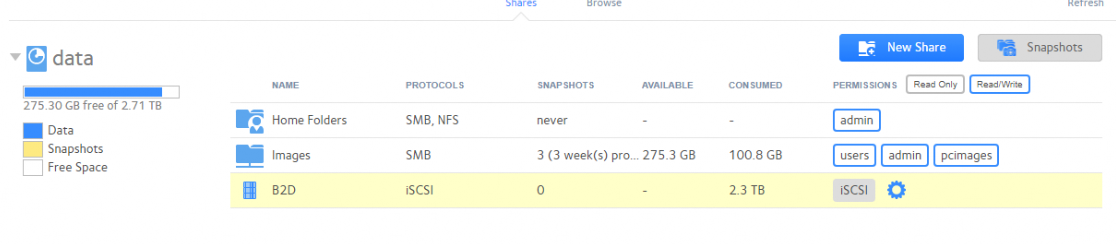
I attached a screenshot of the drive usage, I just dont want this error to come up and slow it down again.
- StephenBSep 18, 2018Guru - Experienced User
HuyTong wrote:
its 1 LUN, thick, its connected as 1 drive, but partitioned to two, 2TiB and 300GB, I think I was playing with something.
could this be why I cannot resize it down?
That would be one reason. It's also thick.
Do you actually need a LUN? If you aren't using a VM, then you probably are better off using a share instead.
Another possibility is that you can get bigger disks, and expand the volume size.
HuyTong wrote:
so the snapshot system uses free space but only makes copies fo the used space?
Your question doesn't make any sense to me, so I am not sure what you are asking. When you first create a snapshot it uses no space. If you then delete a file in the main share, that file remains in the snapshot - so the free space does not increase. The space used by the snapshot increases, and the space used in the share decreases. If you then modify a file in the main share, the original data remains in the snapshot, plus you have the new data in the share. The space in the snapshot goes up, and the free space goes down. There are some more use cases outlined in the post I linked in above.
Your problem isn't because of your three snapshots anyway - the share is taking only 100 GB of data. Your problem is that the LUN is too big.
Related Content
NETGEAR Academy

Boost your skills with the Netgear Academy - Get trained, certified and stay ahead with the latest Netgear technology!
Join Us!