NETGEAR is aware of a growing number of phone and online scams. To learn how to stay safe click here.
Forum Discussion

Platypus69
Dec 04, 2018Luminary
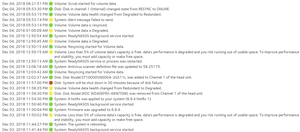
Issue Replacing Disks | RN316 automatically shut down instead of rebuilding RAID array
So is this normal behaviour? Or is this a bug in the software?
I have a RN316 with 6 x 4TB HDDs ina a RAID 5 configuration.
There is less than 5% free space left.
So I want to replace all o...

StephenB
Dec 04, 2018Guru - Experienced User
Platypus69 wrote:
Is this a bug that the RN316 automatically shuts down instead of continuing the rebuild of the RAID set?
Please look on system->settings->alerts in the admin web ui, and let us know if the checkbox next to "Shut down the system when a disk fails or no longer responds" is checked.
It does sound like there is a bug (the disk insertion/RAID rebuild should have canceled the shutdown), I suggest clearing that particular setting - at least while you are doing the upgrades.
Note that the expansion time will get much longer as you proceed (since every sector in the volume is either read or written during each resync). Your data is more at risk when the volume is degraded, so I do recommend making sure you have an up-to-date backup. FWIW, it would be faster to do a factory reset, rebuilt the NAS and then restore the data from a local backup - since you would only build the data volume once.
- Platypus69Dec 04, 2018Luminary
Thanks!
You are correct, the "Shut down the system when a disk fails or no longer responds" is checked.
Although, similar to your reply, it seems to me like a bug as it should cancel the shutdown if a replacement HDD is inserted within the 30 minute grace period.
Not sure really why it should take longer to rebuild/resync the RAID as I add each disk. I would have thought that it would be roughly the same, as each time you have to read the other 5 x 4TB worth of stripes to calulate the missing stripe. And then expand the volume after the final HDD is synced. (There will be no data modifications during this entire process.)
I plan to wait 3 days between each disk replacement. And might foce a scrub after each one, just to be sure.
- StephenBDec 04, 2018Guru - Experienced User
Platypus69 wrote:
Not sure really why it should take longer to rebuild/resync the RAID as I add each disk. I would have thought that it would be roughly the same, as each time you have to read the other 5 x 4TB worth of stripes to calulate the missing stripe. And then expand the volume after the final HDD is synced. (There will be no data modifications during this entire process.)
The volume expansion isn't deferred until the end. It will begin with the second disk insertion. BTW, you likely will need to reboot after the second disk syncs - and make sure the volume is fully expanded before you proceed to the third disk.
So the first disk replacement requires 24 TB of disk i/o. The last one will require 60 TB of disk i/o. The time goes up simply because the volume is getting bigger as you proceed. The total process will need 264 TB of i/o to complete.
A factory reset would have built the volume once - requiring 60 TB of disk i/o, and another ~24 TB to restore the data. So it would have taken approximately 30% of the time (assuming you already had an up-to-date backup). You could have also used RAID-6 - many people prefer the extra protection with very large volumes.
Platypus69 wrote:
nd might foce a scrub after each one, just to be sure.
Don't do that - the RAID scrub will just double the i/o (and the time). Then there would be a BTRFS filesystem scrub on top of that.
Platypus69 wrote:Surely the alert is for the use case when you are not present and cannot replace the HDD relatively quickly, in which case you would argue that you shut down the NAS as another HDD could fail mathematically (so higher risk, than shutting them down and hoping they come up and are OK.)
Likely that is the use case. Of course a disk failure can look like a removal, so I understand why the timer would start then. However, the insertion should cancel it.
- Platypus69Dec 05, 2018Luminary
Thanks again.
I plan to restart after each disk is added and synced. Just to make sure.
My idea around doing a scrub was simply to do something during the "burn in period" of 3 days between disk swaps. If it gets too long I will not do it.
Related Content
NETGEAR Academy

Boost your skills with the Netgear Academy - Get trained, certified and stay ahead with the latest Netgear technology!
Join Us!
