NETGEAR is aware of a growing number of phone and online scams. To learn how to stay safe click here.
Forum Discussion

DS327
Dec 11, 2017Aspirant
need help understanding RAID level x2
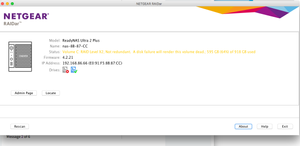
Using this ReadyNAS with two drives inside it in a Mac system. It's exhibiting problems showing up on Raidar, etc. It finally booted up and I get this warning on Raidar: I need to understand...
DS327
Dec 12, 2017Aspirant
Thanks for the help. I'm unable to back up the drives because even though the array has successfully mounted to the desktop occasionally, it doesn't function for read or write. It just beachballs when I try to access any files.
I pulled the left drive out while the nas was running, as you suggested. I was hoping the remaining drive would mount, but it doesn't. If It could mount, I would back up the contents.
Instead, I suppose I'll buy a replacement drive for the dead one. I'll look for documentation on how to join the new drive with the existing one in a RAID 1 level set up.
Thanks
DS327
Dec 12, 2017Aspirant
I'm buying a Seagate 2TB IronWolf NAS SATA 6Gb/s NCQ 64MB Cache 3.5" Internal Hard Drive to replace the bad drive.
Just wondering, is it possible that the single drive in the chassis can mount on my desktop temporarily until I add the new replacement for the dead drive? I tried mounting it but it doesn't. I'm leaving the nas powered up because I'm afraid to power it down with only one drive in it.
Also, will the new drive already be formatted? If not, will the chassis do that when I install the drive?
Thanks. Sorry for the questions. I just want to work.
 StephenBDec 12, 2017Guru - Experienced User
The new drive will be blank, an dthe NAS will take care of partitioning and formatting it.
You could mount the drive in a linux system (with BTRFS installed), bu not on a PC running windows.
- DS327Dec 12, 2017Aspirant
Got the new drive and I basically just hot swapped it for the dead drive (on the left in the chassis). I left it running overnight and as of this morning, the Readynas doesn't seem to be doing anything with the new drive I installed. I use the app that launches (a recently downloaded "Raidar" download. See image in my first post in this message stream). The info in the window is identical and hasn't changed. Still says the left drive is dead and isn't recognizing the new drive. Anything I can do about this?
Thank you.
- StephenBDec 12, 2017Guru - Experienced User
Did you remove the old disk/reinsert the new one with the NAS running?
Is there anything in the web admin UI's log page showing that the system "saw" the removal and insertion, and is resyncing?
The admin web ui is a better way to see what's going on than RAIDar. RAIDar is most useful for NAS discovery and for providing status when the admin web ui is not responding.
Related Content
NETGEAR Academy

Boost your skills with the Netgear Academy - Get trained, certified and stay ahead with the latest Netgear technology!
Join Us!
