NETGEAR is aware of a growing number of phone and online scams. To learn how to stay safe click here.
Forum Discussion

Ruzpro
Feb 11, 2024Aspirant
Netgear ReadyNAS 8 PRO, Problem with the ReadiNAS administration menu
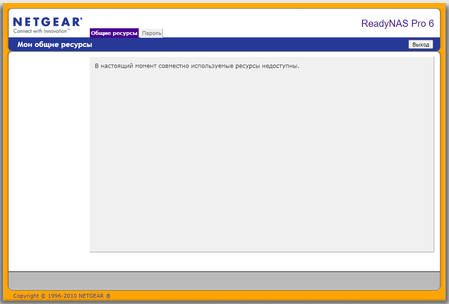
The settings menu has disappeared on the ReadyNAS 6 PRO. How to fix?

StephenB
Feb 12, 2024Guru - Experienced User
You need to log in to https://nas-ip-address/admin. The /admin suffix matters - if you leave it out, you are redirected to https://nas-ip-address/shares. That looks like where you've ended up.
If you are seeing an SSL protocol version or a Cipher mismatch problem, then there are some things you can do.
Use Firefox, and set security.tls.version.min to 1 (browse to about:config and search for the setting). Then you will be able to log in. After that you can install this add-on to provide TLS 1.2 support:
That will let you acess the NAS from other browsers (and eliminate the need to set the security version in firefox).
A better solution would be to convert your NAS to run OS-6. That requires upgrading the RAM to at least 2 GB. The conversion requires you to make a backup and then restore all the files, as it will reformat your disks. We can give you more information on this if you want to do the conversion.
Ruzpro
Feb 12, 2024Aspirant
Thank you very much! Everything worked out.
Related Content
NETGEAR Academy

Boost your skills with the Netgear Academy - Get trained, certified and stay ahead with the latest Netgear technology!
Join Us!
