NETGEAR is aware of a growing number of phone and online scams. To learn how to stay safe click here.
Forum Discussion

JohnnyR2D2
Apr 24, 2016Guide
NETGEAR ReadyNAS Ultra 4 Disks Replacement
Hello, I currently have an ReadyNAS Ultra 4 with four 4TB disks in a X-RAID2 configuration. The NAS is serving primarily as a media server and for backup of some files. I want to replace two of t...
 Apr 25, 2016
JohnnyR2D2 wrote:
So what you're saying here is that after backup everything I can still try to resync the disks although your suggestion is to destroy all the data volume not only because it will be faster but also probably it will be a more clean installation right?
It is faster because each resync requires every sector on all disks to be either read or written. It's more efficient to build the volume once.
You'd have a clean installation either way - identical RAID layers, etc.
JohnnyR2D2 wrote:
So what I'm going to install first isn't an actual firmware correct? it's a kind of upgrade from 4.2 to OS 6 meaning that after all the above I will have to install the new firmware which if I'm not mistaken is the ReadyNASOS-6.4.2-x86_64.img (got if from NTGR support download site).
Actually the module I linked will install 6.5 beta directly, so you won't need the .img that you downloaded. That makes the overall process simpler.
JohnnyR2D2 wrote:
Last but not least...just in case I run into problems which I hope I'm not which ReadyNas new model you recommend for me to buy and use with four 8TB disks remembering that I use only for media share and backup some stuff in there. I need to USB minimum.
The RN314 is the closest model to what you have now. It includes a 5 year hardware warranty and free lifetime chat software support.
The RN214 is worth considering if you are interested in streaming. It uses a quadcore arm processor, which is capable of real-time 1080 transcoding with the plex streaming app. That is particularly useful if you are streaming over the internet. However, warranty is only 3 years, and free software support is limited to 90 days.
The RN204 gives good filesharing performance, but can't do real-time transcoding. The warranty and software support is the same as the RN214.

JohnnyR2D2
Apr 25, 2016Guide
Ok...I think I got it but just to confirm one last time and I'm sorry in advance for the hassle.
"This will install 6.5.0 beta on the ultra. Then
4. Insert your two new disks. The fastest way is to destroy the data volume, hot insert the two disks, and then create a new one. Alternatively,
(a) wait for the initial volume to resync,
(b) hotswap the first disk, wait for resync
(c) hotswap the second disk, wait for resync."
So what you're saying here is that after backup everything I can still try to resync the disks although your suggestion is to destroy all the data volume not only because it will be faster but also probably it will be a more clean installation right?
"Once you've switched to OS 6, you install firmware in the usual way (choosing x86 binaries)."
So what I'm going to install first isn't an actual firmware correct? it's a kind of upgrade from 4.2 to OS 6 meaning that after all the above I will have to install the new firmware which if I'm not mistaken is the ReadyNASOS-6.4.2-x86_64.img (got if from NTGR support download site).
Last but not least...just in case I run into problems which I hope I'm not which ReadyNas new model you recommend for me to buy and use with four 8TB disks remembering that I use only for media share and backup some stuff in there. I need to USB minimum.
Well, after you answered this last ones I will accept the answer as a solution so I want to THANK YOU SO MUCH for all the help and patience you had :-)
Tks again,
Joao
StephenB
Apr 25, 2016Guru - Experienced User
JohnnyR2D2 wrote:
So what you're saying here is that after backup everything I can still try to resync the disks although your suggestion is to destroy all the data volume not only because it will be faster but also probably it will be a more clean installation right?
It is faster because each resync requires every sector on all disks to be either read or written. It's more efficient to build the volume once.
You'd have a clean installation either way - identical RAID layers, etc.
JohnnyR2D2 wrote:
So what I'm going to install first isn't an actual firmware correct? it's a kind of upgrade from 4.2 to OS 6 meaning that after all the above I will have to install the new firmware which if I'm not mistaken is the ReadyNASOS-6.4.2-x86_64.img (got if from NTGR support download site).
Actually the module I linked will install 6.5 beta directly, so you won't need the .img that you downloaded. That makes the overall process simpler.
JohnnyR2D2 wrote:
Last but not least...just in case I run into problems which I hope I'm not which ReadyNas new model you recommend for me to buy and use with four 8TB disks remembering that I use only for media share and backup some stuff in there. I need to USB minimum.
The RN314 is the closest model to what you have now. It includes a 5 year hardware warranty and free lifetime chat software support.
The RN214 is worth considering if you are interested in streaming. It uses a quadcore arm processor, which is capable of real-time 1080 transcoding with the plex streaming app. That is particularly useful if you are streaming over the internet. However, warranty is only 3 years, and free software support is limited to 90 days.
The RN204 gives good filesharing performance, but can't do real-time transcoding. The warranty and software support is the same as the RN214.
- JohnnyR2D2Apr 28, 2016Guide
Hello Stephen,
One more question please :-)
I've just finished to backup everything and want to check one more thing. Here are the intructions you gave me.
1. Download https://www.readynas.com/contributed/mdgm/r4tor6/R4toR6_latest.bin
2. Upgrade firmware in Frontview 4.2 (with above file)
3. Reboot & factory default via boot menuThis will install 6.5.0 beta on the ultra. Then
4. Insert your two new disks. The fastest way is to destroy the data volume, hot insert the two disks, and then create a new one. Alternatively,
(a) wait for the initial volume to resync,
(b) hotswap the first disk, wait for resync
(c) hotswap the second disk, wait for resync.
In regards to Insert the two new disks and destroy the data.
1 - I'm assumng that destroy the data option mentioned by you above will be on the new OS 6 since I couldn't find it on 4.2 and the OS 6 Manual talks about that.
2 - I understand that today I have four 4TB disks with a total raw data of 16TB and a volume of 10TB only (I'm assuming the difference is what the X-RAID uses for redundancy?).
3 - With the new configuration I will have two 8TB and two 4TB diks with a total of raw data of 24 TB. What will be my new VOLUME size/ maximum capacity?
4 - Since I'm kinda going to start from the zero what will be your recommendation about the disks order installattion assuming that I may upgrade the two remaining 4TB disks is the future? Should I put the two 8TB on bays 1 and 2 and the two 4TB on bays 3 and 4 or doesn't matter?
Thanks and I'm sorry to bring this up again,
Johnny
- StephenBApr 29, 2016Guru - Experienced User
JohnnyR2D2 wrote:
In regards to Insert the two new disks and destroy the data.
1 - I'm assumng that destroy the data option mentioned by you above will be on the new OS 6 since I couldn't find it on 4.2 and the OS 6 Manual talks about that.
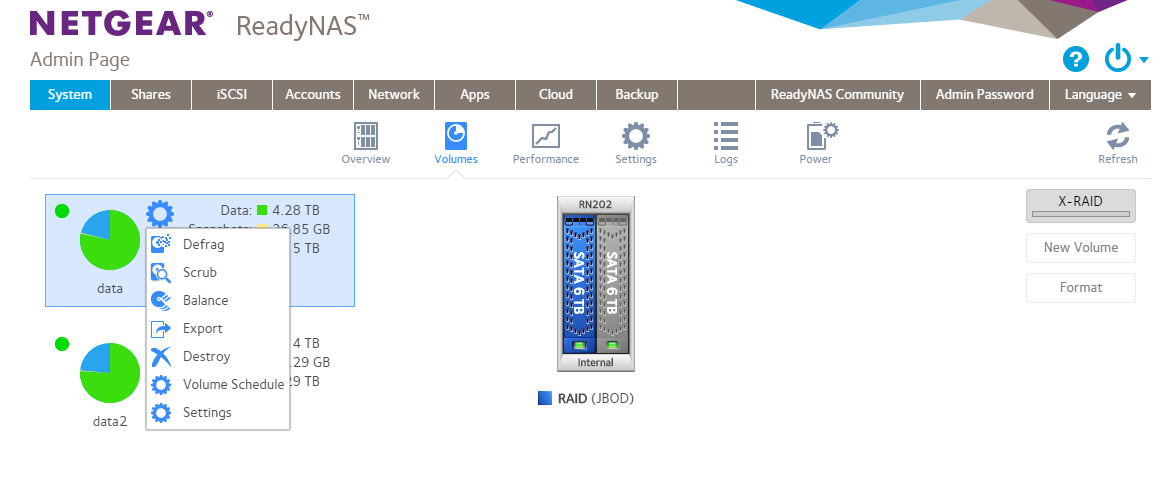
Yes, it is OS-6 only, You might need to turn off xraid in order to do the destroy (and turn it on again right after you create the new volume). You don't need to wait fo the resync to complete.
I've attached a screen shot to help you locate the option. My OS6 systems are running jbod, not xraid (they are backup NAS) - so your screen will only show one volume.
JohnnyR2D2 wrote:
2 - I understand that today I have four 4TB disks with a total raw data of 16TB and a volume of 10TB only (should I assume the difference is what the X-RAID uses for redundancy?).
3 - With the new configuration I will have two 8TB and two 4TB diks with a total of raw data of 24 TB. What will be my new VOLUME size/ maximum capacity?
There are two things going on. One is that there are two different units for disk storage - TB and TiB. 1 TB = 1000*1000*1000*1000 bytes. 1 TiB = 1024*1024*1024*1024 bytes. Unfortunately most systems that report TiB units still call them TB (both ReadyNAS and Windows do that). Disk Manufacturers use TB.
The storage you have now is actually 12 TB - which happens to be almost exactly 10 TiB.
The rule for capacity is to sum the disks and subtract the largest.
So with your current setup, 4x4 TB - 4 TB => 12 TB (or 10 TiB).
With your new setup 2x8 TB + 2x4 TB - 8 TB -> 16 TB (or ~14.5 TiB).
Each disk you upgrade later on to 8 TB will add another 4 TB.
JohnnyR2D2 wrote:
4 - Since I'm kinda going to start from the zero what will be your recommendation about the disks order installattion assuming that I may upgrade the two remaining 4TB disks is the future? Should I put the two 8TB on bays 1 and 2 and the two 4TB on bays 3 and 4 or doesn't matter?
I'd probably use bays 3 and 4, but it really shouldn't matter.
Related Content
NETGEAR Academy

Boost your skills with the Netgear Academy - Get trained, certified and stay ahead with the latest Netgear technology!
Join Us!
