NETGEAR is aware of a growing number of phone and online scams. To learn how to stay safe click here.
Forum Discussion

chirpa
Mar 26, 2009Luminary
*NEW BETA* RAIDar Widget for Mac
The latest RAIDar Widget for the Mac can be downloaded here: RAIDar.wdgt.zip
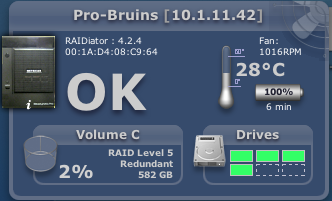
RAIDar Widgets are small lightweight widgets that will work in the Mac OS X environment. The functionality is similar to RAIDar but may be more suitable in a single ReadyNAS environment.
- v1.13-T1: Bug fixes for disk ATA errors and buffer sizes.
- v1.13-T2: Fix stall issue on 10.4.11
43 Replies
Replies have been turned off for this discussion
 jotap_66AspirantWas solved the thermometer problem?
I have installed last version (not the new beta) and I have no thermometer
JP DMBprideAspirantthis is just sick - works like a charm for me, on Snow Leopard. Everything I wanted and was a hassle to do before, no longer is. It found my NAS instantly, makes connecting simple - bravo guys
 realbigestAspirantWidget was working great on RAIDiator 4.1.5, but after upgrading to RAIDiator 4.1.6 [1.00a043] it's broken! :(
Stuck in "Searching for ReadyNAS devices..." state:
- realbigestAspirantHello! Anyone? :(
- mdgm-ntgrNETGEAR Employee RetiredWhat ReadyNas? Are you using the latest version of the widget?
- realbigestAspirant
mdgm wrote: What ReadyNas? Are you using the latest version of the widget?
Using ReadyNAS NV+ and latest widget from top of this topic. - mdgm-ntgrNETGEAR Employee RetiredWorking fine for me. Not sure what would be causing your problem.
- realbigestAspirantWhat supporting widget on NAS side? Some special daemon?
- thatcoderAspirantFYI, I have Jumbo Frames enabled, and I can't detect my Pro.
Is there a service on the NAS side that should be running as a daemon?  laptik1Aspirant
realbigest wrote: Widget was working great on RAIDiator 4.1.5, but after upgrading to RAIDiator 4.1.6 [1.00a043] it's broken! :(
Stuck in "Searching for ReadyNAS devices..." state:
if you have changed the setting System->Language to russian or other, try to change it back to english (unicode) and reboot your NAS
hope this help

Related Content
NETGEAR Academy

Boost your skills with the Netgear Academy - Get trained, certified and stay ahead with the latest Netgear technology!
Join Us!
