NETGEAR is aware of a growing number of phone and online scams. To learn how to stay safe click here.
Forum Discussion

ianbucklar
Sep 09, 2010Aspirant
New NV+ stuck at Booting....
Hi
I have just got a new NV+ (well 2nd hand but new to me!) that came without any disks and have added 3 X 2TB disks to it. I have switched it on, can see it in Raidar and that and the front panel still say that it is booting - I have left it 6 hours now so any suggestions please ? I have a Duo and dont remember this happening but only have a singel 1TB drive in that
Thanks
Ian
I have just got a new NV+ (well 2nd hand but new to me!) that came without any disks and have added 3 X 2TB disks to it. I have switched it on, can see it in Raidar and that and the front panel still say that it is booting - I have left it 6 hours now so any suggestions please ? I have a Duo and dont remember this happening but only have a singel 1TB drive in that
Thanks
Ian
19 Replies
Replies have been turned off for this discussion
- mdgm-ntgrNETGEAR Employee RetiredSo the health of the disk looks to be fine, though SMART is not infallible. If a factory default using the latest beta doesn't work, then it's fairly safe to say that you should thoroughly test your disks:
mdgm wrote:
You may wish to power down (you may need to pull the power if it is hanging and holding the power button does not turn it off), remove your disks (label order) and test them: http://home.bott.ca/webserver/?p=388
http://www.readynas.com/forum/faq.php#How_can_I_verify_that_my_disk_is_bad%3F  ianbucklarAspirantOk - some progress. here is what I have done and the results so far :
Pulled 2 of the 3 disks and did another factory default reset (without upgrading to the latest beta). Then instead of going into the setup, waited the 10 minutes and allowed it create using default settings and this time it actually created the C drive and booted up OK and shows 1.8TB Free of 1.8TB
So I am now planning to complete the setup process and then add the 2 extra disks - should these be added one at a time and be allowed to complete before adding the second one or can I add both at the same time ?
So it seems that it is either having one or both of these extra disks in during initial installation or the fact that I clicked into setup that caused the problem !
Thanks for everyone's help so far !
Ian- mdgm-ntgrNETGEAR Employee RetiredAdd one at a time, wait for the resync, expansion and then add the next one.
- ianbucklarAspirant
mdgm wrote: Add one at a time, wait for the resync, expansion and then add the next one.
Added one extra disk and it still seems to be going through the process. Thought it might be quicker than this as there is nothing on any of the disks - any thoughts on how long each 2TB disk will take please ? - ianbucklarAspirantAll working perfectly now - thanks for everyone's help !
 gideon1AspirantHi Folks
Similar problems here
In a nutshell my readynas nv+ has become unresponsive
It has 4 2tb discs running fine for years on the hcl list
and I have about 2+ TB of pics, movies, music on it
I recently got on the backup kick and starting running cobiansoft backup (free windows client) on my win7 pc to 3TB external drives connected to pc
I mucked around with that for a few weeks pumping large amounts of data over the home network (wired),
Everyone once in a while the nas would disappear from my home network (in windows) but this was normal
It recently became unresponsive (press front power button 1x or 2x, press and hold front pwr button, etc)
So I pulled the plug on it and plugged it back in (This was on Sun morn, now it's Tue eve)
The lcd said something about checking or syncing (I dont remember what it said)
Right All 4 lights are lit up (nothing flashing)
Right now if front buttons are unresponsive (ie the front lcd doesnt light up)
I can see the ip from the admin screen from my router (as a dhcp client)
I can ping it from the command line
Raidar 4.1.7? can see it
The volume green light is flashing and if I hover over it, it shows this screenshot, 15% etc
I cannot view it's admin page (I used to be able to)
I cannot do \\nas or \\192.168.0.249 from windows start run (i used to)
My mapped network drives are disconnected
It's as if it's stuck or busy resyncing
Other that waiting to see if the percentage of resync increases, prob 2 weeks at this rate, what else can I do?
Thanks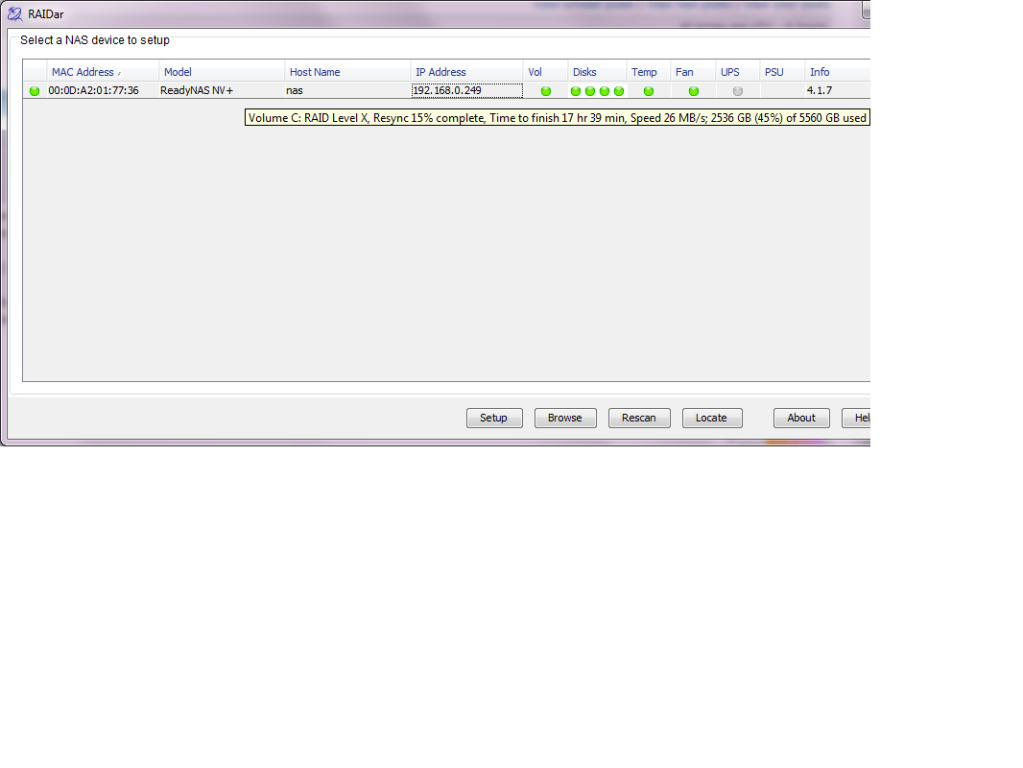
- mdgm-ntgrNETGEAR Employee RetiredGideon, I would suggest you a tech support case (http://www.readynas.com/support).
- gideon1AspirantThanks support number 16120524
- gideon1Aspirantnas rescued, with help of netgear support and knoppix dd_rescue

Related Content
NETGEAR Academy

Boost your skills with the Netgear Academy - Get trained, certified and stay ahead with the latest Netgear technology!
Join Us!
