NETGEAR is aware of a growing number of phone and online scams. To learn how to stay safe click here.
Forum Discussion

xm813
Nov 08, 2022Aspirant
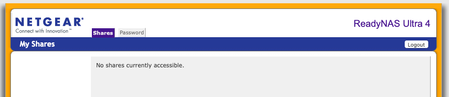
No Shares Currently Accessible
Hello, ReadyNAS has been sitting on the shelf for a little while after I moved. Tried to login and only get this: Logged in as admin. Have seen a couple of these on the forum bu...

xm813
Nov 08, 2022Aspirant
Added /admin and now get this:
I can select the items on the left but nothing appears in the middle.

StephenB
Nov 08, 2022Guru - Experienced User
Do you see any shares if you browse to \\192.168.1.243 in file explorer? (Make sure you use the correct slash).
- xm813Nov 08, 2022Aspirant
Now I just get the first image above:
No shares currently accessible.
- StephenBNov 08, 2022Guru - Experienced User
xm813 wrote:
Now I just get the first image above:
No shares currently accessible.
Then you either used the wrong slash ( // instead of \\), or you were using the browser instead of file explorer.
- xm813Nov 08, 2022Aspirant
A-Ha
I misread your post. So using Finder instead of a browser I am able to see the actual files. But still nothing on the Frontview
Related Content
NETGEAR Academy

Boost your skills with the Netgear Academy - Get trained, certified and stay ahead with the latest Netgear technology!
Join Us!
