NETGEAR is aware of a growing number of phone and online scams. To learn how to stay safe click here.
Forum Discussion

CBCC
Apr 04, 2014Aspirant
Permissions over Network
Hello, I am having trouble with my ReadyNAS Duo V2. I can do anything I want to from the WinXP computer that originally put the files on it, but not with other computers on my network. The ReadyN...

CBCC
Apr 09, 2014Aspirant
OK,
I have RAIDar 4.3.8 installed on the Win7 PC. RAIDiator 4.1.13 was installed on the ReadyNAS Duo via the ReadyNAS Download utility rather than from a file on a PC.
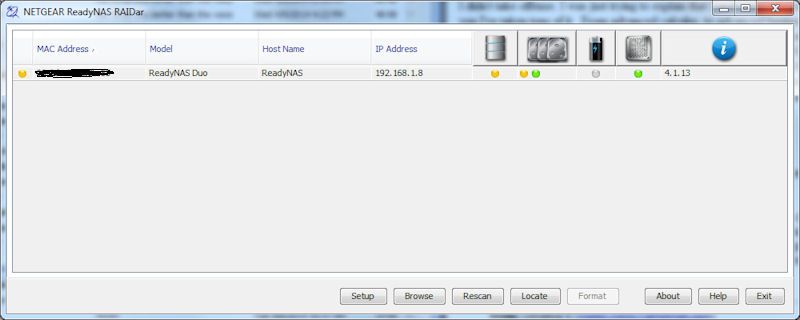

I still don't see Security Mode showing in Frontview under Security.
Installing RAIDiator did not format the drive (only one drive inside now). That drive is in Bay #2 and it's a 500GB. Everything is still on it, or the few things I looked at were. If I wanted to install a 1TB drive and have it copy via X-RAID, I think I have to place the 500GB drive into Bay #1, and the 1TB drive into Bay #2. Is this necessarily true? I am aware that the 1TB drive will show up as 500GB until both are the same size.
So here are the questions.
How may I see the Security Mode to be able to set it correctly for proper Sharing of files (resetting Ownership) so all connected PCs may make any changes I want? Do I need User Accounts for that? And what should I set Ownership to? (since I cannot see it now)
Should I do a factory reset, rather than using X-RAID to copy the 2nd drive, then run the Wizard, recreate my Folders, and copy everything back into them fresh? I'm wondering if something isn't right because the drive was not formatted.
May the drives be Hot Swapped, or should I power down the ReadyNAS?
May I leave a drive to be copied via X-RAID in Bay #2, and install a new drive in Bay #1? Like when I get a 2nd 1TB drive.
Does a new drive have to be partitioned and formatted, or will the ReadyNAS do that for me?
If two drives already have data on them, but each has different stuff, and one is already in use in the ReadyNAS, which one will be copied under X-RAID? Which Bay?
I'm saying X-RAID because that's what shows in RAIDar on the Home page. I want the RAID that duplicates drives for backup, rather than adding them together for more capacity.
Thanks again. :)
I have RAIDar 4.3.8 installed on the Win7 PC. RAIDiator 4.1.13 was installed on the ReadyNAS Duo via the ReadyNAS Download utility rather than from a file on a PC.
I still don't see Security Mode showing in Frontview under Security.
Installing RAIDiator did not format the drive (only one drive inside now). That drive is in Bay #2 and it's a 500GB. Everything is still on it, or the few things I looked at were. If I wanted to install a 1TB drive and have it copy via X-RAID, I think I have to place the 500GB drive into Bay #1, and the 1TB drive into Bay #2. Is this necessarily true? I am aware that the 1TB drive will show up as 500GB until both are the same size.
So here are the questions.
How may I see the Security Mode to be able to set it correctly for proper Sharing of files (resetting Ownership) so all connected PCs may make any changes I want? Do I need User Accounts for that? And what should I set Ownership to? (since I cannot see it now)
Should I do a factory reset, rather than using X-RAID to copy the 2nd drive, then run the Wizard, recreate my Folders, and copy everything back into them fresh? I'm wondering if something isn't right because the drive was not formatted.
May the drives be Hot Swapped, or should I power down the ReadyNAS?
May I leave a drive to be copied via X-RAID in Bay #2, and install a new drive in Bay #1? Like when I get a 2nd 1TB drive.
Does a new drive have to be partitioned and formatted, or will the ReadyNAS do that for me?
If two drives already have data on them, but each has different stuff, and one is already in use in the ReadyNAS, which one will be copied under X-RAID? Which Bay?
I'm saying X-RAID because that's what shows in RAIDar on the Home page. I want the RAID that duplicates drives for backup, rather than adding them together for more capacity.
Thanks again. :)
Related Content
NETGEAR Academy

Boost your skills with the Netgear Academy - Get trained, certified and stay ahead with the latest Netgear technology!
Join Us!
