NETGEAR is aware of a growing number of phone and online scams. To learn how to stay safe click here.
Forum Discussion

everytime
Sep 15, 2016Guide
Upgrade 1, upgrade all, or junk it
I have a less than two-year old ReadyNAS (516) with four 4TB drives and all is well. I also have a seven-year old ReadyNAS ProBusiness Edition. I have been using the older model to back up the newer ...

mdgm-ntgr
Sep 15, 2016NETGEAR Employee Retired
Ah, you can SSH in?
Perhaps start by running e.g.
# df -h
# df -i
Perhaps the 4GB root volume could be full.
everytime
Sep 15, 2016Guide
Not exactly sure what I'm supposed to get, but with the -h I get 47% with two directories listed and on the -i I get 2% with the same two directories.
 StephenBSep 16, 2016Guru - Experienced User
everytime wrote:
Not exactly sure what I'm supposed to get, but with the -h I get 47% with two directories listed and on the -i I get 2% with the same two directories.
Do you mean 2% used or 2% free?
Perhaps cut/paste the results for both commands and post them here.
The symptoms sound like a full OS partition - which can be easily fixed if you get to it in time.
What add-ons are running? Is ReadyDLNA enabled?
- everytimeSep 16, 2016Guide
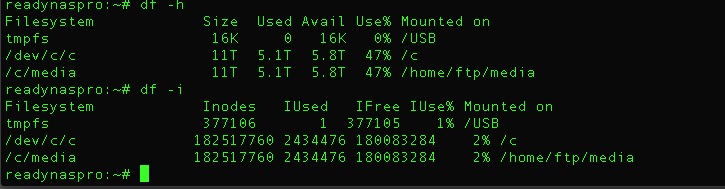
I'm not familiar with what the results mean so I'm posting a screen grab.
Also I'm not able to get the browser to access the unit so I cannot answer your questions about add-ons and ReadyDLNA completely. I think ReadyDLNA might have been checked because I used to use the box to stream music in iTunes.
Is there a way I can get answers to these questions from the command line as root?
- mdgm-ntgrSep 16, 2016NETGEAR Employee Retired
Hmmm. Not even listing the 4GB root volume (that is odd). I think it must be full and can't be fixed in normal mode.
- everytimeSep 23, 2016Guide
mgdm, thank you. That solved the problem. (The unit still has several periods every day where the fan tends to rev up for fifteen or more minutes, but it did that before too.) However, it's a backup unit and is running as well as it did before. The Reallocated Sector Count on that one drive is still at 5. The other four drives are still at 0. So, for the time being, all's good.
Thanks again.
 Blues11Oct 04, 2016Luminary
mgdm, thanks again for your help. Sorry for being out-of-touch, but I suddenly had a dead drive and had to replace it.
I'm going to do the upgrade to OS6. As I've previously stated, this old ReadyNAS BusinessPro is just used as a daily backup unit for my newer 516 NAS. So I did a backup of the 516 onto a separate drive unit and have downloaded PREP4TOR6_0.1-x86.bin and R4toR6_6.5.2.bin.
I'll post again when it's done. (Or if I have issues, although I am not expecting any.)
Again, thank you for your assistance.
- Blues11Oct 04, 2016Luminary
Well, the ReadyNAS has been reading "Booting... 98%" for more than four hours now. It seems like a boot should only take ten or fifteen minutes.
The steps I did:
1. Downloaded PREP4TOR6_0.1-x86.bin and R4toR6_6.5.2.bin.
2. Went to the Install and loaded PREP4TOR6_0.1-x86.bin but didn't boot.
3. Did the sytem upgrade with R4toR6_6.5.2.bin.
It restarted and flashed a message or two that I didn't catch. Then it began to boot. It went through to 96% pretty quickly, perhaps ten minutes or so. After that it moved to 98% and it's been there ever since.
Is this standard? Is there something else I should do?
Thank you. - mdgm-ntgrOct 04, 2016NETGEAR Employee Retired
You could try powering down and doing a factory reset using the boot menu.
Related Content
NETGEAR Academy

Boost your skills with the Netgear Academy - Get trained, certified and stay ahead with the latest Netgear technology!
Join Us!
