NETGEAR is aware of a growing number of phone and online scams. To learn how to stay safe click here.
Forum Discussion

AmalW
Dec 06, 2020Aspirant
Ready NAS RNDP200U - Not Reading Disks
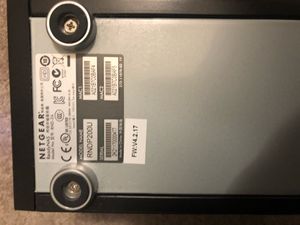
Dear All, In desperate need of some help! Setup: My ReadyNAS Model Name: RNDP200U (Model No: RND-2A) is not reading the two disks. Using Raidar 4.3.0. X-Raid2 Setup - I believe as I did no...

StephenB
Dec 06, 2020Guru - Experienced User
Sandshark wrote:
Since you had no luck with (I am assuming a known good) scratch drive, then the likely problems are...
Might be worth revisiting that after AmalW recovers the data. I'm not clear on exactly what was done with the scratch drive.
AmalW
Dec 07, 2020Aspirant
Sandshark/ Stephen,
I have not done anything with the two original drives, except for taking them out and putting them back in the NAS.
By scratch disk do you mean one of the two originals? Is it likely that both disks would fail at the same time?
If it is a hard disk mechanical fault , sre there people who can repair them in the UK?
I am expecting the the back up USb & internal Seagate 8Tb drives to arrive late today so I can start to recover?
All your advise appreciated. Thanks
I have not done anything with the two original drives, except for taking them out and putting them back in the NAS.
By scratch disk do you mean one of the two originals? Is it likely that both disks would fail at the same time?
If it is a hard disk mechanical fault , sre there people who can repair them in the UK?
I am expecting the the back up USb & internal Seagate 8Tb drives to arrive late today so I can start to recover?
All your advise appreciated. Thanks
- StephenBDec 07, 2020Guru - Experienced User
AmalW wrote:
By scratch disk do you mean one of the two originals?No, it means a spare disk - that is not part of your array. The disk would be reformated, so anything currently on it would be lost.
AmalW wrote:
Is it likely that both disks would fail at the same time?If you mean the original disks, then it can happen. Though one aspect here is that you often don't discover that a disk is bad until you try to read or write to the bad sectors on it. So the failure can be hidden for a long time. When you replace a disk, the NAS is reading every sector of the remaining disks, and any hidden problem will come to light.
AmalW wrote:
If it is a hard disk mechanical fault , sre there people who can repair them in the UK?Hard disks generally can't be repaired, so it would need to be replaced.
AmalW wrote:
The compatible drives {NAS} you mention ... ; If I get one of those you listed, would that be plug and play without risk of disk erasure?
"Compatible desktop units would be the Ultra2, Ultra2Plus (which is what you have), Pro2, Ultra4, Ultra4Plus, Pro4, Ultra6, Ultra6Plus, Pro6, ProBE, and Pro Pioneer."
Is there any harm in running the Seatools utility on the disk first ...
You should test the disks first, since that will clarify whether the NAS itself has failed or not.
Note any NAS you purchase will be at least 7 years old (and could be as old as 12). The model you have is actually the newest model that runs 4.2.x firmware. So if you recover the data using R-linux, then you should consider whether you should purchase a new NAS or get a used one that might not last very long.
- AmalWDec 07, 2020Aspirant
Hi Stephen,
Thanks for your reply;
I installed the Seatools software and tried a spare disk first in the pc's spare bay.
It goes through the sequence; scanning for SCSI/scanning for ATA/Scanning for USB supported devices; at which point it gets stuck - please wait and then when you click on the message window-not responding.
I do not ever get to the Seatools interface page. Any ideas what this might be? Do I need to re-install Seatools?
At present I am not thinking of which replacement drive to get! Just disaster recovery! If an older drive will help me get out of this situation, I will be happy and then come up with a decent back-up plan. Do you agree with Sandsharks options for the replacement drives which may work to recover the data?
Thanks
Amal
StephenB wrote:
AmalW wrote:
By scratch disk do you mean one of the two originals?No, it means a spare disk - that is not part of your array. The disk would be reformated, so anything currently on it would be lost.
AmalW wrote:
Is it likely that both disks would fail at the same time?If you mean the original disks, then it can happen. Though one aspect here is that you often don't discover that a disk is bad until you try to read or write to the bad sectors on it. So the failure can be hidden for a long time. When you replace a disk, the NAS is reading every sector of the remaining disks, and any hidden problem will come to light.
AmalW wrote:
If it is a hard disk mechanical fault , sre there people who can repair them in the UK?Hard disks generally can't be repaired, so it would need to be replaced.
AmalW wrote:The compatible drives {NAS} you mention ... ; If I get one of those you listed, would that be plug and play without risk of disk erasure?
"Compatible desktop units would be the Ultra2, Ultra2Plus (which is what you have), Pro2, Ultra4, Ultra4Plus, Pro4, Ultra6, Ultra6Plus, Pro6, ProBE, and Pro Pioneer."
Is there any harm in running the Seatools utility on the disk first ...
You should test the disks first, since that will clarify whether the NAS itself has failed or not.
Note any NAS you purchase will be at least 7 years old (and could be as old as 12). The model you have is actually the newest model that runs 4.2.x firmware. So if you recover the data using R-linux, then you should consider whether you should purchase a new NAS or get a used one that might not last very long.
- StephenBDec 07, 2020Guru - Experienced User
AmalW wrote:
I installed the Seatools software and tried a spare disk first in the pc's spare bay.
It goes through the sequence; scanning for SCSI/scanning for ATA/Scanning for USB supported devices; at which point it gets stuck - please wait and then when you click on the message window-not responding.
Are you sure this disk is working? Does Seatools start normally when this disk is not installed?
AmalW wrote:
At present I am not thinking of which replacement drive to get! Just disaster recovery! If an older drive will help me get out of this situation, I will be happy and then come up with a decent back-up plan. Do you agree with Sandsharks options for the replacement drives which may work to recover the data?
Sandshark gave you the correct list - though you could also go with a current ReadyNAS (RN300 or above). The difference is that a new ReadyNAS would only let you access your data temporarily, so you could off-load it. Then you'd need to reformat the disks to use them. The advantage here is that you'd end up with a new (or at least much younger) NAS.
But R-linux for Windows should also let you recover the data, and that won't cost you anything. Plus there are used ReadyNAS out there that aren't fully functional, so you do have to be careful with anything you purchase.
Perhaps more importantly - if your issue is the disks (and not the NAS chassis), then getting another NAS won't accomplish anything.
Related Content
NETGEAR Academy

Boost your skills with the Netgear Academy - Get trained, certified and stay ahead with the latest Netgear technology!
Join Us!
