NETGEAR is aware of a growing number of phone and online scams. To learn how to stay safe click here.
Forum Discussion

AmalW
Dec 06, 2020Aspirant
Ready NAS RNDP200U - Not Reading Disks
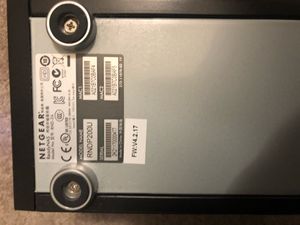
Dear All, In desperate need of some help! Setup: My ReadyNAS Model Name: RNDP200U (Model No: RND-2A) is not reading the two disks. Using Raidar 4.3.0. X-Raid2 Setup - I believe as I did no...

Sandshark
Dec 07, 2020Sensei
AmalW wrote:
6. I have tried another spare disk in the NAS, but does not do anything with it! Not seen by Raidar
This is what I meant by you having no luck with a scratch drive. Just to verify that you installed just the spare drive, correct? If so, and the drive you used is known to be good, then this is an indication that the NAS chassis has a problem.
You asked if there was any repair shop, and I already answered that the possible causes are not repairable. Netgear has never provided NAS repair services except under warranty and has not provided schematics or parts for any third parties.

StephenB
Dec 07, 2020Guru - Experienced User
Sandshark wrote:
AmalW wrote:
6. I have tried another spare disk in the NAS, but does not do anything with it! Not seen by Raidar
This is what I meant by you having no luck with a scratch drive. Just to verify that you installed just the spare drive, correct? If so, and the drive you used is known to be good, then this is an indication that the NAS chassis has a problem.
That depends on whether the disk was already formatted (unless a factory default was done via the boot menu). Though RAIDar should have seen a "corrupt root" in that case.
Anyway, I still think it is worth circling back to this after AmalW has the data off.
- AmalWDec 07, 2020Aspirant
Still waiting for Seatools to startup to check DISK2!
Restarted and plugged & unplugged several times!!!
Stuck on;
"USB: Scanning for supported drives. Please wait..."
I would have thought that Seagate would have some decent software tools! Been using Seagate drives for 20+ years in PC's & Macs!
- AmalWDec 08, 2020Aspirant
Hi Stephen/Sandshark,
Could not get Seatools startup to check Disk2 yesterday, so have decided to go for recovery on DIsk1 which scanned ok.
Any tips on process? I am scanning in R-Linux at the moment.
- StephenBDec 08, 2020Guru - Experienced User
Your files should be on Harddiskvolume3 (which I think is also the mdadm volume at the very bottom of your screen that ends with :2 ).
So far R-linux isn't seeing the file system itself (your screenshot shows ext for :0 and :1, but nothing for :2). Hopefully it will find it by the time the scan completes.
If it doesn't see it, I suggest that you try installing that disk back into the NAS (powered down, leaving the other slot empty), and try using the boot menu of the NAS to boot up skipping the file system check.
- AmalWDec 08, 2020Aspirant
Stephen,
The drive ending in CC45 is Disk1. I am running a Full scan of the whole drive.
it is at 56% now. I think volume3 is all the data. Hopefully it will do something,
StephenB wrote:
Your files should be on Harddiskvolume3 (which I think is also the mdadm volume at the very bottom of your screen that ends with :2 ).
So far R-linux isn't seeing the file system itself (your screenshot shows ext for :0 and :1, but nothing for :2). Hopefully it will find it by the time the scan completes.
If it doesn't see it, I suggest that you try installing that disk back into the NAS (powered down, leaving the other slot empty), and try using the boot menu of the NAS to boot up skipping the file system check.
Related Content
NETGEAR Academy

Boost your skills with the Netgear Academy - Get trained, certified and stay ahead with the latest Netgear technology!
Join Us!
