NETGEAR is aware of a growing number of phone and online scams. To learn how to stay safe click here.
Forum Discussion

Laserbait
Sep 01, 2022Luminary
ReadyDR performance
If you're using ReadyDR, what kind of performance are you seeing for your backups? I think mine is performing quite slow, or at least, slower than I think it should. I have a RN316 (6x4TB drive...

Laserbait
Sep 08, 2022Luminary
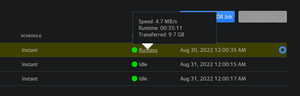
Thanks. The perf of the backup is about the same between the volumes on the RN316 as the EDA500, but the amount of change data in the snapshots is far less. The problem that I am seeing is that sometimes after several back to back heavy usage days, the ReadyDR backup will start to lag and get days behind, and this leads to a gap of protection.
It just seems to me that with as much CPU idle time (as reported by TOP) on both the RN316 and RN204, it should be able to process the backups much faster. In fact it is, when the backup first starts, it's upwards of 30MB/s, and the after a couple of hours it starts dwindling down to the 3-4 MB/s. It's like something is getting is getting bound up.

Sandshark
Sep 09, 2022Sensei
I didn't have a ReadyDR backup when I had an EDA500, but I saw other long-term processes cause backups (Scrubs especially, but balances to a lesser extent). It wasn't those processes that were the backed up ones, but rather ReadyNASD that hit 100% CPU usage because the other process was in some way interfering with it. But TOP clearly showed the problem being 100& CPU usage, so yours seems a bit different if TOP shows plenty of CPU time.
What I suspect, but don't know enough about the BTRFS send/receive at the heart of READYDR to know for sure, is that it's going all though your volume and looking for any changes. Since it is finding none, the transfer rate slows, but it still has to do a lot of I/O on the eSATA volume just to look.
Related Content
NETGEAR Academy

Boost your skills with the Netgear Academy - Get trained, certified and stay ahead with the latest Netgear technology!
Join Us!
