NETGEAR is aware of a growing number of phone and online scams. To learn how to stay safe click here.
Forum Discussion

Equitas
Oct 16, 2018Aspirant
ReadyNas - Time Machine - Insufficient space
I have been successfully backing up my iMac through TIME MACHINE to my ReadyNas now for months.
Recently, TIME MACHINE advised that it cannot connect to the NAS because there is insufficient sp...
Equitas
Oct 19, 2018Aspirant
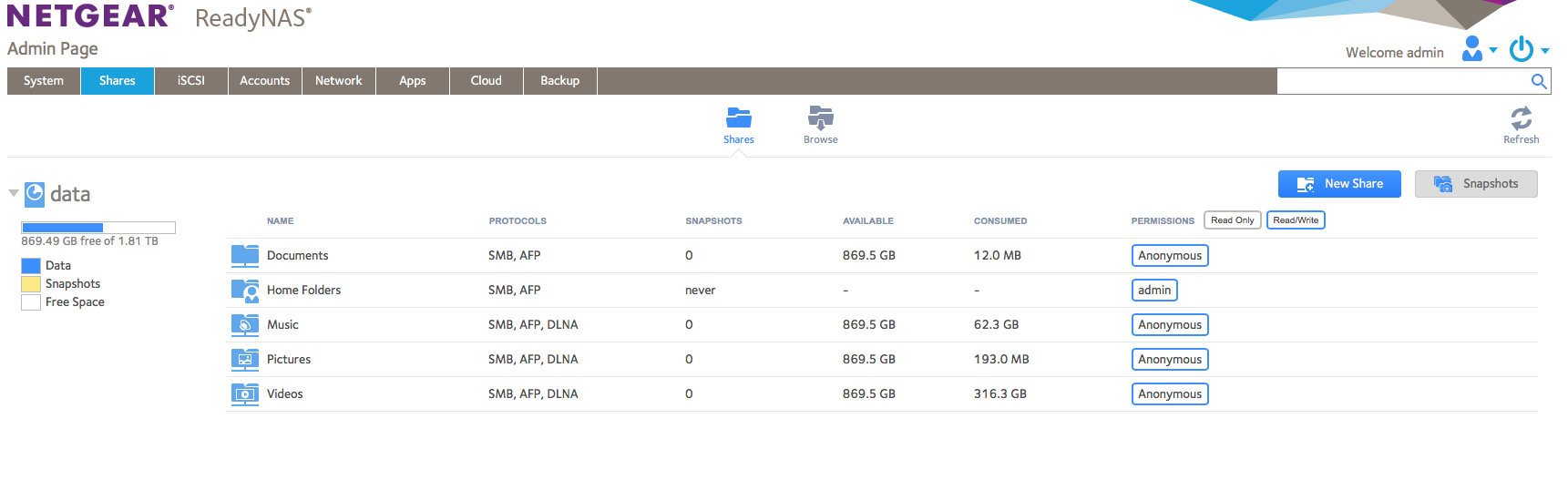
Marc_V - Of course, just as soon as I sent the message, I was able to log-in. Here's the screen shot of the ReadyNas admin page.
You can see, it says I have used over 1Tb of data...but my files take up WAY less than that. I presume the rest is Time Machine backups. Or, maybe it was partitioned?
In any event...how can I see what all the rest of the data is?
Many thanks

schumaku
Oct 19, 2018Guru - Experienced User
While configuring the ReadyNAS for TIme Machine, you had to define the allowed space. Check Backup -> Time Machine for the current settings.
How do I back up Time Machine data to my ReadyNAS OS 6 storage system?
- EquitasOct 19, 2018Aspirant
I'm sure I did at the time.
This is what it looks like now...it seems to show 1Tb allocated...and less needed. Yes? [Screen shot]
Related Content
NETGEAR Academy

Boost your skills with the Netgear Academy - Get trained, certified and stay ahead with the latest Netgear technology!
Join Us!