NETGEAR is aware of a growing number of phone and online scams. To learn how to stay safe click here.
Forum Discussion

Aedmunde
Feb 12, 2016Aspirant
ReadyNas 204 (3x3TB) drives with new firmware 6.4.2 gives "Remove inactive Volumes"
Did a disk by disk upgrade of a 3x2TB ReadyNas 204. Disk3, Disk2...
Before the last disk was upgraded; system was All green, did a firmware upgrade to 6.4.2
I then after reboot swapped out Drive 1 to a 3TB disk. The resynch started and...
Upgrade completed VERY quickly... (less than 1 day, unlike previous which took 1 week approx).
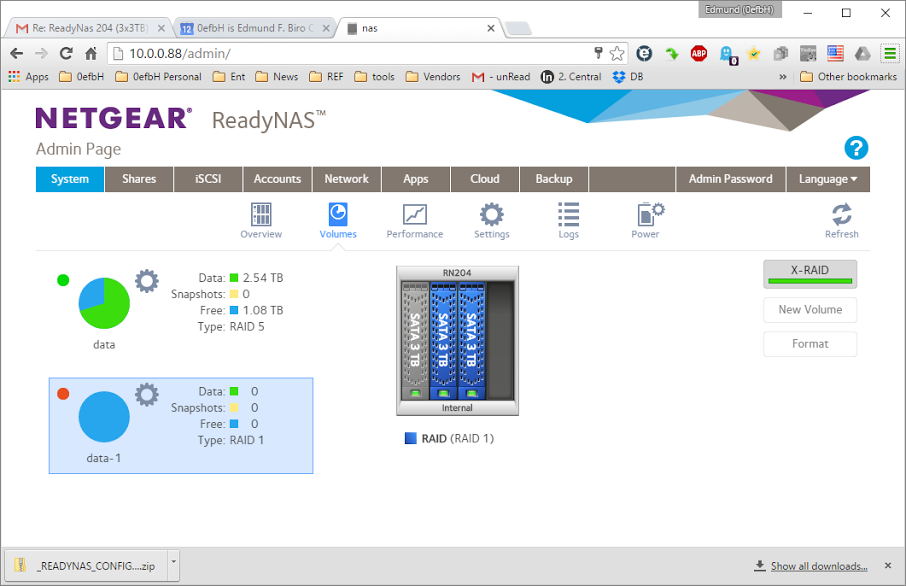
Upon inspection; I have Data and Data1 sets where Data is a Raid5 configuration (what I started with), and Data-1 is a Raid0 configuration with a prompt to "Remove inactive volumes to use the disk. Disk #2,3.
I've not seen THAT before.
Firmware bug, or a documentation addendum / update? The previous two disk replacements (going from 2TB to 3TB) worked fine.
Welcome to ReadyNASOS 6.4.2
root@nas:~# apt-get install idle3-tools
Reading package lists... Done
Building dependency tree
Reading state information... Done
The following NEW packages will be installed:
idle3-tools
0 upgraded, 1 newly installed, 0 to remove and 14 not upgraded.
Need to get 13.4 kB of archives.
After this operation, 56.3 kB of additional disk space will be used.
Get:1 http://mirrors.kernel.org/debian/ wheezy/main idle3-tools armel 0.9.1-1 [13.4 kB]
Fetched 13.4 kB in 0s (79.4 kB/s)
debconf: delaying package configuration, since apt-utils is not installed
Selecting previously unselected package idle3-tools.
(Reading database ... 13155 files and directories currently installed.)
Unpacking idle3-tools (from .../idle3-tools_0.9.1-1_armel.deb) ...
root@nas:~# for d in /dev/disk/internal/*; do idle3ctl -g $d; done
Idle3 timer set to 80 (0x50)
Idle3 timer set to 80 (0x50)
Idle3 timer set to 80 (0x50)
root@nas:~#Many thanks!
14 Replies
Replies have been turned off for this discussion
- JennCNETGEAR Employee Retired
Hi Aedmunde,
Welcome to community!
May I ask how exactly you replaced the disks? I mean the steps you took.
Please also post a screenshot of what you see under Volumes in the admin page.
Regards,
- AedmundeAspirantNo problem. (whups -- first try went via email, N.G.)...1. Installed (3) 2TB drives, added folders and transferred about 3 TB of data.2. A drive failed (SMART) and I replaced it. Discovered it wasn't exactly transparent to do this task; instructions not step-by-step. Instructions just say "replace" and let sync.3. Now that system is back to "Green - Ready" and no errors; decided to replace entire set with (3) 3TB disks because they are all same speed and model (hopefully better).4. Replaced Drive #3, waited for resync. (Didn't happen)5. powercycled unit using menu button; resync started and took several days.6. Repeat 4,5 for Disk #2.7. Repeat 4,5 for Disk #1error as shown above..8*. -- now transferring 3GB+ to "storageSpaces" in W2K12R2E, but that's likely to not work... (but backup better than nothing).suggestions?
- mdgm-ntgrNETGEAR Employee Retired
Please send in your logs (see the Sending Logs link in my sig)


Related Content
NETGEAR Academy

Boost your skills with the Netgear Academy - Get trained, certified and stay ahead with the latest Netgear technology!
Join Us!
