NETGEAR is aware of a growing number of phone and online scams. To learn how to stay safe click here.
Forum Discussion

shardie
Jun 03, 2018Aspirant
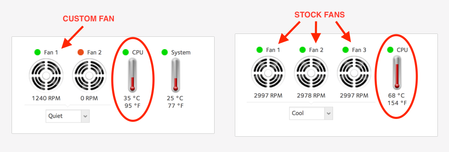
ReadyNAS 2120 runs cooler with custom fan - less noise too.
If there is one thing I hate about servers, its the noise from the fans. So, I decided to pop the lid off and install a custom fan. I dissabled the internal small fans. I compared the temeratures and...

shardie
Jun 04, 2018Aspirant
The fan is a Cool Master. You can use any quiet PC fan.
Lower temps and very quiet.
shardie
Jun 04, 2018Aspirant
Ive also made a custom steel frame for the NAS's - its more open for better airflow.
 StephenBJun 04, 2018Guru - Experienced User
Note that hardware changes can void the warranty (with desktop ReadyNAS, simply opening the case voids the warranty).
- shardieJun 04, 2018Aspirant
Apparently the warranty is not transferable - Im not the original buyer of the unit, so the warranty doesnt really make any difference any more.
- StephenBJun 04, 2018Guru - Experienced User
shardie wrote:
Apparently the warranty is not transferable -
That's true. I added that caveat so others reading your post won't inadvertantly void their warranty making similar mods (which has happened sometimes).
FWIW, I replaced the system fan in my older ReadyNAS Pro-6 yesterday (and earlier needed to upgrade the RAM). I'll probably replace the CPU fan soon. It's also out of warranty.
Related Content
- Nov 30, 2019Retired_Member
NETGEAR Academy

Boost your skills with the Netgear Academy - Get trained, certified and stay ahead with the latest Netgear technology!
Join Us!

