NETGEAR is aware of a growing number of phone and online scams. To learn how to stay safe click here.
Forum Discussion

PerlDiver
Jun 17, 2023Aspirant
ReadyNAS 214 won't recognize replaced drive
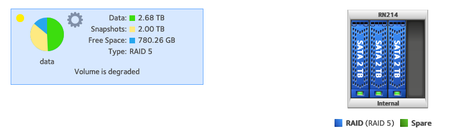
RN214 I've had for a number of years had its first disk issues: lots of ATA errors for disk 4 and "degraded" status for the RAID-5 volume. I bought two new drives from Newegg (Toshiba DT01ACA200, sam...

StephenB
Jun 18, 2023Guru - Experienced User
Have you tried connecting the new drives to a PC (either SATA or a USB adapter/dock) to see if they work? Though two dead-on-arrival disks isn't all that likely, it is possible that something happened during shipment.
Another option is to power down the NAS, and remove the disks (labeling by slot). Then put one of the new disks in slot one by itself, power up, and see if you get a fresh factory install. If you do, power down again and more the disk to slot 4, and see if the system boots normally. If it does, then use the disk test on the volume settings wheel to fully test the disk (that will take a couple hours to complete).
When done with this test, make sure you destroy the volume from the volume tab menu (and maybe for good measure reformat the disk).
- PerlDiverJun 20, 2023Aspirant
Thank you! I will try this and report back.
- PerlDiverJun 29, 2023Aspirant
I'm unable to find my SATA cable (it's a moving box somewhere) but both drives fail the "try it alone in slot 1" test. After the RN214 boots and gets on the network, the admin UI shows "no drives detected". I'm going to return both drives to NewEgg.
I found this post about choosing replacement drives. It applies to a "voluntary" replacement; in your opinion, would one of the recommended drives (8TB WD "Red" or Seagate "Ironwolf") also be suitable for replacing a failing drive?
Thanks so much for your help!
- StephenBJun 30, 2023Guru - Experienced User
PerlDiver wrote:
I found this post about choosing replacement drives. It applies to a "voluntary" replacement; in your opinion, would one of the recommended drives (8TB WD "Red" or Seagate "Ironwolf") also be suitable for replacing a failing drive?
One of my old posts.
WD branding has changed - WD "Red" drives are now all SMR, which I do NOT recommend. WD Red Plus and Ironwolf are both good choices for the RN214. I generally purchase on of those drives for my own NAS (and pick whatever seems cheaper at the moment). At the moment, Amazon has the Seagates for a bit less.
Either way, I'd go with 2x8 TB instead of 4x2 TB. That gives you 2 TB more capacity than you had before, plus two empty slots for expansion later on.
Related Content
NETGEAR Academy

Boost your skills with the Netgear Academy - Get trained, certified and stay ahead with the latest Netgear technology!
Join Us!
