NETGEAR is aware of a growing number of phone and online scams. To learn how to stay safe click here.
Forum Discussion

totibross
Aug 11, 2023Follower
Readynas 316 No volume
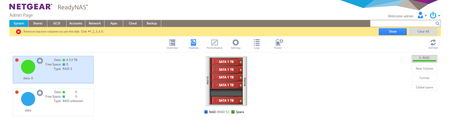
Let me start by thanking you in reading this post. A few weeks ago I restarted the NAS because I was going to move it from location. After a few hours I powered it on to find "NO VOLUME" where presen...
AnishaA
Aug 13, 2023NETGEAR Employee Retired
Hello totibross ,
And welcome to the NETGEAR Community! 🙂
From the screenshot attached, I could find that the volume is degraded. Could you please share the logs with us since I could not find the link for the logs?
You can download the logs and send them personally to me. We will check and let you know the update.
Please find the steps to download the logs
Please follow the mentioned steps to get the required logs:
1. Open the NAS Admin GUI
2. Go to system >> Logs
3. Click on Download logs
The log file name will be like this: System_log-jding-716-20220519-084655.zip
Also, provide the Serial Number of the device we will check for the warranty of the device and if required we will suggest raising a ticked.
Have a lovely day,
Anisha A
Netgear Team
 StephenBAug 14, 2023Guru - Experienced User
AnishaA wrote:
Could you please share the logs with us since I could not find the link for the logs?
I redacted them to preserve privacy - you'll find them in the edit history of the post.
I replied to totibross via PM a couple days ago - unfortunately odds of recovery are poor, as a second disk failed when the volume was already degraded.
- anthonyst74Aug 21, 2023Aspirant
Hi,
I am having this issue as well. Could you help me resolve?
Related Content
NETGEAR Academy

Boost your skills with the Netgear Academy - Get trained, certified and stay ahead with the latest Netgear technology!
Join Us!
