NETGEAR is aware of a growing number of phone and online scams. To learn how to stay safe click here.
Forum Discussion

AhmedMachy
Apr 10, 2018Aspirant
ReadyNAS 4220 Transfer speed drop
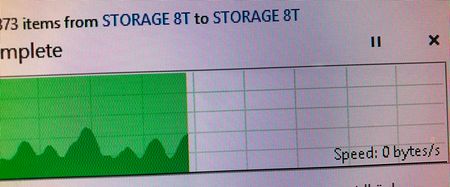
Dear all I have a problem during the transform from the NAS storage , the speed start at 3 Gbps and decrease to 1 Gbps some time to Zero and then back to 1 Gbps , where is the problem might be ? ...

StephenB
Apr 12, 2018Guru - Experienced User
AhmedMachy wrote:
why the admin page show the storage was full while there was afree space on it .
iSCSI provides a virtual disk that looks like raw block storage to the NAS. Your server formats that disk with whatever file system you choose. That virtual disk can become fragmented (just like a real disk), so in general it needs the same filesystem maintenance that a physical disk would need. That is done from the server. The LUN container can also become fragmented, and that maintenance needs to be done on the NAS.
The LUN on the NAS is an opaque container as far as the NAS is concerned - it has no idea what file system the server is using, and it doesn't attempt to look into the contents of the LUN.
There are two types of LUN - "thick" and "thin". The "thick" LUN allocates the full space of that virtual disk, the "thin" LUN allocates the storage on demand. It looks like you created a thick one, and perhaps you should have created a thin one. In general you don't want the NAS file system to be more than about 85% full, so I suggest
- backing up this LUN from the server
- deleting it on the NAS
- running a balance on the NAS
- creating a new "thin" LUN on the NAS
- reformatting it from the server
- restoring it's contents from the server
There is some more information about iSCSI here: https://kb.netgear.com/23292/What-are-basic-LUN-concepts-I-need-to-know-before-using-my-ReadyNAS-OS-6-storage-system
AhmedMachy
Apr 25, 2018Aspirant
Dear StephenB
as i told you i have 12 bay ( X 3 TB ) readynas and i'm going to perform FACTORY DEFAULT on it ( i took all the data that i need ),
what is your suggestion ? do i use XRAID OR FLEX-RAID ? can you give me a brief guid
Best Regards
- StephenBApr 25, 2018Guru - Experienced User
AhmedMachy wrote:
do i use XRAID OR FLEX-RAID ? can you give me a brief guid
Best Regards
Both modes would work.
XRAID is simpler/automatic. With 12x3TB drives you'd end up with RAID-6 - which provides good read speeds, and somewhat slower write performance. You'd have 30 TB of space in a single volume, and you'd be able to lose any two disks without loss of data. You can increase capacity by upgrading at least 4 disks to a larger size.
FlexRaid is more advanced (and can be more confusing) - but it provides more RAID options. RAID-50 might be suitable for you. That would create three 4x3TB RAID-5 groups that are then combined with RAID-0. The volume size would be 27 TB. Performance is faster than RAID-5 and RAID-6. You could lose up to one disk in each RAID-5 group without data loss (up the three disks in this case), but if you were to lose two disks in one RAID-5 group the array would fail. Also, you'd have to recreate the array to expand it (restoring all the data from backup).
There is a guide for FlexRaid here: https://www.netgear.com/images/support/WP_ReadyNAS%20FlexRAID%20Optimization%20Guide_18May17.pdf
Related Content
NETGEAR Academy

Boost your skills with the Netgear Academy - Get trained, certified and stay ahead with the latest Netgear technology!
Join Us!
