Forum Discussion

saxguy1
May 31, 2018Guide
ReadyNAS DUO "corrupt Root" how to re-install?
I have a corrupted HDD that I have pulled out and I reformatted the remaining good one NTFS on a WIndows 10 machine. Seems fine there. But when I go to load it in my ReadyNAS DUO, I see blinkng green...
 Jun 03, 2018
saxguy1 wrote:
Does this really have to be done *first in Windows?
No, it has to be done in the NAS. The NAS needs to partition the disk, format it, create the RAID array(s), and then create the file system.
Did you add this new disk as the second disk? Or did you remove the original disk and insert a new one?

mdgm-ntgr
May 31, 2018NETGEAR Employee Retired
Try deleting the partitions off the disk using your PC and then put the disk back in the NAS.
The NAS needs to format disks.
 saxguy1May 31, 2018Guide
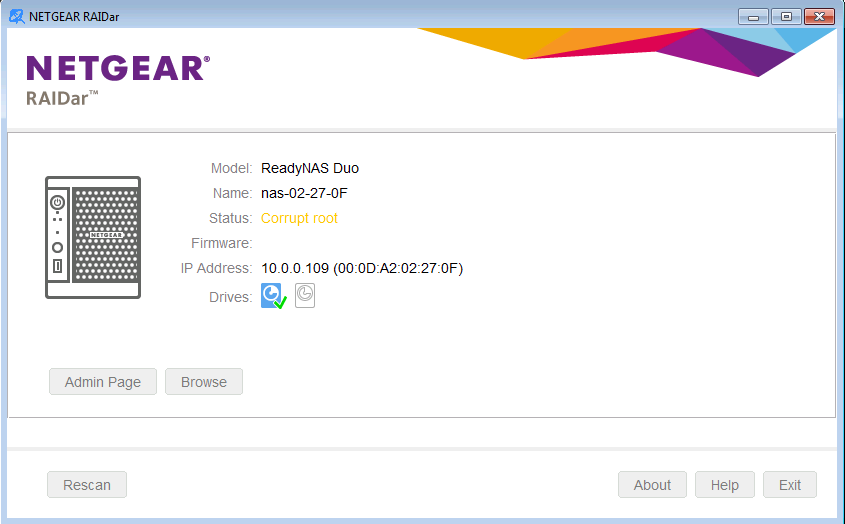
Deleted the volume. put back in the NAS and booted but still seeing the same green flashing lights but I do see a correct IP now (screenshot)
Should I try another hard reset?
- StephenBJun 01, 2018Guru - Experienced User
saxguy1 wrote:
Deleted the volume. put back in the NAS and booted but still seeing the same green flashing lights but I do see a correct IP now (screenshot)
Should I try another hard reset?
"Corrupt root" means that the NAS is seeing partitions on the disk, but nothing it can boot from.
That most likely means that you didn't really delete all the partitions on the disk. The normal process is to open the windows disk manager ("Create and format disk partitions" in win10), and select every "volume" (really partitions) it sees on the drive and delete them. An alternative is to use the "write zeros" test in the vendor tools (seatools for seagate, lifeguard for western digital).
You could try deleting partitions/zeroing the drive in the PC again, or you could try another factory reset.
But given the history, I suggest putting the drive into a PC, and testing it with the appropriate vendor software - doing a long read test, and follow that with the destructive write zeros test. That will confirm the health of the drives, and prepare them for a normal factory install at the same time.
- saxguy1Jun 01, 2018Guide
Thanks Stephen, Seatools test(s) seemed to fix it. Attached the reported drive
Related Content
NETGEAR Academy

Boost your skills with the Netgear Academy - Get trained, certified and stay ahead with the latest Netgear technology!
Join Us!