NETGEAR is aware of a growing number of phone and online scams. To learn how to stay safe click here.
Forum Discussion

no_usernameleft
Jan 13, 2022Aspirant
ReadyNas Duo RND2000-100 won't sync replacement drive.
Model: ReadyNAS Duo [X-RAID] Firmware: RAIDiator 4.1.16 [1.00a043] Memory: 256 MB [2.5-3-3-7] I know this unit is no longer support by Netgear, I get that. But it still works j...
- Jan 17, 2022
For some reason it would not reset on disk one. So I swapped in disk two into the slot and it reset on that one. Then I put the original disk back in and it formatted and synced it without issue.
So basically it's running off the same two disks only with their positions reversed.
I'm in the process of restoring data to the NAS.
Thanks to everyone for their help.

StephenB
Jan 13, 2022Guru - Experienced User
FWIW, I have one of these, which I still use for a secondary backup.
no_usernameleft wrote:
- It is one of the approved drives for this system.
The HCL is too old to be very useful now.
Generally I recommend a CMR NAS-purposed drive. For instance, Seagate Ironwolf or WDC Red Plus. Enterprise class will of course work, but are kind of overkill given the performance of the NAS.
no_usernameleft wrote:
I connected the drive as a USB volume to the NAS and had the NAS reformat it as EXT3. So in theory this should be a blank drive now.
If it's formatted, it's not blank. It might have no data, but it still has partition(s) and of course a file system.
The Duo should automatically reformat the drive and add it to the array if you hot-insert the drive. So try removing it and reinserting it with the NAS running.
- no_usernameleftJan 13, 2022Aspirant
Thanks.
Yeah. I've tried re-inserting the drive a couple of times while it was running and stil can't get it to sync. I tried with no formatting and with unallocated space.
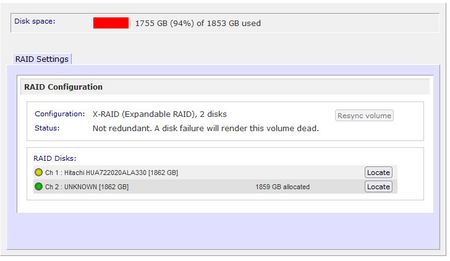
Another thing I noticed is that the NAS claims that drive 1 is dead (see screen cap.) So I pulled it and installed in my SATA dock and checked its SMART data with Crystal disk info. It told me the drive was healthy so I was guessing maybe the nas was referring to the RAID set being dead?
The frustrating thing is that the "resync" is not available on the volumes screen. Is it possible that the NAS is not trying to reformat and sync drive 2 because it thinks drive 1 has failed?
- SandsharkJan 14, 2022Sensei
I think it's quite likely that the declaration of drive 1 being dead is the issue. I had a similar issue on an older NAS where drives were declared dead. It was due to different spin-up times. Does drive 1 come up as dead when you boot with just it installed? That would be quite unusual if you still actually have access to the NAS and its contents.
The only thing I can suggest is booting with just drive 1 until it doesn't come up as dead, then hot inserting drive 2.
- no_usernameleftJan 14, 2022Aspirant
Yes. That's what is odd to me...
- The NAS will not boot with Drive 2 installed. I have to remove Drive 2 and then it will boot off Drive 1, the "dead" drive.
- So Drive 1 is completely bootable on its own in spite of the ReadyNAS saying it is dead.
- I have booted from drive 1 multiple times and it still says it's dead in spite of the NAS contents still being available.
- So I've been pulling everything off of Drive 1 the last few days (even if it was backed up to the cloud) so that I have local copies. And during that time I haven't run into any read/write errors.
I wanted to post here for ideas, but it sounds like I am getting confirmation that this behavior is not correct.
So I am thinking my last ditch effort is to
- Take blank drive 2 and install it as Drive 1 and do a factory reset.
- Then import the NAS configuration, restore it, and reboot.
- Then add the old drive 1 into the drive 2 slot and see if the NAS still thinks it is dead.
- If it is dead then I will add another, new 2 TB drive and sync.
- Then I will copy over all my files I was using for media player.
Sound like a plan?

Related Content
NETGEAR Academy

Boost your skills with the Netgear Academy - Get trained, certified and stay ahead with the latest Netgear technology!
Join Us!


