NETGEAR is aware of a growing number of phone and online scams. To learn how to stay safe click here.
Forum Discussion

Tigryss
Dec 14, 2015Aspirant
ReadyNAS duo v1 after update to 4.1.14 very slow
Hi I use my ReadyNAS duo v1(RND2000/1100 v1?) almost 7 years, and working fine after 4.1.14 update, i got a problem with network speed. I got max 700-720 kb/s. I made already factory reset, p...

StephenB
Dec 19, 2015Guru - Experienced User
If you look at the network stats on the NAS screen (network->interfaces, "show errors") are you seeing errors increasing during the transfer?
Tigryss
Dec 19, 2015Aspirant
Network Errors  [Ethernet 1]

Auto-negotiation	6
Bad packets	2
Disconnect	0
False carrier	1
Idle errors	258
Link failures	0
Receive errors	61
Symbol errors	1
VLAN tags	0
TCP Retransmits	1
Unrecovered TCP Retransmits	0
- TigryssDec 19, 2015Aspirant
and this is the ultra 2
Network Errors  [Ethernet 2]

TX packets	28285199
TX errors	0
TX dropped	0
TX overruns	0
TX carrier	0
RX packets	47339712
RX errors	0
RX dropped	217
RX overruns	0
RX frame	0
Collisions	0
- StephenBDec 20, 2015Guru - Experienced User
Maybe try a different ethernet cable (and also change the LAN port you are using on the router or switch). I'd turn off jumbo frames (setting MTU to 1500) for now.
I am thinking that packet loss is causing the throughput variation. This could be the network connection, but it is also possible that the NIC on the duo is starting to fail.
- TigryssDec 20, 2015Aspirant
Hi Stephen,
I have 3 Readynas and 2 linux server on the same cisco switch and the linuxes(debian 7.7 and 8.2) working fine, but every nas sync. only with ~1000 kb/s I can only thinking on config error, or some driver problem... The third Nas is new rnd102. is there any way to do some speedtest banchmark?
- StephenBDec 21, 2015Guru - Experienced User
Nastester (http://www.808.dk/?code-csharp-nas-performance) is a reasonable throughput tester.
I suggest clearing the network stats on the duo, and running the test. Then look at the stats again. Normally you shouldn't be seeing any symbol errors, false carriers, receive errors, or bad packets.
- TigryssDec 21, 2015Aspirant
Readynas Duo
NAS performance tester 1.7 http://www.808.dk/?nastester
Running warmup...
Running a 1000MB file write on \\x.x.x.x\backup\ 5 times...
Iteration 1: 1,13 MB/sec
Iteration 2: 1,10 MB/sec
Iteration 3: 1,12 MB/sec
Iteration 4: 1,13 MB/sec
Iteration 5: 1,10 MB/sec
-----------------------------
Average (W): 1,11 MB/sec
-----------------------------
Running a 1000MB file read on \\x.x.x.x\backup\ 5 times...
Iteration 1: 1,17 MB/sec
Iteration 2: 0,43 MB/sec
Iteration 3: 0,88 MB/sec
Iteration 4: 0,56 MB/sec
Iteration 5: 0,39 MB/sec
-----------------------------
Average (R): 0,69 MB/sec
-----------------------------
Network Errors [Ethernet 1]
Auto-negotiation 0
Bad packets 0
Disconnect 0
False carrier 0
Idle errors 0
Link failures 0
Receive errors 0
Symbol errors 0
VLAN tags 0
TCP Retransmits 161358
Unrecovered TCP Retransmits 14 - StephenBDec 21, 2015Guru - Experienced User
That is a huge number of TCP retransmits.
- TigryssDec 22, 2015Aspirant
And what can i do with them?
- StephenBDec 22, 2015Guru - Experienced User
Tigryss wrote:
And what can i do with them?
Either something needs to change on the network or tne NIC is failing. You've already tried direct connect, so that limits the network possibilities.
Are jumbo frames set up consistently on the switches PC's and NAS? Did you try a different network cable?
It's conceivable that something has happened to the OS software on the NAS. I think its unlikely, but if you have a scratch disk you can check it. You'd shut down the duo, remove/label the disks, and do a fresh factory install with just the scratch drive. Then check the throughput.
If those don't help, then its likely the duo's NIC. Unfortunately there's not much you can do about that, other than go shopping for a new NAS.
- TigryssDec 22, 2015Aspirant
I tried already new sata disks with factory reset, new cable. but it is almost impossible that al of my devices (duo, ultra 2 and rnd102)got the same issue with the nic.
this is the messure from rnd102
NAS performance tester 1.7 http://www.808.dk/?nastester
Running warmup...
Running a 1000MB file write on \\x.x.x.x\backup 5 times...
Iteration 1: 0,86 MB/sec
Iteration 2: 1,12 MB/sec
Iteration 3: 1,17 MB/sec
Iteration 4: 1,18 MB/sec
Iteration 5: 1,18 MB/sec
-----------------------------
Average (W): 1,10 MB/sec
-----------------------------
Running a 1000MB file read on \\x.x.x.x\backup 5 times...
Iteration 1: 1,18 MB/sec
Iteration 2: 1,18 MB/sec
Iteration 3: 1,18 MB/sec
Iteration 4: 1,18 MB/sec
Iteration 5: 1,18 MB/sec
-----------------------------
Average (R): 1,18 MB/sec
----------------------------- - StephenBDec 22, 2015Guru - Experienced User
Tigryss wrote:
I tried already new sata disks with factory reset, new cable. but it is almost impossible that al of my devices (duo, ultra 2 and rnd102)got the same issue with the nic.
I agree, I missed that info in your earlier post.
What MTU size is set on the three NAS?
- TigryssDec 23, 2015Aspirant
ReadyNAS Duo (4.1.14): MTU 1500
ReadyNAS Ultra 2 (4.2.28): MTU 1492
Readynas RND102 (6.4.1): MTU 1492
- StephenBDec 23, 2015Guru - Experienced User
Tigryss wrote:
ReadyNAS Duo (4.1.14): MTU 1500
ReadyNAS Ultra 2 (4.2.28): MTU 1492
Readynas RND102 (6.4.1): MTU 1492
They should all be the same.
You can probe the network MTU by pinging your router from the PC (using ethernet).
Open cmd, and enter
ping routeripaddress -f -l 1472
Note that "-l" is a lower case L, not a 1.
if that completes successfully, the MTU is 1500.
If it fails, reduce the value after the -l until you find the largest value that completes. Add 28 to that value, and you have the MTU. For example, if 1464 works and 1465 fails, the MTU would be 1492.
Set the MTU in the NAS and also the PC to this value.
I don't think that's the main problem, but it should still be set consistently.
Can you outline your network set up in more detail? Include the connection topology (e.g., what model switch or router the PC, servers and the ReadyNAS are connected to, and how the switches/routers are connected to each other).
- TigryssDec 23, 2015Aspirant
ping routeripaddress -f -l 1472
working fine so I changed on every Nas the MTU to 1500
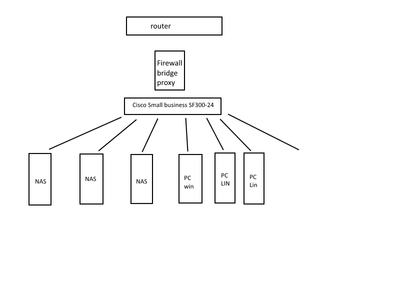
network is easy router --> bridge(firewall,nat, proxy) --> switch (cisco SF300-24) -- NAS,PC etc
There is 1 win destop PC and 6 Linux and they all connecting to cisco switch. every PC got gigabit NIC, over cat6 or 7 sstp cable.
- StephenBDec 23, 2015Guru - Experienced User
The switch itself is only fast ethernet though, correct? At least that's what I see here: http://www.cisco.com/c/dam/en/us/products/collateral/switches/small-business-smart-switches/brochure_c02-610054.pdf
Since it is a managed switch, it should have its own ethernet stats for each port that you can check.
- TigryssDec 23, 2015Aspirant
omg.... I don't have a pwd. nop i will get the pass so what should i do if i have the result from the ports
- StephenBDec 23, 2015Guru - Experienced User
Mostly I was thinking you could see if there are any network issues reported in the switch.
Most managed switches have upgradable firmware, so you could see if there are any updates for your switch.
Also, you could check if the port is configured as half-duplex or full-duplex. Some older switches (cisco in particular) had some issues automatically negotiating the duplex. If the switch is thinking half-duplex that will create persistent packet loss. With the password, you could force it to full-duplex.
If you had an inexpensive gigabit switch you should shift the three NAS and the PC to that, and see if there is a switch incompatibility. You'd also get faster performance. How many ports ethernet ports are you currently using?
- TigryssDec 23, 2015Aspirant
hehe this is funny i changed the MTU to 1500 on NAS Duo and now the speed is back to 300-325 kb/s
do you know which version of tcp.c builded in 4.1.14 pkg?
It is possible to install my own linux on the device then back to Nasready sofware?
- StephenBDec 24, 2015Guru - Experienced User
You're having performance issues with all the NAS, and they are running 3 different linux kernels. So I don't think its the tcp stack.
4.1.15-T3 runs Linux version 2.6.17.14, so it is a very old kernel.
It's not practical to install your own linux on a v1 NAS.
- TigryssDec 24, 2015Aspirant
ok then baybe we have a better chance with ultra 2 and 102. But first of all I need access to the switch, right?
- TigryssDec 28, 2015Aspirant
Receive Statistics Transmit Statistics Total Bytes(Octets) Unicast Packets Multicast Packets Broadcast Packets Packets with Errors Total Bytes(Octets) Unicast Packets Multicast Packets Broadcast Packets 1589678050 1057533 3843 1621 0 35982015 201038 92202 34043 660599470 457900 5182 257 0 26341801 71901 90865 35408 1479643 3553 2738 513 0 22176480 2605 93310 35155 no errors ther must be something with firmware
every port is 100 full duplex 1500 MTU
- StephenBDec 28, 2015Guru - Experienced User
Tigryss wrote:
Receive Statistics Transmit Statistics Total Bytes(Octets) Unicast Packets Multicast Packets Broadcast Packets Packets with Errors Total Bytes(Octets) Unicast Packets Multicast Packets Broadcast Packets 1589678050 1057533 3843 1621 0 35982015 201038 92202 34043 660599470 457900 5182 257 0 26341801 71901 90865 35408 1479643 3553 2738 513 0 22176480 2605 93310 35155 no errors ther must be something with firmware
every port is 100 full duplex 1500 MTU
Unfortunately this isn't showing tcp-retransmits (likely because that is layer-3) or transmit errors. It is good to confirm the MTU setting and the duplex. Clearly the NAS transmitted packets are reaching the switch.
Is there a setting for 802.3x flow control in the switch (sometimes called "pause frames")? If it is disabled, try enabling it.
If this is a firmware issue that affects three completely different readynas models (with three different kernels), I think we'd have seen hundreds of posts on it - and we haven't.
Did you do the direct connect test that was suggested earlier in the thread? I'm not able to tell from the replies.
- TigryssDec 28, 2015Aspirant
Hi direct connection was also 700 - 750 kb/s on duo
and 1000-1200 on the other 2
i found a flow control there is now auto-negotiation
and i found statistic for 802.1x EAP but there is no error
EAPOL Frames
Transmitted3
2
3
- TigryssDec 28, 2015Aspirant
so i tried now with an linux desktop pc direct with NAS DUO and it's 11MB/s so then we can say its not the NIC
Related Content
NETGEAR Academy

Boost your skills with the Netgear Academy - Get trained, certified and stay ahead with the latest Netgear technology!
Join Us!
