NETGEAR is aware of a growing number of phone and online scams. To learn how to stay safe click here.
Forum Discussion

flundstrom2
Oct 08, 2022Aspirant
ReadyNAS DUO web interface or file shares not responding, but ping does
My (ancient) ReadyNAS Duo RND2000v2 have been working flawless for years, but all of a sudden it stopped working: It's no longer possible to access, neither from Windows. It doesn't even open the we...
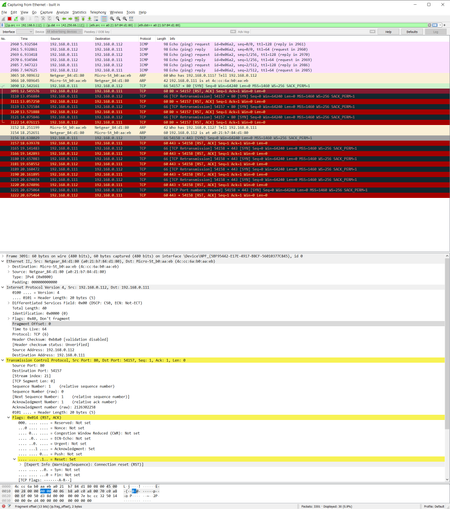
 Oct 19, 2022
flundstrom2 wrote:
The FRONT says ReadyNAS DUO, and the sticker on the BOTTOM says ReadyNAS Duo RND2000 v2
Yes, the labeling is confusing. That is why I asked about the front panel.
You have the original Duo (which is called the v1 here). It runs 4.1.x firmware.
As far as the web ui goes, one issue is that browsers recently deprecated TLS 1.0 - which is all your NAS uses for HTTPS. To get initial access you need to use either
- Internet Explorer (if the PC still has it)
- Edge in "IE mode"
- an old version of Firefox (94.0.2 works).
In the last case, you need to immediately change the browser settings to disable auto-update.
Once you are in, it is possible to change a NAS configuration file to use http instead of https. That lets you access the NAS from any browser (but the admin interface is no longer encrypted). If you want more information on that, you can find it here:
But if you aren't getting a protocol version/cipher mismatch error in the browser, then there is something else going on as well. That seems likely, since the NAS also stopped working with File Explorer.
I suggest using a Windows RAID recovery tool to offload the data next. You'd need to connect disk 1 to the PC (either with SATA or with a USB adapter/dock). R-linux for Windows is free recovery tool that will work. Power down the NAS before you remove the disks (and also label them by slot).
Of course you also need enough storage to copy off the data.
Note that the disks aren't formatted the same way - so only one disk works with this tool. Normally that is disk 1, but in some cases the two disks have gotten out of order somehow, and only disk 2 will work.
flundstrom2
Oct 18, 2022Aspirant
The FRONT says ReadyNAS DUO, and the sticker on the BOTTOM says ReadyNAS Duo RND2000 v2
StephenB
Oct 19, 2022Guru - Experienced User
flundstrom2 wrote:
The FRONT says ReadyNAS DUO, and the sticker on the BOTTOM says ReadyNAS Duo RND2000 v2
Yes, the labeling is confusing. That is why I asked about the front panel.
You have the original Duo (which is called the v1 here). It runs 4.1.x firmware.
As far as the web ui goes, one issue is that browsers recently deprecated TLS 1.0 - which is all your NAS uses for HTTPS. To get initial access you need to use either
- Internet Explorer (if the PC still has it)
- Edge in "IE mode"
- an old version of Firefox (94.0.2 works).
In the last case, you need to immediately change the browser settings to disable auto-update.
Once you are in, it is possible to change a NAS configuration file to use http instead of https. That lets you access the NAS from any browser (but the admin interface is no longer encrypted). If you want more information on that, you can find it here:
But if you aren't getting a protocol version/cipher mismatch error in the browser, then there is something else going on as well. That seems likely, since the NAS also stopped working with File Explorer.
I suggest using a Windows RAID recovery tool to offload the data next. You'd need to connect disk 1 to the PC (either with SATA or with a USB adapter/dock). R-linux for Windows is free recovery tool that will work. Power down the NAS before you remove the disks (and also label them by slot).
Of course you also need enough storage to copy off the data.
Note that the disks aren't formatted the same way - so only one disk works with this tool. Normally that is disk 1, but in some cases the two disks have gotten out of order somehow, and only disk 2 will work.
- flundstrom2Oct 31, 2022Aspirant
Thanks!
R-Linux seems to have successfully recovered everything. (Hard to know if every single one of those 12000+ photographs have been recovered, but it won't be the first time in history I've lost a couple of hundred photos due to hardware malfunction... 🙂 )
Is there any way to factory install the NAS, or do I need to buy a new one?
- StephenBOct 31, 2022Guru - Experienced User
flundstrom2 wrote:
Is there any way to factory install the NAS, or do I need to buy a new one?
You can do a factory install ("factory default") using the boot menu. See pages 15-16 here"
- flundstrom2Jan 02, 2023Aspirant
Thanks!
This solved the issue. You're my hero!
Related Content
NETGEAR Academy

Boost your skills with the Netgear Academy - Get trained, certified and stay ahead with the latest Netgear technology!
Join Us!
