NETGEAR is aware of a growing number of phone and online scams. To learn how to stay safe click here.
Forum Discussion

udwo
Jul 06, 2017Aspirant
ReadyNAS NV+ Raid question
We have ReadyNAS NV+ with 2 HD in it and it is currently set to X-RAID, Status Redundant. the issue is that when the drives sync, we get data put back into the folders that we previously moved out. F...

StephenB
Jul 06, 2017Guru - Experienced User
It shouldn't be doing this. What firmware is your NV+ running? 4.1.x or 5.3.x???
-Are the files in both both folders? Or do they just seem to be moving back?
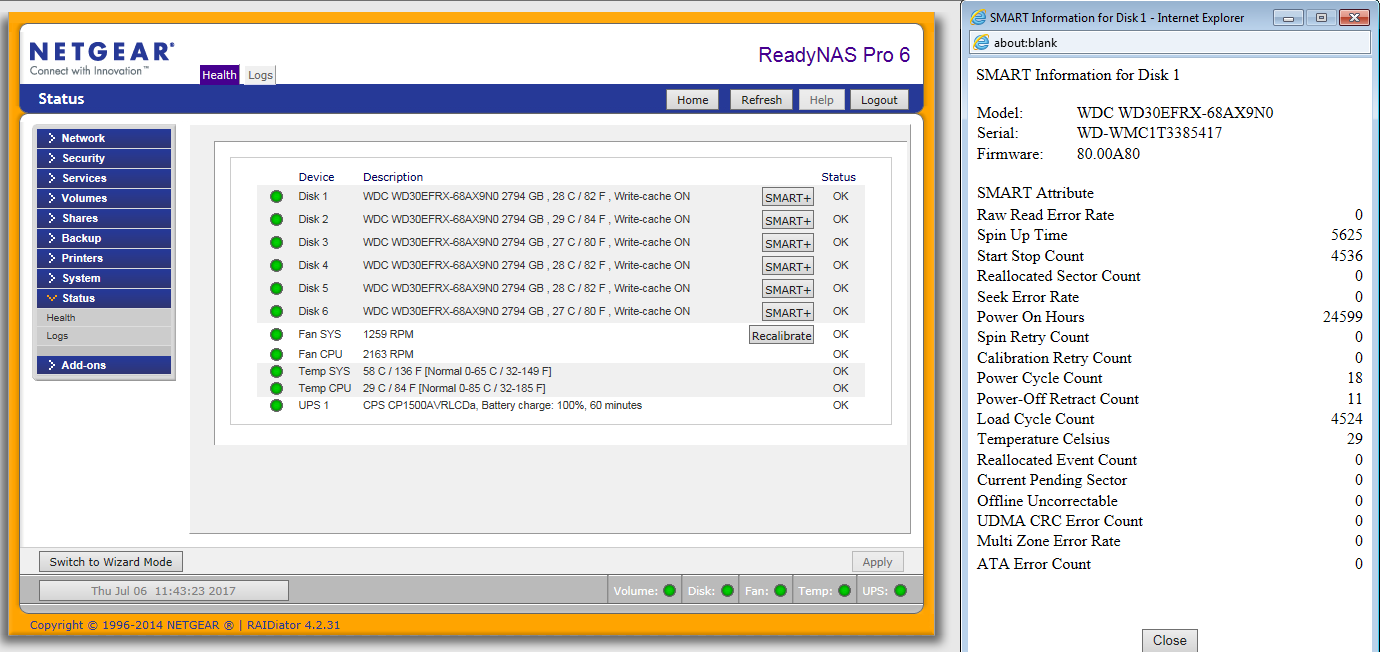
-Have you checked the disk health via Frontview (the SMART+ stats)?
-Depending on how you access the NAS, Windows might have the folders configured as available offline. If yours are set up that way, turn that windows feature off.
- udwoJul 06, 2017Aspirant
Firmware is RAIDiator 4.1.16 [1.00a043]
we access the files via network going to the shares we cerated on the NAS. I was conctantly notifiing our assistant that she MUST move the folders to the sub-folder and she said she was but then they appeared back in the dirrectory.
i didn't check the disk health via Fronview but will.. in the RAIDar, it shows Healthy in green. is this the same thing?
thank you for looking at my post Stephen
- StephenBJul 06, 2017Guru - Experienced User
udwo wrote:
Firmware is RAIDiator 4.1.16 [1.00a043]
Thx, that confirms that you have an NV+ v1. Your firmware is up-to-date.
udwo wrote:
i didn't check the disk health via Fronview but will.. in the RAIDar, it shows Healthy in green. is this the same thing?
It isn't showing the SMART+ stats. Though it's perhaps tangential, the array shouldn't be resyncing all the time. So if you are seeing frequent resyncing status in RAIDar or Frontview, that also needs to be looked at. FWIW I need to use Internet Explorer for this, it doesn't work with chrome.
Here's a screen shot from my Pro - but it's the same on your NV+:
udwo wrote:
I was constantly notifiing our assistant that she MUST move the folders to the sub-folder and she said she was but then they appeared back in the drrectory.
Maybe try a few yourself (perhaps to a test subfolder) and see if this also happens when you do it.
Related Content
NETGEAR Academy

Boost your skills with the Netgear Academy - Get trained, certified and stay ahead with the latest Netgear technology!
Join Us!
