NETGEAR is aware of a growing number of phone and online scams. To learn how to stay safe click here.
Forum Discussion

rozel1
Feb 17, 2023Aspirant
ReadyNas RN104 - Trying to Attach Yottamaster FS4RU3 4 Disk RAID 5 Array via USB 3
Hi - I touched on this here: - https://community.netgear.com/t5/Using-your-ReadyNAS-in-Business/ReadyNas-Duo-V2-Constantly-Blinking-Blue-LED-and-Windows-11/m-p/2293900/highlight/false#M198603 ...
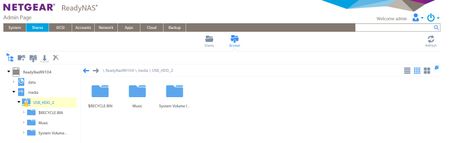

StephenB
Feb 17, 2023Guru - Experienced User
rozel1 wrote:
Snapshots - is there an easy way to cancel them on all Shares?
Unfortunately no. That is one reason I don't recommend the "smart" snapshot setting. I use custom snapshots myself, with limited retention (generally 3 months). Then the old snapshots are automatically deleted.
rozel1 wrote:
I must admit that in the beginning, I was hoping that the RN104 could set up the RAID on the attached Yottamaster, but guess this isn't possible?
You'd have to disable the hardware raid on the yottamaster. ReadyNAS support for RAID enclosures was designed for the EDA500. That wasn't supported in the Arm-based ReadyNAS (RN1xx and RN2xx series).
rozel1
Feb 17, 2023Aspirant
Ok thank you 👍 - I will connect direct to media player
- SandsharkFeb 17, 2023Sensei
It would be very odd for the ReadyNAS to try to do anything with the RAID in the Yottamaster. USB devices with internal RAID do not typically expose the individual drives to the host unless the RAID is disabled (except, perhaps, through their own special software). In addition, I have always believed that the NAS will not create a RAID volume on a multi-drive USB device even when it can see the individual drives, at least using XRAID. AFAIK, it will only do so on an eSATA device that uses port expansion, as does the EDA500. But I've not tried anything for many OS updates, so maybe it will work with a multi-drive USB chassis now. Netgear may have been looking at a USB expansion to replace the EDA500 and added that capability even though they never released the hardware. I think you may be able to go in via SSH and create a RAID that the OS will recognize on such a device.
Now, it might still make the "drive" (really the whole external array) read-only if it had issues with transfers to it. I've not done enough with USB drives and a ReadyNAS, especially a low-end one like the 104, to know.
I have an ancient 2-drive USB chassis that I think I can set up as JBOD so the NAS sees the drives separately. I always used it in "concatinated" mode when I was still using it with a ReadyNAS, and the NAS saw it as a single drive. I'll see if I have any time to pull it out and mess with it on one of my sandbox units. Unfortunately, I don't have anything similar to the Yottamaster on which to experiment.
- StephenBFeb 17, 2023Guru - Experienced User
Sandshark wrote:
Now, it might still make the "drive" (really the whole external array) read-only if it had issues with transfers to it. I've not done enough with USB drives and a ReadyNAS, especially a low-end one like the 104, to know.
Looking at that message again, it is possible that the NAS is detecting that the USB drive wasn't properly ejected. That would result in a read-only volume. The mystery is why that would happen in the middle of a transfer.
The only explanations I have are
- insufficient power causing the yottamaster to reboot.
- a poor USB cable connection
- rozel1Feb 18, 2023Aspirant
StephenB wrote:
The only explanations I have are
- insufficient power causing the yottamaster to reboot.
- a poor USB cable connection
Well I've managed to connect the Yottamaster to the Media Player and it's seen on my Network - job done! Although it's a noisy bugger, another reason why I didn't want it in my living room.
Before I moved it I was able to copy 88GB of files without a single issue. So I don't think the USB cable is at fault, after all it came with the Yottamaster and has hardly been used. And can't see the PSU to be at fault either. But the true test will be when I copy over the remaining 3TB of files to the Yottamaster over the Network

Related Content
NETGEAR Academy

Boost your skills with the Netgear Academy - Get trained, certified and stay ahead with the latest Netgear technology!
Join Us!
