NETGEAR is aware of a growing number of phone and online scams. To learn how to stay safe click here.
Forum Discussion

thekidbass
Nov 06, 2022Tutor
Readynas Ultra 6 (RNDU6000) After Memory Test and rebooted Error " No Disks Detected"
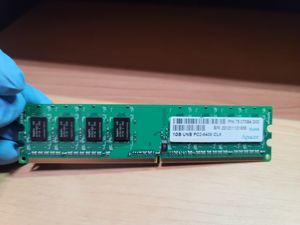
Hopefully this time it's posted on the Readynas community webstie.I have an Readynas Ullra 6 (RDNU6000) with 6x3TB installed. RAIDiator ver 4.2.31. Flex-RAID level-0. After viewing post from Mook1 "...
 Dec 30, 2022
thekidbass wrote:
When this Ultra wipe out all the media I had in it (18TB), I already had it all backed up on raw HDs stored in my closet.
It is of course best practice to have a backup of the data even with X-RAID, since RAID redundancy isn't enough to keep it safe.
When you do have backup(s), the downsides of RAID-0 are just an inconvenience, since you can recreate the volume and restore the data from the backup if it fails. Time-consuming, but not a disaster.

thekidbass
Dec 30, 2022Tutor
I want full storage capacitiy. That's the way I had it prior to upgrading the memory, when the drives were not being recognized. All I have to do is delete the volume that includes the 3 drives. When I get the additional 3 drives, I'll create a single volume with all 6 drives for a total of just under 17TB, which is how I had it setup since I purchased it back in 2017.
StephenB
Dec 30, 2022Guru - Experienced User
thekidbass wrote:
I want full storage capacitiy.
I have one NAS (a two-bay RN202) where I want that as well. I've gone with JBOD (single disk volumes) instead of RAID-0.
Although I do need to make sure I have enough free space on both volumes, I don't find that to be that difficult in practice - especially as disks have become larger.
JBOD has a couple of advantages over RAID-0:
- failure of a disk only loses the files on that disk. With RAID-0, you lose everything if one disk fails.
- recovery (if needed) is much simpler
Though on my larger NAS, I just go with XRAID, and get big enough disks to preserve single redundancy and get the storage I want.
- thekidbassDec 30, 2022Tutor
Thanks for the info. The only reason I didn't upgrade the drives in this Ultra 6 to larger ones is that I wanted to use the drives that are still functional which are only 3TB. At the time I purchased this NAS, I don't think WD were making RED NAS drives larger than that. If the drives eventually do fail again, then I'll go the way of your recmmendation of using larger drives and use X-RAID2 for redundancy. When this Ultra wipe out all the media I had in it (18TB), I already had it all backed up on raw HDs stored in my closet. LOL
Fortunately I also have the Netgear Readynas 316. When I purchased it, I used 6x4TB drives and maxed it out with the two expansion cabinets (EDA500s) for a total of 58.75TB. I was able to restore the 18TBs of media from the Ultra 6 to the Readynas 316. Now I have another 18TB free space in the upgraded Ultra 6, running OS6 ver 6.10.8. Thanks to your expertise in helping me revive the Ultra 6. Luckily I didn't trash it when I had the problem with the drives not being recognized after the memory upgrade.
- StephenBDec 30, 2022Guru - Experienced User
thekidbass wrote:
When this Ultra wipe out all the media I had in it (18TB), I already had it all backed up on raw HDs stored in my closet.
It is of course best practice to have a backup of the data even with X-RAID, since RAID redundancy isn't enough to keep it safe.
When you do have backup(s), the downsides of RAID-0 are just an inconvenience, since you can recreate the volume and restore the data from the backup if it fails. Time-consuming, but not a disaster.
- thekidbassDec 30, 2022Tutor
Yes, definitely. The 18TBs of media I had on the Ultra 6 took me a week and a half to restore onto the Readynas 316.
Related Content
NETGEAR Academy

Boost your skills with the Netgear Academy - Get trained, certified and stay ahead with the latest Netgear technology!
Join Us!
