NETGEAR is aware of a growing number of phone and online scams. To learn how to stay safe click here.
Forum Discussion

Hiryu
Jan 08, 2016Aspirant
RN 102 has become very slow in transferring or accessing files
I have been using the RN102 for 2 years. It has been working well until recently.
I have a 4TB HDD installed and still have 2.2TB free with the latest firmware installed
Recently I have noticed the access time of the shared folder containing large number of files has become very long. Some folders are practically inassessible.
It appears when the number of files is fewer than certain number, it is fine.
For example, I have created a folder for photo backup. When I copy the photo to the shared folder, the files copying was normal. However, after a large number of files were copied, it becomes very slow in both copying to or accessing the folder. The transfer speed.is still fast, but there is a long pause between the files.
I have the same problem using different computers with windows 7 or windows 8 installed.
Problem solved, actually it is probably the latest firmware 6.4.1 caused the problem
The NAS seems to be working normally after I installed the 6.4.0. But I will see if problem will recur later.
16 Replies
Replies have been turned off for this discussion
 StephenBGuru - Experienced User
I'd much rather see actual firmware versions, and not just "latest".
What firmware version are you running? Is Antivirus enabled?
 ArtiahAspirant
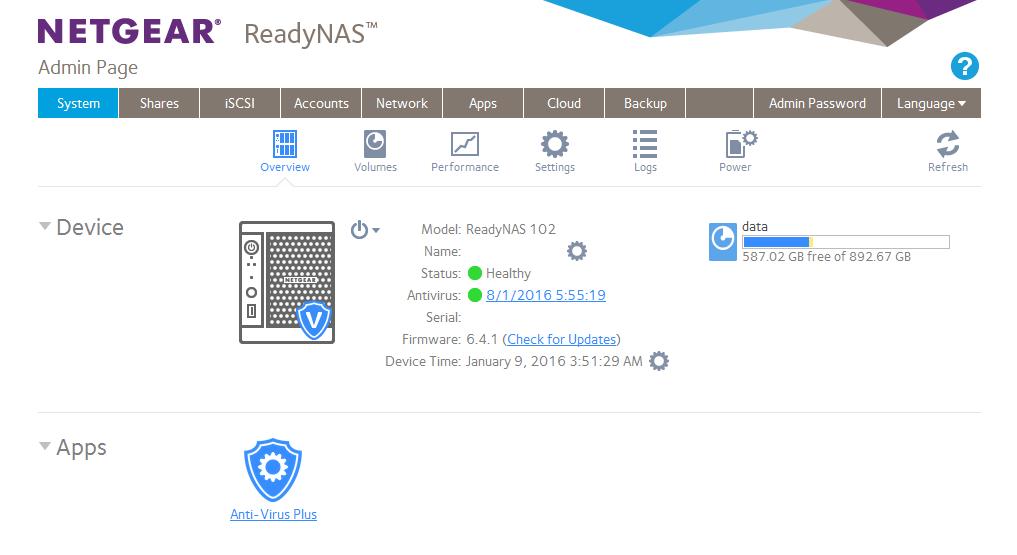
Hi Hiryu and StephenB I have the same problem with a ReadyNAS N102, my firmware is 6.4.1, antivirus definition is 8/1/2016 and is enable. I want to make a SMART check to the hard drive (TOSHIBA DTO1ACA100 with 1 TB) but in the settings menú the option doesn't appear. I want to do this to discard bad function of the HD. Can you help me with this please?
Many thanks in advance.
- StephenBGuru - Experienced User
Download the logs, and look in the zip file for smart_history.log. disk_info.log also contains it.
But if your system has become slow with 6.4.1, the thing to do first is disable antivirus (on system->settings->services)
- ArtiahAspirant
Hi StephenB many thanks for your answer, I disabled the NAS antivirus and now I have more speed in the access. I left to you the logs you told me:
smart_history.log
Spoilermodel TOSHIBA DT01ACA100
realloc_sect 0
realloc_evnt 0
spin_retry_cnt 0
ioedc -1
cmd_timeouts -1
pending_sect 0
uncorrectable_err 0
ata_errors 0
timestamp 1366867474
time 2013-04-25 05:24:34disk_info.log
SpoilerDevice: sda
Controller: 0
Channel: 0
Model: TOSHIBA DT01ACA100
Firmware: MS2OA750
Class: SATA
RPM: 7200
Sectors: 1953525168
Pool: data ;
ATA Error Count: 0
Reallocated Sectors: 0
Reallocation Events: 0
Spin Retry Count: 0
Current Pending Sector Count: 0
Uncorrectable Sector Count: 0
Temperature: 35
Start/Stop Count: 49
Power-On Hours: 19054
Power Cycle Count: 49
Load Cycle Count: 56Do you know if Netgear have an app to do SMART checks in the ReadyNAS?
Many thanks in advance, cheers!
 HiryuAspirant
Problem solved, actually it is probably the latest firmware 6.4.1 caused the problem
The NAS seems to be working normally after I installed the 6.4.0. But I will see if problem will recur later.
- BrianL2NETGEAR Employee Retired
Hi Hiryu,
Thanks for the feedback. For the meantime, you may now tag this thread as resolved by clicking the "Accept as Solution" button in one of the responses that you received.
Kind regards,
BrianL
NETGEAR Community Team

Related Content
NETGEAR Academy

Boost your skills with the Netgear Academy - Get trained, certified and stay ahead with the latest Netgear technology!
Join Us!
