NETGEAR is aware of a growing number of phone and online scams. To learn how to stay safe click here.
Forum Discussion

titimoi
Oct 05, 2017Aspirant
RN102 Volume Data RAID level unknown - Disk full - after changing disk order
Hello, I'm running on 6.8.1 I've had some Disk 2 test failed recently and I wanted to check the SMART data as well as running WD data lifeguard diagnostic to eventually do a RMA (disks are almost 3...
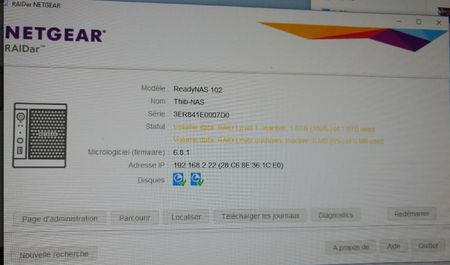

titimoi
Oct 05, 2017Aspirant
Hi StephenB,
Thanks for your reply. I had all these balance/defrag/test running regularly, that's actually what I was refering to when I talked about disk test issues. I read here and there on this forum that in such cases I needed to check with the tool provided by WD. This is actually the source of all my troubles.
I am currious about why 1 HDD got filled up, this must have happened during the sync..
All my Data is backed up so loosing everything isn't such a big deal. It's just that I prefer to understand what happens.
New questions :
- Is it a problem to let run a NAS with a RAID 1 and only 1 HDD, does the data or anything get changed during this process ?
I have the feeling that when I had the NAS booting with 1 single HDD, there was some specific changes made on it.
- Is it a problem to switch the HDD between slot 1 and 2 (I though they were pure copy) ?

StephenB
Oct 05, 2017Guru - Experienced User
Well, as I said, I don't know what exactly triggered your issue. You could wait and see if Netgear requests to see your logs. FWIW, I expect the issue occurred when you resync'd disk 2 to disk 1 when you first reinserted disk 2. If there were errors on disk 1, then you would have damaged the file system at that point.
The system should be able to boot up with disk 2 in slot 1, though Netgear generally recommends preserving the slot order. As I mention above, I think the damage was already done before you tried that.
The good news is that you are backed up, so data recovery isn't needed. Perhaps download the logs, and then proceed with the reset. You might want to put disk 2 into slot 1 first, and leave slot 2 empty. Is the WDC disk a "Red"? If not, what model are you using?
Related Content
NETGEAR Academy

Boost your skills with the Netgear Academy - Get trained, certified and stay ahead with the latest Netgear technology!
Join Us!

