NETGEAR is aware of a growing number of phone and online scams. To learn how to stay safe click here.
Forum Discussion

Concept4
Apr 17, 2019Aspirant
RN104 Incremental Backup to USB3
My daily backup to USB seems to be taking forever recently, similar amount of data but it's just not finishing in time. I've hovered over the backup whilst it is running and the overview pop-up says ...
 Apr 18, 2019
What do I need to use for the destination path if.... the hdd is named USB_HDD_16 and the folder I want to copy to is Digital?
The NAS I'm pushing/copying from has rsync enabled in the settings.
Again, thanks.
Concept4
Apr 17, 2019Aspirant
Thanks some good info here, many thanks for the help.
We have a live NAS which backs up to a backup NAS, i then use the USB3 drive as another backup from the backup NAS. Our director takes this home, we swap between a few external drives so we have a 36 hr backup. I only access these USB3 drives via the readynas rather than direct but direct access could be helpful. The USB3 drive helps in case of fire.
Is there a way of encrypting the ext HDDs? Although they may not be used soon, we've got new premises linked via fibre so I could have a live nas in one location and the backup in the other location. Just thinking, should I mirror live to backup and then continue backing up to USB3 to have a 24 hr log, that could be a good setup.
I'm going to give this a bash using the 127.0.0.1, I've always preferred backing up shares individually so will continue. If one fails the others continue etc and when accessing the backup they are in a similar order.
Again thanks for the help. Much appreciated.
StephenB
Apr 17, 2019Guru - Experienced User
Concept4 wrote:
We have a live NAS which backs up to a backup NAS, i then use the USB3 drive as another backup from the backup NAS. Our director takes this home, we swap between a few external drives so we have a 36 hr backup. I only access these USB3 drives via the readynas rather than direct but direct access could be helpful. The USB3 drive helps in case of fire.
Thx for the info. NTFS would give you direct access - performance is slightly slower than EXT, but not much.
Concept4 wrote:
Just thinking, should I mirror live to backup and then continue backing up to USB3 to have a 24 hr log, that could be a good setup.
That could also work well.
Concept4 wrote:
Is there a way of encrypting the ext HDDs?
Unfortunately no. It would be a nice feature. If you have an application server, you could connect the USB hard drives to that, and use a backup program that has that feature (and maybe also get versioning).
- Concept4Apr 17, 2019Aspirant
I like the thinking with the server, we have a DC server I could use to do this. Will check that out. Never thought of that, always used the NAS.
Thanks for all the help.
- Concept4Apr 18, 2019Aspirant
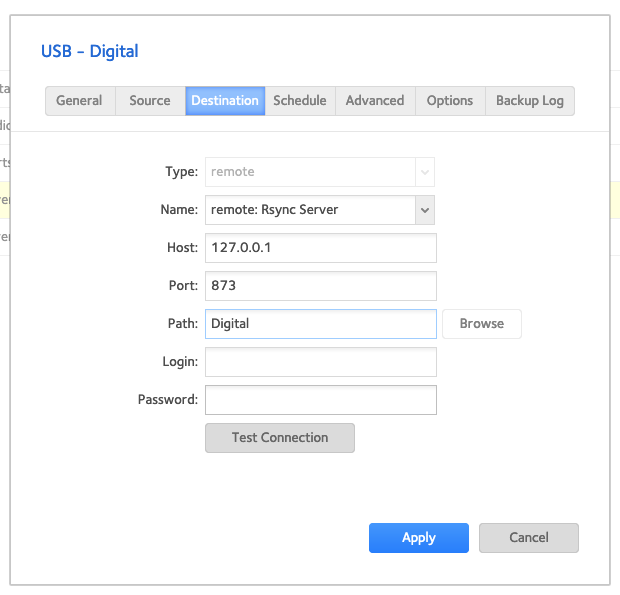
Just tried a backup using 127.0.0.1 as the Host but it failed.
On the USB HDD I have 3 folders for the 2 shares on the backup NAS. I'm trying to backup one share and put them in the relevant folders.
Any ideas on the connection issue?
Attached my settings, I might have done something wrong here...
- StephenBApr 18, 2019Guru - Experienced User
Is rsync enabled for the Digital share?
- Concept4Apr 18, 2019Aspirant
Yeah i have rsync on, added a screenshot.
Thanks
- Concept4Apr 18, 2019Aspirant
What do I need to use for the destination path if.... the hdd is named USB_HDD_16 and the folder I want to copy to is Digital?
The NAS I'm pushing/copying from has rsync enabled in the settings.
Again, thanks.
- Concept4Apr 18, 2019Aspirant
I think I have done it, I've used... USB_HDD_16/Digital
- Concept4Apr 18, 2019Aspirant
Looks like I'm all setup, I missed the link to the guide you supplied yesterday.
Thanks for all the help on this.
- StephenBApr 18, 2019Guru - Experienced User
Good. If you go onto the advanced options tab, you'll see an option called "remove deleted files on target". That will delete files on the USB drive that you previously deleted on the NAS.
If you want the USB folders to always match the NAS shares when the backup is completed, then you'll want to check that box. The scenario here is recovering from a NAS failure - when you just want to restore the shares on the NAS.
But if you want use the backup to retrieve files that you accidently deleted, then you won't want to check it.
Personally I check it, and use snapshots to recover from accidental deletion.
- Concept4Apr 18, 2019Aspirant
Thanks Stephen... yeah I have that option ticked on the USB.
At the minute we have a live NAS which is then backed up via rsync to our backup NAS, this is every night. It works well but we are 8 hrs out of sync. Then we backup to USB3 HDD which is then took offsite, 24hrs out of sync but it's a safety net.
Our live nas is an older model, NV+ v2 and the backup in the Rn104.
I was thinking of mirroring live to backup or rsyncing more frequently. Wasn't sure the best setup with the NAS's we have, what would you recommend?
I was then thinking daily snapshots on the backup NAS so if something goes missing we have 28days of snapshots.
I was then going to backup the backup NAS to USB so we have an extra copy in case of complete disk failure. Does this sound ok or is it over kill.
I've never used snapshots to retrive a file, can you just access individual files without loading an entire revision of all files?
- Concept4Apr 18, 2019Aspirant
Sorry for another message, was just looking at snapshots...
If we did the mirror, live nas to backup nas... am I right in thinking we could setup snapshots on the backup every 2 hours between 8am/6pm (office hours) and then setup to just save for a week etc. This would give us a weekly backup with stages to access existing data.
Our work is fast turnaround so we usually know about missing files within a day or we may need to revert to older files if a client decides 'actually I prefer what you did from day 1'. We do save old artwork files to help but sometimes human error just kicks in.
Then if we backup the backup nas we have the same saved data on a single USB HDD incase of nas/drive failure.
- StephenBApr 18, 2019Guru - Experienced User
Concept4 wrote:
I was thinking of mirroring live to backup or rsyncing more frequently. Wasn't sure the best setup with the NAS's we have, what would you recommend?
You won't get full coherency if you do "pull" back ups (running on the RN104) during working hours. You might not get it if you do "push" backups either - I don't own an NV+ v2, so I have no hands-on experience with 5.x firmware.
You might also find that some backups fail (due to locked files for instance).
Performance will drop some when a backup is running - which might be a consideration with a v2 NAS (which doesn't have a lot of memory, and has slow processor).
Coherency might not matter (particularly if you don't have live databases on the main NAS).
You could certainly up the rate from the NV+ v2 -> RN104 to hourly and see what happens.
Concept4 wrote:I was then thinking daily snapshots on the backup NAS so if something goes missing we have 28days of snapshots.
That's what I do - using custom snapshots. That lets you set retention. You can balance the retention limit to keep the space usage reasonable.
Concept4 wrote:
I've never used snapshots to retrive a file, can you just access individual files without loading an entire revision of all files?
Yes. You can browse into a snapshot from the admin web ui, and restore an individual file.
Concept4 wrote:
I was then going to backup the backup NAS to USB so we have an extra copy in case of complete disk failure. Does this sound ok or is it over kill.
I don't think it's overkill. Personally I keep at least three copies of everything. I used to be ok with a single backup, but I sometimes found (the hard way) that some files on the backup couldn't be read. FWIW, this was pre-NAS. I haven't lost data since I switched to the three copy approach.
Ransomware is another scenario where a USB copy would be needed - especially if you up the rate on the NV+ v2->RN104 backup jobs. Snapshots can help recover from ransomware, but you need a lot of free space. The RN104 will start deleting snapshots if the volume reaches 90% full. To guarantee that it won't do that during a ransomware attack you'd need ~60% free space on the RN104 (since all the files will be deleted/encrypted on the main NAS, the snapshot space will rise sharply).
- StephenBApr 18, 2019Guru - Experienced User
Concept4 wrote:
If we did the mirror, live nas to backup nas... am I right in thinking we could setup snapshots on the backup every 2 hours between 8am/6pm (office hours) and then setup to just save for a week etc. This would give us a weekly backup with stages to access existing data.
That should work too. The space usage of the snapshots depends on the "churn" - how often files are deleted, modified, or renamed.
There's no way to sync the snapshots with the rsync updates, so they will sometimes be taken in the middle of a backup run.
Another option is to upgrade your main NAS to an RN214 or RN424, and put the snapshots on there. Then you could re-purpose the NV+ v2 as a secondary backup (ideally placing it offsite). Then you could probably eliminate the USB drives.
- Concept4Apr 18, 2019Aspirant
Thanks again Stephen, as always great help.
I think we kept the RN as the backup as it USB3 and I never got rsync working.
I think I'll do as you say, swap the NAS boxes around.
Related Content
NETGEAR Academy

Boost your skills with the Netgear Academy - Get trained, certified and stay ahead with the latest Netgear technology!
Join Us!