NETGEAR is aware of a growing number of phone and online scams. To learn how to stay safe click here.
Forum Discussion

Alein
May 09, 2017Aspirant
RN204 can't start
Hi, I have a problem with RN204. Something is wrong with USB, I am not soure what. but this is log. Annapurna Labs stage 2: stage2_eth3_ram_loader v1.49.9 Executing next! Annapurna Labs...
Alein
May 12, 2017Aspirant
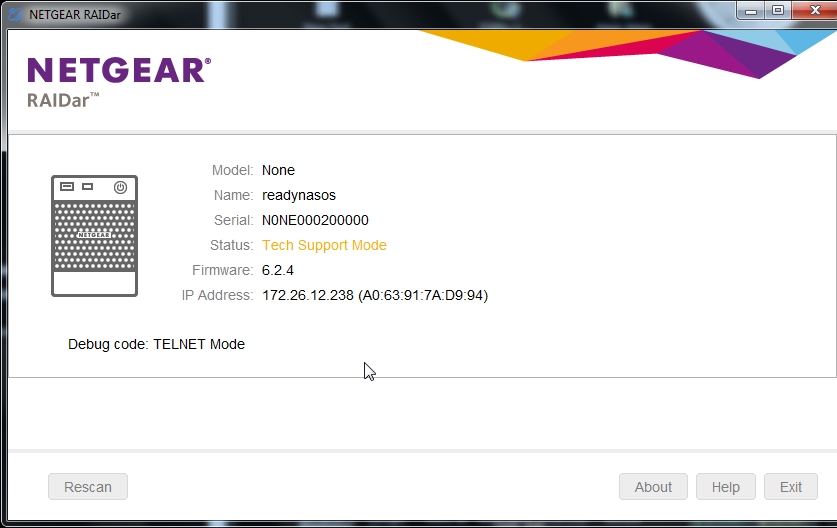
By Raidar you mean external application? not OS6 LCD,console?
https://www.downloads.netgear.com/files/GDC/READYNAS-COMMON/RAIDar_6.3.0.exe
If yes, I will try after work

StephenB
May 12, 2017Guru - Experienced User
Alein wrote:
By Raidar you mean external application? not OS6 LCD,console?
That is what he means. It's possible the code is also on the LCD console - I've never looked to see.
- AleinMay 12, 2017Aspirant
That is all what I am getting
U-Boot 2013.10-alpine_db-1.49 (Jan 08 2016 - 10:41:23)
01/08/2016 ReadyNAS-200 V1.1Annapurna Labs
Board: Alpine Development Board
I2C: ready
DRAM: 2 GiB
eeprom_per_device_init: no valid information found!
power_init_board: EEPROM per device information is not valid - using defaults!
Board config ID: Netgear NAS RN20x
dt_based_init: ETH params initialization failed!
ac_adapter_plug_in = 0
NAND: 128 MiB
00:01.0 - 1c36:0001 - Network controller
00:03.0 - 1c36:0001 - Network controller
00:04.0 - 1c36:0011 - Cryptographic device
00:05.0 - 1c36:0021 - Base system peripheral
00:09.0 - 1c36:0031 - Mass storage controller
PCIE_0: Link up. Speed 5GT/s Width x1
01:00.0 - 1b21:0612 - Mass storage controller
PCIE_1: Link up. Speed 5GT/s Width x1
02:00.0 - 1b6f:7052 - Serial bus controller
In: serial
Out: serial
Err: serial
Net: , al_eth1 [PRIME], al_eth3
mn=11, hr=00, dt=00
Power On!
SERDES 2, p4, pma, reg[13][4:4] <= 0x00
SERDES 2, p4, pma, reg[15][2:0] <= 0x02
Found 1 Disks!
Hit any key to stop autoboot: 0
bootargs=pci=pcie_bus_perf console=ttyS0,115200 reason=normal bdtype=rn204
(Re)start USB...
USB0: Register 8000450 NbrPorts 8
Starting the controller
USB XHCI 1.00
scanning bus 0 for devices... 2 USB Device(s) found
scanning usb for storage devices... 1 Storage Device(s) found
reading uImage-recovery
3746824 bytes read in 1992 ms (1.8 MiB/s)
reading initrd-recovery.gz
2733998 bytes read in 1461 ms (1.8 MiB/s)
gpio: pin 33 (gpio 33) value is 1
## Booting kernel from Legacy Image at 08000000 ...
Image Name: Linux-4.1.7.alpine.1
Created: 2015-09-25 18:43:37 UTC
Image Type: ARM Linux Kernel Image (uncompressed)
Data Size: 3746760 Bytes = 3.6 MiB
Load Address: 00008000
Entry Point: 00008000
Verifying Checksum ... OK
## Loading init Ramdisk from Legacy Image at 08800000 ...
Image Name: initramfs
Created: 2016-12-21 6:08:04 UTC
Image Type: ARM Linux RAMDisk Image (lzma compressed)
Data Size: 2733934 Bytes = 2.6 MiB
Load Address: 00000000
Entry Point: 00000000
Verifying Checksum ... OK
## Flattened Device Tree blob at 07000000
Booting using the fdt blob at 0x7000000
Loading Kernel Image ... OK
reserving fdt memory region: addr=0 size=100000
Loading Ramdisk to 0189d000, end 01b3876e ... OK
Using Device Tree in place at 07000000, end 07008bd3Starting kernel ...
pci 0002:00:00.0: can't enable device: BAR 0 [mem 0x00000000-0x00000fff] not claimed
pci 0002:00:00.0: Error enabling bridge (-22), continuing
pci 0002:01:00.0: can't enable device: BAR 0 [mem 0xe8000000-0xe8007fff 64bit] not claimed
Start to run USB Recovery...
Get systype=rn204
Searching for external boot flash device...Could not find external boot flash!
ERROR: Could not find external flash device!!
Booting into debug mode...
udhcpc (v1.21.1) started
grep: /etc/resolv.conf: No such file or directory
Sending discover...
Sending discover...
Sending discover...
No lease, failing
udhcpc (v1.21.1) started
Sending discover...
Sending discover...
Sending discover...
Sending select for 172.26.12.238...
Lease of 172.26.12.238 obtained, lease time 2592000
deleting routers
route: SIOCDELRT: No such process
adding dns 172.26.12.151
adding dns 172.26.10.151
Hostid: 117AD994
/bin/ash: can't access tty; job control turned off
/ # - AleinMay 15, 2017Aspirant
I had an idea to use 202 unit. After factory defaults I was trying to boot from new disk in 204 unit. but it seems that 204 unit has older OS. I can not downgrade 202, so is there an option to install OS from PC? or force 204 to boot from disk even if flash OS is older?
- mdgm-ntgrMay 17, 2017NETGEAR Employee Retired
Ah I forgot that custom USB was for older ARM units (RN100/RN2120) and based on 6.2.4.
- AleinMay 18, 2017Aspirant
ok, So what is next. What I can do?

Related Content
NETGEAR Academy

Boost your skills with the Netgear Academy - Get trained, certified and stay ahead with the latest Netgear technology!
Join Us!
