Forum Discussion

aks-2
Sep 07, 2026Apprentice
RN214 OS6.10.10 Snapshots
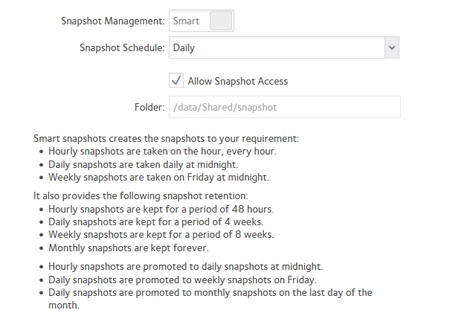
I found this post from 2021, but I am not seeing what I expect from snapshots. I have had this config for a long time, let's assume >2Y. I expected a monthly snapshot to be retained, as the d...

Sandshark
Sep 07, 2026Sensei
Check the snapshot pruning setting in the volume settings. While you have enough free space for the default setting, perhaps you inadvertanty changed it.

aks-2
Sep 07, 2026Apprentice
Also, current snapshot size is only 627MB, so I'm not sure it's a size problem. Maybe quantity limit?
 StephenBSep 07, 2026Guru - Experienced User
aks-2 wrote:
volume settings>snapshot pruning is set to 90%.
Which is the default, and it seems unlikely that you'd have gotten anywhere close to that that theshold at the beginning of August.
aks-2 wrote:
Also, current snapshot size is only 627MB, so I'm not sure it's a size problem. Maybe quantity limit?
That shouldn't matter.
aks-2 wrote:
I expected a monthly snapshot to be retained, as the daily>weekly>monthly promoted snapshots are cleared out - specifically the last bullet point above.
Have you downloaded the log zip file? There could be useful clues in there.
As an aside, I personally don't recommend "smart" snapshots (and won't use them myself). The reason is that the the monthly snapshots are retained for ever - which will eventually result in a full volume. Instead I set a reasonable snapshot retention limit, and only write snapshots when something in the share has change.
- aks-2Sep 08, 2026Apprentice
Thanks, I will look at the custom snapshots.
The logs look vanilla with no extra useful info, but seem to indicate a long history of snaphots >160:
Config: 4, subvolume: /data/Shared
Type   | #   | Pre # | Date                             | User | Cleanup | Description | Userdata
-------+-----+-------+----------------------------------+------+---------+-------------+--------------------------------------
single | 0   |       |                                  | root |         | current     |
single | 161 |       | Wed 12 Aug 2026 12:00:07 AM WEST | root |         |             | snapshot=c_1786489206
single | 162 |       | Thu 13 Aug 2026 12:00:08 AM WEST | root |         |             | snapshot=c_1786575608
single | 163 |       | Sun 16 Aug 2026 12:00:09 AM WEST | root |         |             | snapshot=c_1786834809
single | 164 |       | Mon 17 Aug 2026 12:00:13 AM WEST | root |         |             | snapshot=c_1786921212
single | 165 |       | Tue 18 Aug 2026 12:00:26 AM WEST | root |         |             | snapshot=c_1787007626
single | 166 |       | Thu 20 Aug 2026 12:00:02 AM WEST | root |         |             | snapshot=c_1787180402
single | 167 |       | Fri 21 Aug 2026 12:00:06 AM WEST | root |         |             | snapshot=c_1787266805
single | 168 |       | Sat 29 Aug 2026 12:00:08 AM WEST | root |         |             | snapshot=c_1787958007
single | 169 |       | Sun 30 Aug 2026 12:00:11 AM WEST | root |         |             | snapshot=c_1788044411
single | 170 |       | Mon 31 Aug 2026 12:00:13 AM WEST | root |         |             | snapshot=c_1788130813
single | 171 |       | Sat 05 Sep 2026 11:39:24 PM WEST | root |         |             | snapshot=m_Manual-snapshot-2026-09-05
single | 172 |       | Sun 06 Sep 2026 12:00:01 AM WEST | root |         |             | snapshot=c_1788649200
The snapshot config for this share has this line at the end of the file:
SNAPSHOT_HWM="172"I created a new smart snapshot on another share that has previously never had snapshots, created a manual snapshot, and then the config had "SNAPSHOT_HWM=1" line. Seems to just be an incrementing counter.
The NAS status log has entries deleting the snapshots periodically, so I will analyse the log and come back with an update and details.
Related Content
NETGEAR Academy

Boost your skills with the Netgear Academy - Get trained, certified and stay ahead with the latest Netgear technology!
Join Us!
