Forum Discussion

aks-2
Sep 07, 2026Apprentice
RN214 OS6.10.10 Snapshots
I found this post from 2021, but I am not seeing what I expect from snapshots. I have had this config for a long time, let's assume >2Y. I expected a monthly snapshot to be retained, as the d...
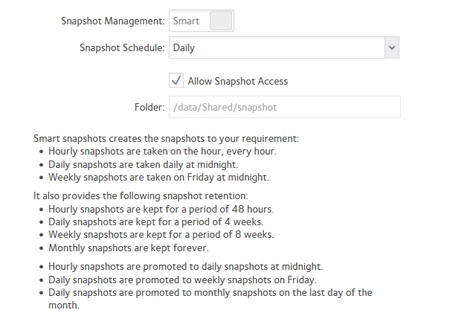

aks-2
Sep 17, 2026Apprentice
Guys, deleting older snapshots behaviour seems consistent now, nothing lasts more than ~4-5 weeks.
However, Sandshark mentioned defrag and snapshot don't play nicely, and I did a defrag 21-Aug - maybe this caused this round of deletions (a bit delayed however, and not all (yet)):
This is a processed log from today (status_2026-09-17.log):
Column summary:
Date	Snapshot created date
C# 		Created snapshot #
D# 		Deleted snapshot #
Depth	Current number of snapshots

Log/created date        C#  / D#    Date of snapshot             Depth        days    Current snapshots #
2026-08-11 10:30:19          D156  2026-05-18 00:00:15  age: 85    0   no active snapshots
2026-08-12 00:00:08    C161                                        1   oldest: 0      [161]
2026-08-13 00:00:09    C162                                        2   oldest: 1      [161, 162]
2026-08-16 00:00:10    C163                                        3   oldest: 4      [161, 162, 163]
2026-08-17 00:00:14    C164                                        4   oldest: 5      [161, 162, 163, 164]
2026-08-18 00:00:28    C165                                        5   oldest: 6      [161, 162, 163, 164, 165]
2026-08-20 00:00:03    C166                                        6   oldest: 7      [161, 162, 163, 164, 165, 166]
2026-08-21 00:00:07    C167                                        7   oldest: 8      [161, 162, 163, 164, 165, 166, 167]
[26/08/21 12:08:04 WEST] notice:volume:LOGMSG_BALANCE_STARTED_VOLUME Balance started for volume data.
[26/08/21 12:08:06 WEST] notice:volume:LOGMSG_BALANCE_COMPLETED_VOLUME Balance complete for volume data.
[26/08/21 12:08:51 WEST] notice:volume:LOGMSG_DEFRAGSTART_VOLUME Defragmentation started for volume data.
[26/08/21 12:20:00 WEST] notice:volume:LOGMSG_DEFRAGEND_VOLUME Defragmentation complete for volume data.
2026-08-29 00:00:09    C168                                        8   oldest: 17     [161, 162, 163, 164, 165, 166, 167, 168]
2026-08-30 00:00:12    C169                                        9   oldest: 18     [161, 162, 163, 164, 165, 166, 167, 168, 169]
2026-08-31 00:00:14    C170                                       10   oldest: 19     [161, 162, 163, 164, 165, 166, 167, 168, 169, 170]
2026-09-05 23:39:25    C170                                       10   oldest: 24     [161, 162, 163, 164, 165, 166, 167, 168, 169, 170, 170]
2026-09-06 00:00:01    C171                                       11   oldest: 24     [161, 162, 163, 164, 165, 166, 167, 168, 169, 170, 170, 171]
2026-09-08 07:57:51    C171                                       11   oldest: 27     [161, 162, 163, 164, 165, 166, 167, 168, 169, 170, 170, 171, 171]
2026-09-11 21:05:19          D162  2026-08-13 00:00:09  age: 29   10   oldest: 30     [161, 163, 164, 165, 166, 167, 168, 169, 170, 170, 171, 171]
2026-09-11 21:05:19          D161  2026-08-12 00:00:08  age: 30    9   oldest: 26     [163, 164, 165, 166, 167, 168, 169, 170, 170, 171, 171]
2026-09-13 10:05:28          D163  2026-08-16 00:00:10  age: 28    8   oldest: 27     [164, 165, 166, 167, 168, 169, 170, 170, 171, 171]
2026-09-14 14:05:45          D164  2026-08-17 00:00:14  age: 28    7   oldest: 27     [165, 166, 167, 168, 169, 170, 170, 171, 171]
2026-09-15 09:06:10          D165  2026-08-18 00:00:28  age: 28    6   oldest: 26     [166, 167, 168, 169, 170, 170, 171, 171]
I could just give up (and switch to custom snapshots), but I'd love to get to the bottom of this issue - with help 😉!
For the time being, I will manually create snapshots and continue monitoring/processing.

StephenB
Sep 17, 2026Guru - Experienced User
aks-2 wrote:However, Sandshark mentioned defrag and snapshot don't play nicely, and I did a defrag 21-Aug - maybe this caused this round of deletions (a bit delayed however, and not all (yet)):
defrags can greatly increase the snapshot space (as Sandshark pointed out in his reply). The puzzle here is that the defrag completed quite quickly.
In any event, the auto-deletion for volume safety deletes the oldest snapshots first, and stops when the free space goes back under the threshold. So it is possible I guess.
I didn't notice that the defrag and the balance were run back-to-back. So maybe also run another balance, now that you know you have free space.
- aks-2Sep 20, 2026Apprentice
Thanks, as I posted earlier, I don't see any issue with available free space, unless I'm missing something?
I ran another balance, it completed very fast, ~10s:
[26/09/20 22:12:23 WEST] notice:volume:LOGMSG_BALANCE_STARTED_VOLUME Balance started for volume data. [26/09/20 22:12:42 WEST] notice:volume:LOGMSG_BALANCE_COMPLETED_VOLUME Balance complete for volume data.- StephenBSep 20, 2026Guru - Experienced User
aks-2 wrote:
I don't see any issue with available free space, unless I'm missing something?
I think there must have been an issue back when the auto-pruning was triggered. Since the volume now has plenty of free space, it must have been taken up by snapshots.
Do you have volume quota turned on? That would let you know how much space the snapshots are taking.
aks-2 wrote:
I ran another balance, it completed very fast, ~10s:
Speed of mine varies, the last one took about half an hour. Though I have had some that completed in ~10 seconds.
The reason I suggested re-running the balance is that I thought it might not have been able to relocate any chunks. That would perhaps explain the very fast run time.
Of course, it could also be that there was nothing that needed to be relocated. (FYI you can see the relocated chunks in volume.log).
- aks-2Sep 21, 2026Apprentice
Yes quota is enabled. Snapshop pruning is set at 90%.
I can see see this in volume web I/F:
Snapshots taking 1.17GB - currently 8.79TB / 14.54TB used (~60%) where does this info show up in the logs?
I think there must have been an issue back when the auto-pruning was triggered. Since the volume now has plenty of free space, it must have been taken up by snapshots.
How would I be able to tell? The volume is 14.5TB, with 5.7TB free, with no significant deletions, and no addition of drives. This is the latest btrfs info:
# btrfs filesystem df /data
Data, single: total=8.79TiB, used=8.79TiB
System, RAID1: total=32.00MiB, used=992.00KiB
Metadata, RAID1: total=1.00GiB, used=19.34MiB
Metadata, DUP: total=1.00GiB, used=420.44MiB
GlobalReserve, single: total=68.22MiB, used=0.00B

# btrfs filesystem usage /data
Overall:
    Device size:                  14.54TiB
    Device allocated:              8.80TiB
    Device unallocated:            5.75TiB
    Device missing:                  0.00B
    Used:                          8.79TiB
    Free (estimated):              5.75TiB      (min: 2.88TiB)
    Data ratio:                       1.00
    Metadata ratio:                   2.00
    Global reserve:               68.22MiB      (used: 0.00B)
Thanks for looking.
Related Content
NETGEAR Academy

Boost your skills with the Netgear Academy - Get trained, certified and stay ahead with the latest Netgear technology!
Join Us!
