NETGEAR is aware of a growing number of phone and online scams. To learn how to stay safe click here.
Forum Discussion

maudigier
Jul 24, 2017Aspirant
RNDU4000 Can't access shares
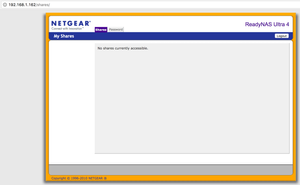
Hello, I purchased an ReadyNAS back in 2011 and was using it up until 2013 when I divorced. I just plugged it back in and tried to access via my macbook pro and could not. On the front of the ReadyN...

StephenB
Jul 24, 2017Guru - Experienced User
Let's not do the OS reinstall just yet.
That screen only means that you have no shares that are set up to use http as the file sharing protocol.
What happens if you enter https://192.168.1.162/admin ? You should get a username/password prompt. Do you know the admin password of the NAS?
Also, did you try using finder to connect to the NAS using it's IP address?
- maudigierJul 24, 2017Aspirant
Wow - that did it! I was able to access the admin tool (pic below) as well as connect to my desired share via finder. I confirm that I was able to access my pictures. Thanks so much!
Would you recommend a firmware update or anything else to get it up to snuff before I start using it again?
- Marty_MJul 25, 2017NETGEAR Employee Retired
Hello maudigier,
Since you manage to access the Admin page and the share of the NAS verified all of your pictures are there. The NAS appears to be in a working condition you may start using your NAS from here on. As for firmware upgrade I would recommend first to observe the behavior of your NAS if it is working fine then there is no need to upgrade the firmware however if you notice there are some signs of software or firmware problem then that is the time we would recommend to consider upgrading the firmware.
Regards,
Marty_M
NETGEAR Community Team- StephenBJul 25, 2017Guru - Experienced User
I'm glad you are up and running.
What firmware are you running now? Current firmware is 4.2.31.
I disagree some with Marty - you probably should update the firmware, since it has to be a few years out of date. However, I think the thing to do next is to back up the critical data (anything you really don't want to lose) to another device, so you have a second copy.
Related Content
NETGEAR Academy

Boost your skills with the Netgear Academy - Get trained, certified and stay ahead with the latest Netgear technology!
Join Us!
