NETGEAR is aware of a growing number of phone and online scams. To learn how to stay safe click here.
Forum Discussion

kkopp
Feb 09, 2012Aspirant
rsnapshot overwriting snapshots?
I have been successfully(or so I thought) using rsnapshot at the company I work for since the begining July 2011.
My backup schedule is 12:00 PM and 6:00 PM every weekday and it saves everything for 6 months. I only have to go back every once in a while to get files so I am not sure when this started, but I believe it happened within the last two months(thinking maybe the 6 month mark??). I am absolutely sure it was working correctly towards the end of last year.
What is happening is that if I go to my snapshot folder all of the backups are for the 12:00 PM backup. I am still getting emails that it is backing up at the 6:00 PM time, but that time is not shown on any of the timestamps in the snapshot folder.
Is there a setting that I may need to change in the config files?
Here is the pic of my snapshot folder.
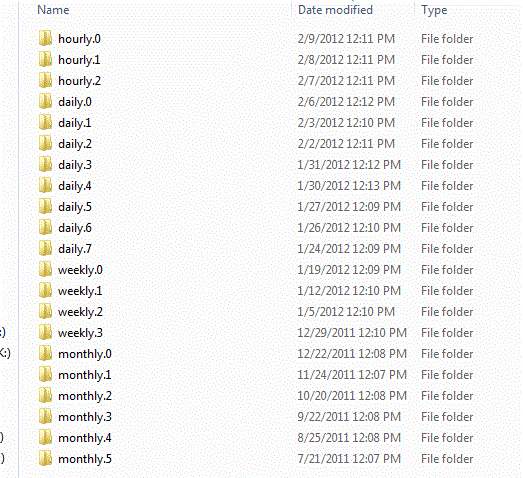
Any ideas would be greatly appreciated. FYI I have Radiator 4.2.17 and rsnapshot v2.2 and didnt plan on upgrading either to the newest if I didnt have too as I would fear losing all my backups.
EDIT: ReadyNAS 2100
Thanks!!
Kyle
My backup schedule is 12:00 PM and 6:00 PM every weekday and it saves everything for 6 months. I only have to go back every once in a while to get files so I am not sure when this started, but I believe it happened within the last two months(thinking maybe the 6 month mark??). I am absolutely sure it was working correctly towards the end of last year.
What is happening is that if I go to my snapshot folder all of the backups are for the 12:00 PM backup. I am still getting emails that it is backing up at the 6:00 PM time, but that time is not shown on any of the timestamps in the snapshot folder.
Is there a setting that I may need to change in the config files?
Here is the pic of my snapshot folder.
Any ideas would be greatly appreciated. FYI I have Radiator 4.2.17 and rsnapshot v2.2 and didnt plan on upgrading either to the newest if I didnt have too as I would fear losing all my backups.
EDIT: ReadyNAS 2100
Thanks!!
Kyle
1 Reply
Replies have been turned off for this discussion
 kkoppAspirantBump
Related Content
NETGEAR Academy

Boost your skills with the Netgear Academy - Get trained, certified and stay ahead with the latest Netgear technology!
Join Us!
