NETGEAR is aware of a growing number of phone and online scams. To learn how to stay safe click here.
Forum Discussion

Soldermonkey
Jan 31, 2021Aspirant
Rsync backup job reports false success
After taking on the 6.10.4 firmware update on both local and remote NAS boxes, my daily rsync-over-ssh backup job reports a false success. It returns immediately, but no files are transferred or upd...
Soldermonkey
Jan 31, 2021Aspirant
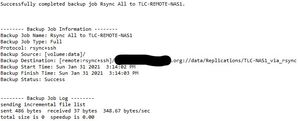
Here's the e-mailed log:
Successfully completed backup job Rsync All to TLC-REMOTE-NAS1.


-------- Backup Job Information --------
Backup Job Name: Rsync All to TLC-REMOTE-NAS1
Backup Job Type: Incremental
Protocol: rsync+ssh
Backup Source: [volume:data]/
Backup Destination: [remote:rsync+ssh]/<redacted>://data/Replications/TLC-NAS1_via_rsync
Backup Start Time: Sun Jan 31 2021 12:05:10 AM
Backup Finish Time: Sun Jan 31 2021 12:05:11 AM
Backup Status: Success


-------- Backup Job Log --------
sending incremental file list
sent 486 bytes  received 37 bytes  348.67 bytes/sec
total size is 0  speedup is 0.00

StephenB
Feb 01, 2021Guru - Experienced User
This has been reported already. For now the best thing to do is drop back to 6.10.3.
 rn_enthusiastFeb 01, 2021Virtuoso
Would be nice with some kind of update from Netgear on this, though.
- StephenBFeb 01, 2021Guru - Experienced User
rn_enthusiast wrote:
Would be nice with some kind of update from Netgear on this, though.
Agreed. It happens on every system, so there's no issue with them reproducing it.
- SoldermonkeyFeb 01, 2021Aspirant
Is it necessary to downgrade both the sending and receiving machines to 6.10.3 or can I, for example, only downgrade the sending machine?
- SandsharkFeb 01, 2021Sensei
You need to downgrade the one running the backup. So if it's a "push" job, the sender. If a "pull", then the receiver.
- SoldermonkeyApr 08, 2021Aspirant
I downgraded to 6.10.3 on the sending machine, and the problem went away.
Any word on a real fix for this issue? I noticed that one of my other machines, an RN214, took on a "hotfix update" to 6.10.4, but I could not find any release notes for this. Does this hotfix properly resolve the issue?

Related Content
NETGEAR Academy

Boost your skills with the Netgear Academy - Get trained, certified and stay ahead with the latest Netgear technology!
Join Us!
