NETGEAR is aware of a growing number of phone and online scams. To learn how to stay safe click here.
Forum Discussion

NATfrank
Jun 12, 2017Aspirant
Server is unavailable always at the same time
HI
We have a netgear readyNAS 104 (firmware 6.7.4) and it has been working fine until about a week ago.
Now everyday between 13:00 and 17:00 its not available or its available for a few seconds but then the connection is lost.
At first i though it might be doing the backup but that is schedule between 21:05 and 23:05 and both the backup and the backup server(the main server is connected to a second backupserver) are using the same timezone.
any ideas what might be the problem?
thanks in advance.
11 Replies
Replies have been turned off for this discussion
- SandsharkSensei
Perhaps there is another device on the network that is using a static IP addrress that's set for the same IP as the NAS and it comes on at that time and tramples all over the NAS traffic? Or the NAS is set for a static IP that has beeen allocated by DHCP to some other device and, somehow, they co-exist until that time due to some specific traffic?
- NATfrankAspirant
Hi Sandshark
thanks for your reaction.
I am a bit cluesless about where to check how the NAS is setting the IPs (either static or dhcp) and if there are other devices using the same IP. Is there an easy way to check this?
thanks again
 StephenBGuru - Experienced User
Do you have two ethernet cables connected to the NAS or only one? If you have two cables, then try disconnecting one of them.
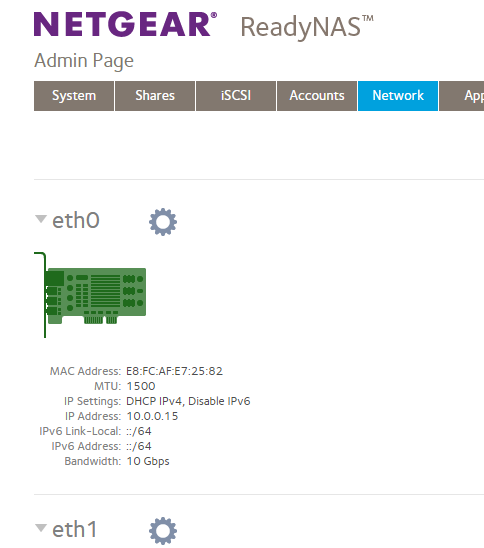
Then log into the web UI, and looking at the network page.
There's a settings wheel next to each of the ethernet NICs
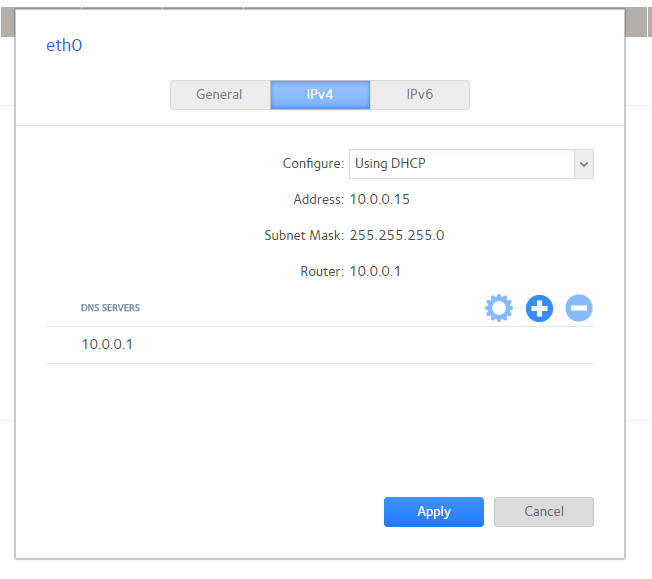
Click on the settings wheel for the adapter that isn't grayed out and choose settings. You'll see a pop-up with three tabs. Select the center one (IPv4)
If it says "using DHCP" like the one above then the NAS is not using a static address, but is getting an IP address from a DHCP server (in a home network, that would normally be the router).
Make a note of this IP address (10.0.0.15 in my screenshot example). When you lose connectivity, first try running RAIDar and see if it can find the NAS. RAIDar is here: https://kb.netgear.com/20684/ReadyNAS-Downloads#raidar
Try disconnecting the ethernet cable on the NAS, and then ping the IP address you wrote down. If RAIDar gave you a different IP address, then ping that one too.. If you get a response, then there is a a device with a static address on the network. Then reconnect the NAS ethernet.

Related Content
NETGEAR Academy

Boost your skills with the Netgear Academy - Get trained, certified and stay ahead with the latest Netgear technology!
Join Us!
