NETGEAR is aware of a growing number of phone and online scams. To learn how to stay safe click here.
Forum Discussion

rrosko
Mar 10, 2016Aspirant
Setting up Email alerts (RN10200)
I'm trying to get email notifications for the ReadyNAS setup and I've scoured the Netgear site and the internet the past few days looking for documentation that actually works, but to no avail. U...
rrosko
Mar 10, 2016Aspirant
Yep, those are the exact values I've been using and they haven't worked. Toggled off TLS, and tried port 465 as well. No luck
Two factor authentication is disabled by default and the less secure devices is as well and I've only enabled the latter

StephenB
Mar 10, 2016Guru - Experienced User
If you just enabled "less secure apps" you might need to wait a while for google to propagate it to all their servers.
- rroskoMar 10, 2016Aspirant
I enabled "less secure devices" about 3 days ago, and I assume the expected "propagation" timeframe is similar to DNS record changes which would be around 48 hours.
- StephenBMar 10, 2016Guru - Experienced User
rrosko wrote:
I enabled "less secure devices" about 3 days ago, and I assume the expected "propagation" timeframe is similar to DNS record changes which would be around 48 hours.
I agree it should have happened by now.
Not sure if this matters or no - in my case I am sending the email to the same gmail account. Might be worth seeing if it works if you do that.
- rroskoMar 22, 2016Aspirant
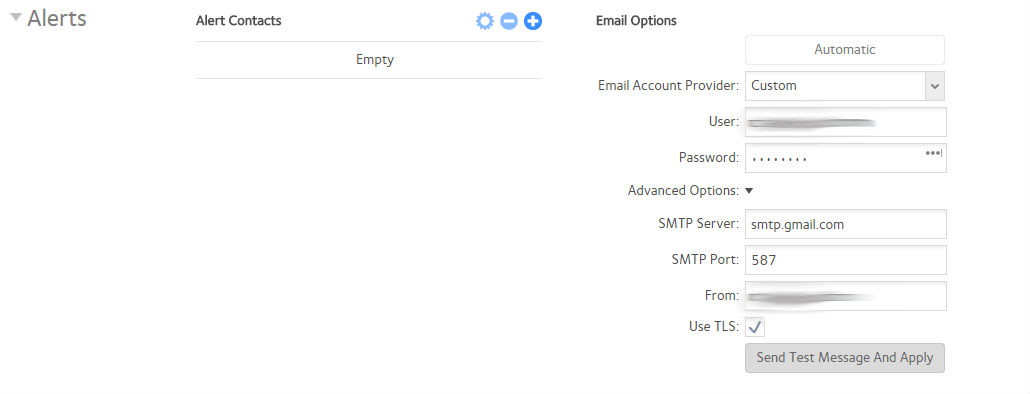
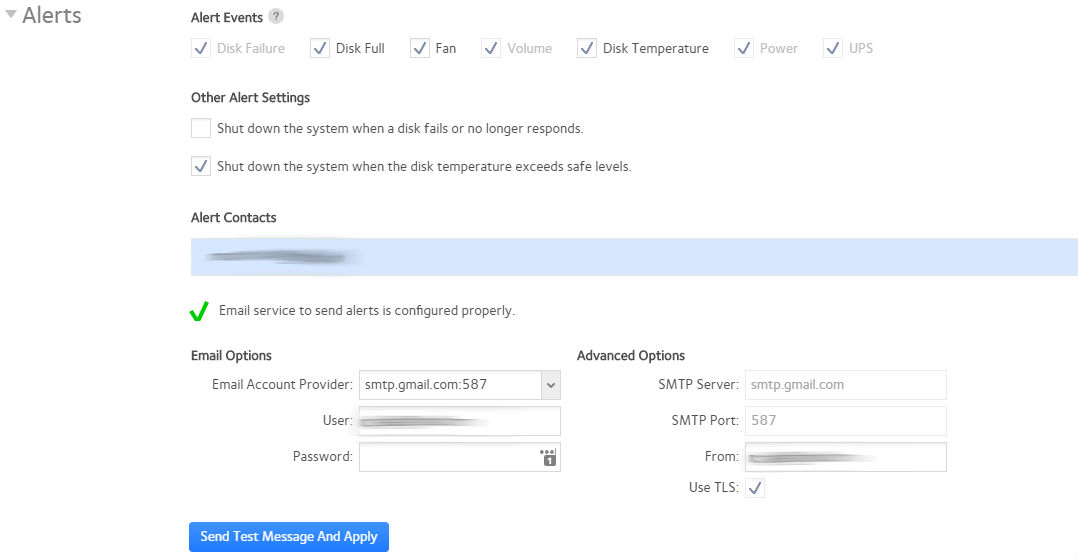
Update - So, as I mentioned - I have 20+ ReadyNAS RN10200 devices in the field and I've noticed something odd. Updated all firmware on these devices to 6.4.2 and yet there is a difference in the GUI between some devices(note the attached screenshots)
In this first image, this is the only device(6.4.2) out of 20+ where the layout of the ALERTS page differs from the others, and yet I can successfully setup & receive notifications only on this one.
On this second image, with all the other 20+ devices I have, all on 6.4.2 - the ALERTS page layout looks like this and I'm unable to get any email alerts to function. All the information is identical to the first device. In this image, the green check apparently signifies the alerts are setup properly, but an error is still generated when tested and no email is sent, nor received.
The devices appear to be operating normally in terms of basic data storage and running the scheduled tasks I have setup, but this is definitely quirky and a pain in the ass. Ultimately, leaves me with a bad impression having put hours into already just trying to get basic functions like alerts to work properly.
Related Content
NETGEAR Academy

Boost your skills with the Netgear Academy - Get trained, certified and stay ahead with the latest Netgear technology!
Join Us!
