NETGEAR is aware of a growing number of phone and online scams. To learn how to stay safe click here.
Forum Discussion

stuartmp
Jul 20, 2016Aspirant
Setting up FTP server on ReadyNAS OS6
We have set up an ftp server on our PC using FileZilla that successfully receives log files from our sites around the country. The clients at the sites, send the data themselves to our external IP, t...
- Jul 26, 2016
StephenB wrote:
stuartmp wrote:Does such a thing exist on the readyNAS system?
I believe not, but I agree it would be useful.
Ah thankyou, I will close the request for now although I haven't been able to set my clients up correctly, I am just going to run FileZilla and directly enter the files in now.
Thankyou Stephen.B, sotrack and Hopchen for your help.

sotrack
Jul 20, 2016Luminary
Hi stuartmp
1. you don't need port forwarding for UDP protocol
2. you don't need forward port 20. Port 21 is enough
3. NAS FTP settings: put passive ports 32768 - 33768. 65535 is not correct value for router passive port range.
4. Router: put passive port range 32768 - 33768 instead of 11000 - 12000.

Hopchen
Jul 20, 2016Prodigy
Just as an additional note.
You should select the mount of passive ports, based on how many connections you expect at a given time. One passive port per connection. So if 10 people need to connect at the same time, then use 10 passive ports. If it is only you using it, then one passive port is enough - as sotrack explained.
- StephenBJul 21, 2016Guru - Experienced User
Hopchen wrote:
Just as an additional note.
You should select the mount of passive ports, based on how many connections you expect at a given time. One passive port per connection. So if 10 people need to connect at the same time, then use 10 passive ports. If it is only you using it, then one passive port is enough - as sotrack explained.
This depends to some degree on client configuration - some clients can do multiple transfers. I generally allocate 4 ports per connected client.
Also, it is best to use ports in the range 49152-65535 (this is the range allocated for user custom ports by IANA).
NAT translation of the port numbers (e.g., 11000->32768) fails because the FTP server protocol sends the passive port number on the control port (port 21). So you can't map to a different port number in the router.
- stuartmpJul 22, 2016Aspirant
Hopchen wrote:Just as an additional note.
You should select the mount of passive ports, based on how many connections you expect at a given time. One passive port per connection. So if 10 people need to connect at the same time, then use 10 passive ports. If it is only you using it, then one passive port is enough - as sotrack explained.
We will be adding users over time and once we've got one working we will want to add many tens/hundreds more. Will it not function if I have more passive ports than the number of active users?
- StephenBJul 22, 2016Guru - Experienced User
stuartmp wrote:
Hopchen wrote:
Just as an additional note.
You should select the mount of passive ports, based on how many connections you expect at a given time. One passive port per connection. So if 10 people need to connect at the same time, then use 10 passive ports. If it is only you using it, then one passive port is enough - as sotrack explained.
We will be adding users over time and once we've got one working we will want to add many tens/hundreds more. Will it not function if I have more passive ports than the number of active users?
Yes, and I suggested using about 4 passive ports * the number of expected simultaneous users.
You generally don't want to open more ports in the router that you need.
- stuartmpJul 22, 2016Aspirant
StephenB wrote:
stuartmp wrote:
Hopchen wrote:Just as an additional note.
You should select the mount of passive ports, based on how many connections you expect at a given time. One passive port per connection. So if 10 people need to connect at the same time, then use 10 passive ports. If it is only you using it, then one passive port is enough - as sotrack explained.
We will be adding users over time and once we've got one working we will want to add many tens/hundreds more. Will it not function if I have more passive ports than the number of active users?
Yes, and I suggested using about 4 passive ports * the number of expected simultaneous users.
You generally don't want to open more ports in the router that you need.
Hmmm I mean it will not function at all? or it will not be the optimal situation (regarding security/operation)? Will I have to alter the number of passive ports whenever I wish to let a new client access our ftp server?
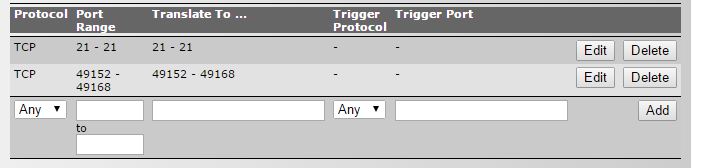
I have changed the port settings to the ones you have mentioned, here (for 4 clients):
However I am not recieving any files on my readyNAS still.
Related Content
NETGEAR Academy

Boost your skills with the Netgear Academy - Get trained, certified and stay ahead with the latest Netgear technology!
Join Us!
